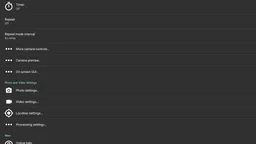
Open Camera review
 Analysis by Appsdrops
I tend to judge a camera app less by the first impressive shot than by whether I still reach for it after the novelty wears off. Open Camera makes a good case for staying installed: it gives people who want more say over a phone photo a practical alternative to the camera app that came with their device. I found its appeal strongest when I wanted to choose how a picture was taken, rather than simply tap the shutter and move on.
It is a free photography app developed by Mark Harman, and its open-source nature is part of its identity. The app has an average rating of 4.0 from around 288,000 ratings, with more than 100 million installs. Those figures suggest broad familiarity, but they do not tell you whether its controls fit your habits. That depends on whether you enjoy adjusting a camera or would rather leave every decision to automatic processing.
Why the first week feels rewarding
Open Camera is worth exploring if the default camera feels too limited. Its draw is not a flashy collection of filters; it is the feeling that the phone can behave more like a camera you can deliberately set up. Instead of treating every photo as a one-tap moment, you can take time to understand the controls and use them to solve particular shooting problems.
That difference is easiest to notice when conditions are awkward. For a dim indoor scene, a bright window, or a subject that will not stay still, automatic exposure and focus can make choices you may not want. A camera app with more manual control gives you a chance to intervene. The useful habit is to change one setting at a time, take a test shot, and compare it with the automatic result. That makes the controls easier to learn than changing several things at once and guessing what helped.
There is a trade-off: more options can slow down a spontaneous photo. If a child, pet, or fleeting street moment is about to disappear, digging through settings is not an advantage. I would keep the everyday camera app available for quick snapshots and use Open Camera when I have a reason to be more deliberate. The two approaches can complement each other rather than one needing to replace the other.
For a first-week test, I would try a few repeatable scenes instead of judging the app from a single outing: a familiar indoor corner, a moving subject, and a bright outdoor view. Keep the framing similar and compare results. This helps separate the effect of your choices from changes in light or composition, and it quickly reveals whether the extra control is genuinely useful to you.
Turning controls into a routine
A practical tip is to make a small personal checklist before a planned shoot: check framing, focus, exposure, and whether the current setup suits the subject. That is more useful than trying to memorize every option. If the picture is too bright, adjust for that; if the subject is soft, check focus. A simple cause-and-effect approach makes a feature-rich camera less intimidating and helps you avoid turning every ordinary photo into an experiment.
Open Camera is also a sensible choice for someone who wants an open-source option rather than another polished but opaque camera experience. That does not automatically make it the best choice for every phone or photographer, and open-source alone is not a guarantee of a particular result. I see it as a reason to consider the app, not a substitute for trying it with the camera hardware and shooting style you actually use.
What keeps it useful after the novelty
The month-to-month value comes from repeated situations, not from exploring menus for their own sake. If you often photograph notes, household repairs, small products, or a view you want to frame carefully, being able to take a more intentional approach can pay off. The benefit is especially clear when you can repeat the same kind of shot and learn which adjustments make it more reliable.
Imagine photographing a loose hinge before visiting a hardware shop. You need the screw and surrounding fitting to be clear, not a dramatic image. I would steady the phone, make sure the important detail is in focus, and check that the lighting does not wash out the metal. A manual-minded camera app is useful here because the goal is readable evidence rather than an attractive automatic snapshot. The same reasoning applies to photographing a label, a plant problem, or an item you plan to sell.
Another lasting use is a deliberate sequence of photos. If you are documenting a room before rearranging it, for example, consistency matters more than one perfect image. I would choose a repeatable viewpoint, keep the framing as similar as possible, and avoid changing settings without a reason. That workflow makes later comparisons easier. It is a less obvious advantage of having control: sometimes the value is not a better-looking picture, but a more useful set of pictures.
For casual travel, the app can be a good second camera when you want to pause and compose a scene. It is less compelling when you are walking quickly and taking occasional pictures with one hand. In that situation, the usual phone camera may be better simply because it is already familiar and optimized for speed. I would decide based on the moment, not on a rule that every photo must be taken with the more configurable app.
When another camera app is the better fit
Most built-in camera apps are designed to make ordinary shooting easy. They can be the better choice if you value quick access, a familiar interface, or automatic processing that makes a photo ready to share with little thought. Open Camera is more appealing when you want to take responsibility for more of the capture. That distinction matters more than a blanket claim that one app produces better photos: the phone’s camera hardware, the lighting, and your settings all shape the result.
If you want a camera experience built around decorative effects or instant social sharing, a different app may suit you better. Open Camera’s central appeal is control, not a promise that every image will look finished without any effort. Likewise, people who rarely adjust camera settings may find that the added choices are not worth learning. A feature you never use does not become valuable just because it is available.
One useful way to avoid a frustrating comparison is to keep the subject and conditions similar when trying different camera apps. A bright scene can flatter almost any camera, while motion or mixed indoor lighting exposes differences in how much control you want. Compare the result you would actually keep, not just the number of visible settings. If you consistently prefer the automatic app’s output, there is no reason to force a change.
The upkeep, and the parts that can wear thin
The maintenance burden is mostly personal rather than technical: you need to remember what you changed and decide whether it still suits the next shot. A setting chosen for a still subject in steady light may not suit a moving subject or a darker room. Before a one-off important picture, I would take a quick test shot and review it rather than assume the previous setup is still right. That small check is a more useful habit than keeping a mental catalogue of every control.
On Android, the listed minimum operating system is version 6.0, so the app is aimed at a broad range of devices. Its current version is 1.56.2. I would still judge the experience on the phone in hand: camera capabilities and the way an app feels can vary between devices. The app is free and rated for Everyone, which makes it easy to try without treating it as a major purchase decision.
The main source of fatigue is decision-making. When you are trying to capture something quickly, stopping to consider controls can feel like work. A second source is the learning curve: if you change settings without understanding their effects, results may become less predictable rather than better. I recommend learning only the controls that solve a real problem for you. If you mainly take uncomplicated family snapshots, leave the more involved workflow for occasions when it has a clear payoff.
There is also a subtle risk in chasing control for its own sake. It is easy to spend more time adjusting a camera than paying attention to the moment. I treat settings as tools, not a measure of photographic skill. For a sunset walk, a quick automatic shot may preserve the memory better than a carefully tuned image taken after the color has faded. For a record of a small detail, slowing down may be exactly the right choice.
A lasting place in the camera folder
Open Camera has been available since October 17, 2013, and its continued reach is notable: it has passed 100 million installs. Its 4.0 average across roughly 288,000 ratings gives a useful sense of how widely people have tried it, while the more than 7,700 written reviews reflect a substantial body of user feedback. I would read popularity as reassurance that it is an established option, not proof that its style will suit every photographer.
My long-term recommendation is conditional but clear. Keep it installed if you regularly photograph subjects that benefit from deliberate focus, exposure, or repeatable framing, and if you enjoy learning a few controls that improve those jobs. It can earn a lasting place as the camera I open when the default app is not giving me enough say. If you want the fastest possible point-and-shoot experience, or rarely notice how a photo was captured, the built-in camera is likely to remain your everyday choice.
That is why I see Open Camera as a useful working tool rather than a novelty to explore once and forget. Its strongest value appears through small repeated wins: a clearer record photo, a more consistent series, or a scene framed the way you intended. Start with one real need, learn the controls that address it, and keep using the app only if those improvements matter in your routine.
What we like
- Offers manual controls for focus exposure and white balance.
- Supports external microphones for improved audio capture.
- Can save photos in RAW format on supported devices.
- Includes a timer and burst mode for flexible shooting.
- Provides grid overlays and level indicators for composition.
What could be better
- Some features depend on the phone's camera hardware.
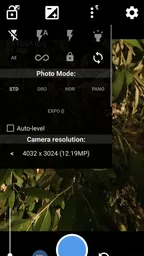
- The interface can feel dense for first-time users.
- Video stabilization may be unavailable on some devices.
- RAW files take up more storage than standard images.
- The app does not include built-in photo editing tools.





