
OnStage: Worship Team Planner review
 Analysis by Appsdrops
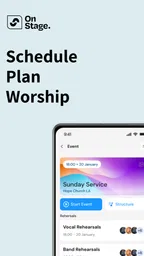
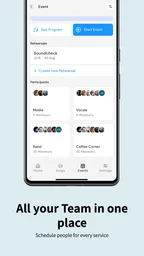
Planning a Sunday service usually starts before anyone opens a setlist: someone has to gather ideas, settle on a workable order, and make sure the people leading worship are looking at the same plan. OnStage: Worship Team Planner is aimed at that specific job. I see it as an event-planning app for worship teams, rather than a general church-management tool or a music player. Its appeal is straightforward: bring service planning, song choices, and team coordination into one workflow instead of relying entirely on scattered messages and documents.
From an initial idea to a service plan
OnStage is developed by OnStage, and its focus is clear from the way it is positioned: plan a Sunday service, assemble a setlist, and lead the worship team. That narrow purpose is useful. If I am responsible for shaping a service, I do not need to translate a broad event planner into church language before I can get started. The app is built around the kind of preparation worship leaders already do.
A practical workflow begins with the service itself. I would first decide what the gathering needs to accomplish, then use the plan as a place to turn that intention into an order of songs and other service elements. The important benefit is not simply having a digital list. It is having a shared point of reference that can help replace the familiar chain of a draft in one person’s notes, a revision in a group message, and a final version sent out at the last minute.
That makes the app most compelling for a leader who plans recurring services and needs to keep the planning process understandable to other people. A volunteer who only needs to know which songs to practice may not need to manage the whole plan, while a worship leader coordinating several contributors can benefit from having the service outline treated as a central working document.
Building a setlist with the service in mind
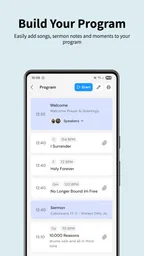
I would approach the setlist as part of the full service, not as a pile of songs to arrange in isolation. Start with the purpose and shape of the gathering, then choose music that supports that direction. A useful habit is to settle the broad sequence before polishing individual choices: it is easier to judge whether a set feels balanced when you can see how each song fits into the whole.
OnStage’s setlist focus makes that workflow more natural than keeping the songs in a separate note while the rest of the service lives elsewhere. It can also make revision less confusing. If a song changes, the team has a better chance of checking the current plan rather than relying on an old message someone saved. I would still make changes deliberately: a last-minute substitution can affect rehearsal preparation, transitions, and the confidence of whoever is leading.
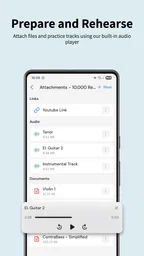
One useful, slightly less obvious practice is to treat the plan as a handoff document, not merely a private planning aid. Before sharing it with the team, I would read it from the perspective of a musician who has not been part of the planning conversation. Is the order clear? Does the person receiving it know what they need to prepare? A tidy setlist is only helpful if it reduces questions rather than moving them into a different chat.
Passing the plan to the people who make it happen
Service planning involves different kinds of attention. The person choosing songs may be thinking about the overall arc; a singer or instrumentalist may be focused on what to rehearse; the person leading on Sunday needs to keep the service moving. A shared planning app can reduce the distance between those perspectives, but it does not remove the need for clear communication. I would use OnStage as the place to consult the plan and use direct conversation for decisions that need explanation.
That distinction matters when a change is more than a simple swap. If a song is replaced because the service direction has shifted, people may need to understand why, not just see a different title in the sequence. A planning tool can help everyone work from the same version, but human context still belongs in the handoff. The best result comes when the app carries the stable details and the leader communicates the reasoning behind meaningful changes.
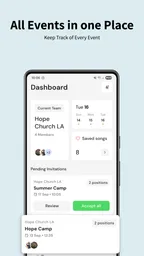
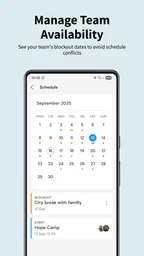
For a small team, the advantage may be less about elaborate coordination and more about consistency. A leader can establish one routine: prepare the service, review the setlist, then direct the team to the current plan. For a larger or more distributed group, that routine can help reduce the risk of different people preparing from different drafts. It is not a substitute for a reliable rehearsal or a leader who answers questions, but it can make those interactions more focused.
A realistic Sunday workflow
Imagine that I am preparing a Sunday gathering during a busy week. I begin with the intended shape of the service, choose a setlist that fits it, and review the order as a whole rather than confirming each song in isolation. I then make the plan available to the worship team early enough for them to prepare. If a choice changes, I update the working plan and make sure the people affected understand the revision.
On rehearsal day, the plan gives everyone a shared reference. Instead of spending the first part of the conversation reconstructing which version is current, the team can focus on the actual music and transitions. On Sunday, the same preparation supports the leader’s confidence: the setlist has been considered in context, and the team has had a chance to orient itself. That is the kind of everyday improvement I would expect from an app like this—not a service that runs itself, but fewer avoidable planning gaps.
A helpful tip is to set a personal cutoff for routine edits. Keep the plan open to necessary changes, but avoid casually revising it after people have prepared unless there is a good reason. The app can make edits easier to organize; it cannot make a late change cost-free. That trade-off is worth keeping in mind whenever convenience tempts a leader to treat the setlist as permanently provisional.
Where it fits among familiar alternatives
The usual alternatives are often a shared document, a spreadsheet, group messages, or a combination of all three. Those tools can be flexible, and a team already comfortable with them may see no reason to switch. Their weakness is that the service plan can become fragmented: the order is in one place, the latest correction in another, and the context in someone’s memory. OnStage’s value is its specific worship-planning focus, which gives the workflow a more appropriate home than a generic event checklist.
That focus is not automatically an advantage for everyone. If your team plans only occasional gatherings, has a very simple setlist, or already has a dependable document-based routine, adding another app may create more upkeep than it saves. If you need broad church administration beyond planning services and setlists, this app’s focused role may also be too narrow. I would choose it when the recurring coordination problem is real, not just because a dedicated tool sounds more organized.
Its audience is also reflected in its scale and reception: it has more than fifty thousand installs and a 4.6 average from 586 ratings. Those figures offer a quick sense that people are using and rating it, but they cannot tell me whether a particular team’s routine will fit. I would judge it by whether the people involved are willing to check one shared plan consistently.
Cost, access, and the first commitment
OnStage is free to start, which makes trying its planning approach less of a commitment than paying before you know whether the team will adopt it. There are in-app purchases ranging from $6.49 to $649.99 per item, so I would check the purchase details in the app store before choosing anything paid. The free starting point is useful, but it should not be read as a promise that every possible need or scale of use will remain free.
The app is rated Everyone, and the current version is 1.9.12. It was released on March 18, 2025, and requires Android 7.0 or later. That minimum makes it usable on a range of Android devices, though the practical test is still whether the phones used by the people on your team run the app comfortably. I would ask a few regular contributors to try the same planning routine before moving the whole group over.
For a team considering the switch, I would start with one service rather than trying to reorganize every planning habit at once. Use the app to prepare that service, let the team work from the plan, and notice where questions still arise. If the tool reduces confusion without creating a second place everyone has to remember to check, keep building the routine. If people continue to depend on messages for the essential details, the problem may be adoption or communication rather than the planning format itself.
When the workflow needs a different answer
The main limitation I would watch for is the gap between having a plan and getting everyone to use it. A shared app only helps if the team knows where the current version lives and checks it at the right time. A volunteer who rarely uses planning apps may need a simple introduction, and a leader who keeps sending conflicting updates through several channels can undermine the app’s role. In that situation, agreeing on one source of truth is more important than adding more features to the process.
There is also a difference between planning and execution. OnStage is suited to organizing a worship service and its setlist; I would not assume that it replaces every tool a team might use for music, rehearsal, communication, or broader operations. If your primary need is a general calendar or a flexible document that many departments can edit, a familiar shared workspace may be the better fit. If your main frustration is keeping Sunday’s worship plan coherent and visible, the dedicated focus here is more persuasive.
I would be cautious about adopting it just to solve a one-time scheduling issue. Its strongest case is repeated use: the same planning steps return each week, the same people need the same handoff, and small improvements in clarity accumulate. Conversely, a team with frequent last-minute decisions should first decide how it wants to communicate changes. No setlist planner can prevent confusion if the group has no agreed process for notifying people about revisions.
My take for worship leaders
I would recommend OnStage: Worship Team Planner to worship leaders who want a dedicated place to shape a Sunday service, build its setlist, and give the team a more dependable reference. Its best use is practical and specific: carry a plan from an initial idea through preparation and into the gathering, while reducing the chance that everyone is working from a different draft.
I would not recommend it automatically to every church or volunteer group. Teams with a simple, well-run document workflow may be better off keeping what already works, and anyone expecting a planning app to handle the human side of rehearsal will still need clear communication and follow-through. But if service planning currently depends on scattered notes and repeated clarification, I think it is worth trying with one real Sunday plan. The clearest test is whether the handoff becomes easier for the people who have to lead, rehearse, and take part—not whether the app simply gives the plan a new home.
What we like
- Keeps worship set plans organized in one shared place.
- Helps team members stay informed about upcoming services.
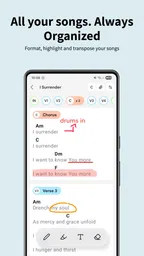
- Makes song and arrangement details easier to access.
- Supports coordination across different worship roles.
- Provides a focused planning space for worship teams.
What could be better
- Its usefulness depends on teammates adopting the app.
- Some features may require a paid plan.
- New users may need time to learn the planning workflow.
- Teams still need to confirm last-minute changes.
- Availability of features may vary by platform.





