


OneWire: Latest News & Alerts review
 Analysis by Appsdrops
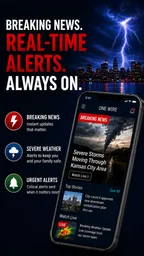
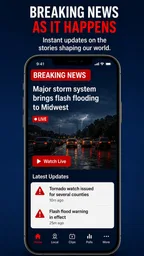
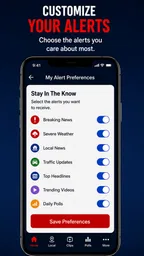
When something important is happening nearby, I want to get a useful update without digging through several news feeds. OneWire is built around that need: it brings news, local updates, and severe-weather information together in a free app for everyday checking. My overall impression is that it makes the most sense as a quick-awareness tool, not as a replacement for a newspaper, a dedicated weather service, or a full breaking-news channel.
Quick checks are the app’s strongest use
OneWire sits in the News & Magazines category, and its focus is practical rather than broad: updates you may want to see promptly, particularly when local conditions matter. That can make it useful in the small gaps of a day—before leaving home, while deciding whether to change plans, or after hearing about an incident and wanting a clearer picture.
I would treat it as a starting point for awareness. A short update can tell me that a situation deserves attention, but a headline alone is not always enough to understand its cause, likely impact, or what to do next. For decisions involving safety, I would still check an authoritative local source or emergency guidance rather than relying on a single news app.
The speed to expect is mostly about convenience: one place to check for several kinds of updates, rather than repeatedly opening separate apps. That is different from a guarantee that every item will appear instantly. News and weather information depends on the event, the source, and the way updates are distributed, so I would not make the app my only alert system when a delay could matter.
A useful routine for ordinary days
A realistic way to use it is to check once before a commute or school run. If severe weather is a concern, that glance can prompt a more deliberate check of local conditions before setting out. If the day looks routine, I can move on without browsing a long stream of general headlines. This is where a focused news app can feel less demanding than a broad social feed, where useful reporting competes with unrelated posts and opinion.
Another sensible habit is to separate awareness from verification. I might use OneWire to notice that a local story is developing, then open a trusted source for details before changing plans or sharing the news. That two-step approach is especially helpful with fast-moving incidents, when early reports can be incomplete and headlines may change as more information becomes available.
Busy moments call for a little restraint
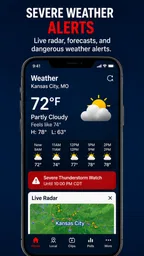
The app’s combination of breaking news, local updates, and severe-weather coverage is appealing when several things are happening at once. It also creates a trade-off: if I check frequently during a developing event, I may see overlapping updates rather than a neat, final account. That is normal for live news, but it can make a busy feed feel repetitive or unsettled.
For heavy use, I would avoid treating every notification or headline as a separate action item. A better workflow is to scan for what has changed, note the time and location of the update, and then consult a more detailed source if the information affects me. This keeps the app useful without turning a developing story into a cycle of constant checking.
I also recommend deciding in advance what kinds of updates deserve immediate attention. If every headline gets the same urgency, the most important information becomes harder to spot. Keeping a focused routine—checking before travel, during a weather concern, or after a significant local alert—makes more sense than leaving a news feed open all day.
Reliability is about how you use it
The app is published by AppSpark Group, and its current version is 2.33.1. It has an average rating of 4.3 from around 1,100 ratings, with 207 written reviews and over 100,000 installs. Those figures suggest that people are using it, but they do not tell me whether every alert arrives promptly or how it behaves during every local event. I would judge reliability by whether it fits into a broader information routine, not by assuming it can replace other sources.
For recovery after an interruption, the practical question is whether I can return to the app and resume checking what is happening. I would keep the habit simple: reopen it when needed, review the latest relevant item, and verify important details elsewhere. I would not assume that a notification I missed contains everything needed to catch up, particularly if the story is changing quickly.
There is also a difference between being informed and being prepared. A news update can help me notice that severe weather is affecting an area; preparation still means checking local instructions, planning a safe route, and using emergency channels where appropriate. OneWire can contribute to awareness, but the consequences of relying on any single feed are too high when immediate safety is involved.
Device fit, cost, and expectations
OneWire is free to install and is rated for Everyone. The app includes in-app purchases ranging from $0.99 to $9.99 per item, so I would check what an optional purchase covers before paying. The basic choice is straightforward: someone who only wants to try a news-and-alert app can start without an upfront purchase, while anyone considering paid extras should decide whether they add something genuinely useful to their routine.
The app supports devices running Android 8.0 or later. That gives owners of older compatible phones a chance to use it, though the minimum operating-system requirement alone cannot tell me how smoothly it will run on a particular device. Available memory, background activity, network conditions, and the phone’s overall age can all affect how quickly an app opens or refreshes.
If your phone is older or already struggles with several news apps, I would keep expectations measured and test OneWire during an ordinary day before depending on it for time-sensitive updates. On any device, a weak connection can slow news delivery; that is a limitation of connected information services generally, not something a headline feed can solve. I would keep a separate route to local emergency information for situations where connectivity or app access is uncertain.
Where it sits beside other news options
Compared with a traditional newspaper app, OneWire’s appeal is the emphasis on timely and local awareness rather than a long reading session. Compared with a dedicated weather app, its broader news role may be more convenient when I want both local developments and weather-related updates in one place, but it is not automatically the better tool for detailed forecasts. And compared with social media, it offers a more purposeful reason to check, though social posts can sometimes surface eyewitness context that a news summary does not provide.
Those alternatives are not interchangeable. If I want in-depth reporting, a publication with strong coverage of my interests is likely a better choice. If I need precise weather planning, I would use a specialist forecast source. If I want to understand how neighbors are reacting to an event, a local community channel may add perspective—but I would verify claims before trusting or repeating them. OneWire is most valuable between those needs, as a convenient prompt to find out what deserves further attention.
Who should make room for it?
I would recommend giving it a try if you regularly want local news and severe-weather awareness without making a broad social feed your first stop. It is also a reasonable fit for someone who prefers brief check-ins and is comfortable verifying high-stakes details with official or specialist sources.
I would skip it as a primary source if you need comprehensive investigative reporting, highly detailed weather tools, or guaranteed emergency notifications. It may also be a poor fit if you dislike checking another feed or prefer to follow a small number of trusted publications directly. More information is not always better; a simple routine with a few dependable sources can be more useful than several overlapping alerts.
OneWire was released on December 11, 2023, and remains a focused option for people who want a quick view of news and local conditions. My verdict is positive with an important boundary: use it to notice what may matter, then verify anything that could change a safety decision or major plan. As a lightweight part of a broader news routine, it has a clear purpose; as your only source for breaking events, it asks for more trust than I would give any single app.
What we like
- Get breaking news alerts soon after stories develop.
- Follow news from sources that match your interests.
- Browse a range of topics in one place.
- Quick updates make it easy to catch up on the go.
- A clean news feed helps you scan headlines quickly.
What could be better
- Breaking alerts may feel frequent if many topics are selected.
- Some stories may require visiting an external source to read fully.
- News coverage can vary depending on available publishers.
- Personalized recommendations may take time to reflect your interests.
- A steady internet connection is needed for current updates.





