






OnePay – Mobile Banking review
 Analysis by Appsdrops
The appeal of OnePay is its attempt to bring everyday banking and credit into one mobile experience. That sounds simple, but it changes how useful a finance app can be: instead of treating each money task as a separate destination, I can think of it as one place to check in when I need to make a financial decision. I’d consider it most appealing to someone who wants a compact starting point for routine money management, rather than a specialist tool for detailed investing or accounting.
One place to begin a money task
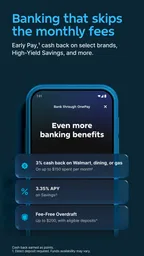
OnePay is a free finance app from ONE Finance, Inc. Its focus, reflected in the way I would approach it, is the overlap between banking and credit. Those topics often live in different apps, with different screens and habits. Bringing them together can make an ordinary check-in feel less fragmented: I can open one app to orient myself before deciding what to do next, rather than jumping immediately between unrelated financial services.
That unified starting point is the capability I find most meaningful. A finance app does not need to replace every account or become a full financial plan to be useful. It can earn a place on a phone simply by making routine decisions easier to approach. The practical benefit is not that all money becomes effortless; it is that the first step—looking at the banking-and-credit side of one’s finances—can feel more direct.
The distinction matters because “one app for money” can mean very different things. I would not assume OnePay is a complete substitute for a bank, budgeting system, credit-monitoring service, and investment platform all at once. The more sensible expectation is that it provides a mobile entry point for banking and credit needs. That narrower framing helps set realistic expectations and makes it easier to judge whether its approach matches your habits.
There is also a useful audience signal in its reach. OnePay has more than ten million installs and an average rating of 4.8 from around 240,000 ratings, with roughly 26,000 written reviews. Those figures suggest that many people have tried it and that ratings are broadly positive, but popularity is not a promise that the app fits every financial situation. I’d treat the numbers as a reason to take a closer look, not as a replacement for checking whether its services suit your own needs.
What the combined approach changes
When banking and credit are approached together, the app can serve as a useful pause before action. For example, if I am deciding whether a purchase fits my finances, I want to consider more than the price alone. A banking view and a credit view belong in the same broader conversation, even when they remain distinct services. OnePay’s central idea gives that conversation a single mobile home, which may make it easier to build a habit of checking before acting.
This is especially relevant for people who already manage finances from a phone. The app is rated for Everyone, and it has been available since July 23, 2020, so it is not a brand-new concept arriving without an established user base. Its current version is 5.101.0, and the listed minimum operating-system requirement is 7.1. The version and compatibility details are worth checking against your device before installing, particularly if you use an older phone.
How I would use it in an ordinary week
Picture a familiar situation: payday has arrived, a household bill is due, and a friend has suggested going out later in the week. I might open OnePay before committing to the optional expense. The point would not be to turn a quick check into a full budget session. I would use the app as a single place to orient myself around banking and credit, then make a decision with more context than I would have from looking only at a card balance or only at a credit account.
That small workflow is more valuable when repeated than when treated as a one-off. I’d make the check part of an existing routine—perhaps when reviewing upcoming bills—rather than relying on memory to open the app only after a financial surprise. A combined app can reduce the mental friction of starting, but it cannot make the user’s choices automatically. The useful habit is to look before a decision, not merely to install another icon and hope it changes spending patterns.
A practical tip is to keep the app’s role clear. Use it for the banking-and-credit tasks it is intended to support, and keep any separate budget, savings plan, or tax records where you already maintain them. If you try to make one mobile app the sole source of truth for every financial detail, you may end up with gaps or duplicate work. A focused role makes OnePay easier to evaluate and helps prevent the common mistake of confusing convenience with complete financial oversight.
I would also decide in advance what information I expect to check when I open it. A quick routine—review the money-related item that prompted the visit, take the next action, then close the app—keeps a finance tool from becoming a distraction. This is a modest but useful trade-off: the app can make access more convenient, yet the user still needs a personal process for turning a screen check into a sensible choice.
Where it fits among finance apps
Compared with using separate apps for banking and credit, OnePay’s main advantage is having a combined destination. If you dislike switching between services just to get a broad sense of your financial picture, that consolidation may feel worthwhile. Compared with a dedicated budgeting app, however, a banking-and-credit focus is not automatically the better choice. People who want detailed categories, long-term spending analysis, or a carefully structured household budget may prefer a tool designed specifically for those jobs.
It also differs from the simplest approach: using a bank’s own app and checking credit elsewhere only when necessary. That arrangement may be perfectly adequate if you are comfortable with the separation and already have reliable routines. OnePay is more compelling when the split itself is the irritation. I would not switch solely because a single app sounds tidier; I would switch only if bringing the relevant tasks together actually saves me time or makes me more likely to review them.
For people comparing options, the key question is not “Which finance app has the most features?” but “Which one helps me do the task I repeatedly put off?” If that task is getting a joined-up starting point for banking and credit, OnePay’s emphasis makes sense. If the problem is forecasting monthly expenses, tracking shared household spending, or managing investments, a more specialized app may be a better fit. Choosing by recurring need is more useful than choosing by a broad category label.
The trade-offs I would keep in mind
The biggest limitation of a unified experience is that one app can make separate financial topics feel more unified than they really are. Banking and credit are related, but they are not interchangeable. I would still read each screen carefully and avoid assuming that an overview answers every question about a particular account or decision. Consolidation can simplify navigation; it does not remove the need to understand what each financial service is doing.
Another trade-off is dependence on a mobile-first routine. If you prefer to review finances on a larger screen, keep extensive records, or work through decisions using spreadsheets, a phone app may be better as a quick check than as your main workspace. Likewise, people who already have a system they trust may gain little from adding another place to look. In that case, OnePay could create more app-hopping rather than less.
I would also avoid treating a strong average rating as a substitute for personal fit. A highly rated app can still be wrong for someone who needs a particular budgeting workflow or who would rather keep banking and credit separate. Before making it part of a routine, think about what you want to do inside it and whether a combined mobile approach genuinely helps. The best outcome is a tool that supports an existing financial habit, not one that asks you to reorganize everything around it.
OnePay is free to install, which lowers the barrier to trying it, but free does not mean there is no decision to make. The meaningful cost is attention: you need to decide whether the app earns a regular place in your financial routine. I would start with one clear use case, such as checking in on banking and credit together, and judge whether that makes a real difference over time. That is a better test than trying to use every feature simply because it is available.
Who is most likely to benefit
I’d recommend giving OnePay a closer look if you want a mobile-first way to bring banking and credit into the same general workflow, and if you value convenience over building a highly customized financial dashboard. It may suit someone who wants a straightforward place to begin a money check-in, particularly when switching between separate apps has become an annoying part of the day.
I would be less inclined to recommend it to someone whose top priority is in-depth budgeting, detailed reports, or managing a broad set of financial products in one sophisticated planning system. Those needs call for tools that make those specific jobs central. I would also hesitate if you are content with your existing bank app and have no trouble checking credit separately; a new app should solve a real inconvenience, not simply add another login and routine.
Overall, OnePay’s strongest idea is its combined focus, not an implied promise to do every financial job. I see it as a potentially handy home base for people who want banking and credit closer together on their phone. Its popularity and high average rating make it easy to understand why many users have tried it, but the right decision depends on whether that joined-up starting point matches your everyday needs. If it does, the app may help make a regular financial check-in feel more manageable; if your needs are more specialized, a focused alternative is likely the smarter choice.
What we like
- Check balances and recent transactions from your phone
- Pay bills without visiting a branch
- Transfer money through the mobile app
- Use fingerprint or face recognition where supported
- Get account alerts to stay aware of activity
What could be better
- Some features may require an eligible OnePay account
- Services may be limited by your location
- Transfers can take time to complete
- App access depends on a stable internet connection
- Older phones may not support all security features





