
OnClean-Phone Clean review
 Analysis by Appsdrops
Phone storage can become cluttered surprisingly quickly, and sorting through it by hand is rarely anyone’s idea of a good time. OnClean-Phone Clean is a free Android tools app built around a simple promise: clean up junk and make it easier to keep a phone organized. I see its appeal in that straightforward goal. Rather than presenting itself as an all-purpose phone suite, it puts the focus on tidying up, which makes it easy to understand what you’re downloading and why.
A straightforward approach to phone cleanup
The first thing that stands out about OnClean-Phone Clean is its clear, practical identity. The name and short description both point toward phone cleaning, while the app’s broader message is about organizing with ease. That kind of focus can be welcome if you want a tool for dealing with digital clutter without having to learn a complicated system first.
Still, a useful cleanup experience depends on more than a convincing promise. The app needs to make its actions understandable, help users judge what is safe to remove, and avoid making routine maintenance feel like a chore. Those are the qualities I would pay attention to when using any phone cleaner. The best result is not a dramatic-looking screen; it is a clear process that leaves you confident about what happened.
OnClean is made by Ayadev2023 and is available at no cost. It has an Everyone content rating, and its current release is V1.0.8. The minimum operating-system requirement is Android 7.0, so it is aimed at a broad range of Android devices. The app has reached over one million installs, with an average rating of 3.8 from around 7,800 ratings. Those figures suggest that many people have tried it, while the rating also leaves room for individual experiences to vary.
When the network becomes part of the experience
Connectivity can shape the experience of almost any mobile utility, even when its central purpose is managing a phone. You might be connected to a home Wi-Fi network, using mobile data while out, or dealing with an unstable signal. Those changing conditions can affect how comfortable an app feels to open and use, particularly when you are trying to complete a quick task rather than settle in for a long session.
For a cleanup tool, the ideal interaction feels direct: open the app, understand what it is asking you to do, and make a considered choice. If a screen takes longer to appear or an action seems to pause, it helps when the app communicates clearly rather than leaving you wondering whether anything is happening. That is a general standard I apply to tools like this, not a claim about a particular connection requirement or a specific OnClean feature.
I would also keep the purpose of a phone cleaner in perspective. A network connection should not make a user feel rushed into approving a cleanup or tapping through a screen without reading it. When I use a utility that may affect stored content, I prefer to take a moment, review the choices presented, and proceed only when the next step makes sense. A calm, legible flow is more valuable than an aggressive push to finish quickly.
Using a cleaner in everyday mobile situations
People reach for storage tools in different circumstances. You may notice clutter while commuting, check your phone during a short break, or decide to organize things at home on a reliable connection. A focused app can fit these small windows of time, provided its screens are easy to understand and the task does not require more attention than you can give it at that moment.
My practical advice is to use a cleanup app when you can concentrate, especially if you are unsure what an on-screen option means. A crowded train or a hurried moment is not ideal for making decisions about files or other stored items. Even if a tool aims to simplify organization, the person using it should remain in control. Read the labels, check the selections, and avoid tapping through prompts just to get to the next screen.
There is also a difference between wanting a phone to feel tidier and expecting a utility to solve every storage problem. A cleaner can be part of a regular maintenance routine, but it is sensible to think about what you actually want to keep before removing anything. I value tools that support deliberate organization rather than encouraging users to treat every item as disposable clutter.
OnClean’s description gives it an accessible, everyday role: cleaning junk and organizing with ease. That is a clear starting point for someone searching for an Android phone cleaner, but the quality of the experience ultimately comes down to how well the app explains its choices while you use it. A simple goal is a strength when the interface follows through with a similarly simple, understandable process.
Pauses, interruptions, and getting back on track
Mobile use is rarely uninterrupted. A call might arrive, you may switch to another app, or your connection may fluctuate while you are in the middle of a task. With any utility that asks you to make choices, it is worth noticing whether the screen remains clear when you return and whether you can tell what step you were on. That makes it easier to avoid repeating an action or approving something without understanding it.
If a screen appears to stall, I would start with the basics: give it a moment, check whether the phone is responsive, and avoid repeatedly tapping the same control. If the app closes or the device becomes busy, reopen it when things settle and review the available options again. These are sensible habits for using mobile tools generally; they should not be taken as a promise about how OnClean handles every interruption or recovery situation.
The same measured approach applies when the network is weak. Rather than assuming an action has completed, look for a clear on-screen indication before moving on. If you are uncertain about a result, pause instead of launching the same operation over and over. For a cleanup utility, confidence matters: users should be able to understand what they are doing, especially when their goal is to remove clutter without losing something important.
I also recommend treating any unfamiliar prompt carefully. Read what it says, consider whether it matches the task you intended to perform, and back out if it does not make sense. This is not a knock on OnClean; it is simply a good routine for any app that helps manage a device. A little attention up front can prevent a rushed decision later.
Keeping data use and storage choices in mind
When choosing a phone utility, it is natural to think about both storage and mobile data. Those are separate concerns: an app’s purpose may involve organizing a device, while the amount of connectivity involved can depend on how the app behaves and what the user does with it. I would not assume that every cleaner works the same way, so it is sensible to use your phone’s own settings if you want to keep an eye on data consumption.
If you have a limited mobile plan, try new apps while connected to Wi-Fi when that is convenient, then check your device’s data controls to understand your overall usage. That is a general, practical precaution rather than a statement that OnClean requires a connection or uses a particular amount of data. It lets you stay in control without guessing about the app’s network behavior.
Storage decisions deserve the same care. Before confirming any action, make sure you understand what the app is identifying and what the next step will do. A tool’s promise to clean junk does not mean every item on a phone is unwanted. I prefer to think of a cleaner as an assistant for organizing, not as a substitute for deciding what matters to me.
OnClean is free to download, which lowers the barrier for someone who wants to explore a phone-cleaning tool. I would still take the time to review the app’s screens and the choices it presents rather than treating “free” as a reason to skip normal caution. A good utility should make its purpose easy to grasp and let the user approach cleanup at a comfortable pace.
Who may find OnClean useful?
This app may suit Android users who want a focused tool for phone cleanup and organization, particularly those who prefer a clearly stated purpose over a crowded list of unrelated functions. Its Everyone rating and support for Android 7.0 or later also make it relevant to people using a range of Android devices. As always, compatibility and personal preference matter, so it is worth checking the app’s fit for your own phone before making it part of your routine.
The rating gives a useful snapshot of how the app is received, but it is not a guarantee that every person will have the same experience. OnClean has a 3.8 average, alongside around 220 written reviews. I would treat those opinions as one part of the decision, then consider whether the app’s purpose matches what you need and whether its interface feels clear when you try it.
For searchers comparing options, the important question is not simply whether an app calls itself a cleaner. It is whether the experience makes phone maintenance easier without turning it into guesswork. Look for clear descriptions, readable prompts, and an approach that leaves you in charge of what gets organized. Those are useful standards for evaluating OnClean and other phone cleanup apps alike.
A connectivity-conscious verdict
OnClean presents a simple proposition: clean up junk and organize with ease. I like that the purpose is easy to understand, and its free availability makes it approachable for Android users looking for a dedicated tool. Its reach is also notable, with over one million installs, while its rating points to a mixed but broadly established user response rather than a universal endorsement.
Connectivity is best treated as a practical part of using the app, not something to make assumptions about. Whether you are on Wi-Fi or mobile data, take your time with prompts, verify that an action has completed, and use your device’s settings if you want to monitor data use. When a task is interrupted, returning calmly and checking the screen is more sensible than rushing to repeat steps.
My overall view is that OnClean is worth considering if you want an Android utility centered on cleanup and organization. The key is to use it thoughtfully: understand each choice, keep control over what you remove, and judge the experience by how clearly it guides you through the task. For someone seeking a straightforward phone cleaning app, that focused purpose is a reasonable place to start.
What we like
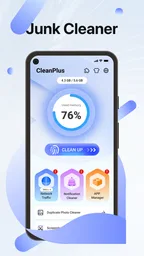
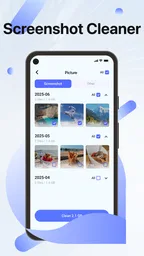
- Quickly identifies junk files that may be safe to remove.
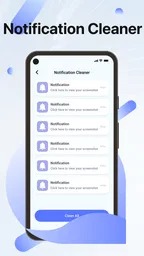
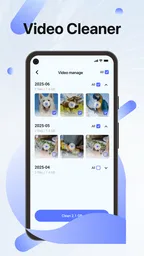
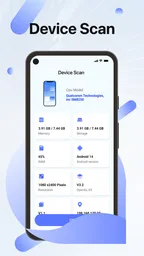
- Simple screens make basic cleanup easy to navigate.
- Can help free storage without manually browsing every folder.
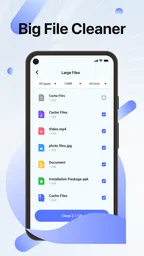
- Includes tools for reviewing large files before deletion.
- Useful for users who want a straightforward cleanup utility.
What could be better
- Cleanup suggestions may require careful review before confirming deletion.
- Results can vary depending on the device and Android version.
- Some features may be limited or unavailable on certain phones.
- Cleaning temporary files may provide only short-term storage savings.
- Ads or upgrade prompts may interrupt the cleanup process.





