
OffPlay Music: MP3 Player review
 Analysis by Appsdrops
I like the idea behind OffPlay Music: MP3 Player: a straightforward way to listen to MP3s already in your library without relying on an internet connection. That makes it appealing for commutes, travel, or any time you want your own music on hand. Its focus is practical rather than expansive, so the key question is whether your files are ready to play and whether a local-library experience is what you want.
Getting unstuck when a track will not play
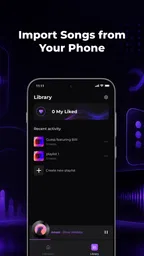
With a local MP3 player, the first hurdle is often not playback controls but finding the music. If your library looks empty, I would start by checking that the tracks are actually stored on the device and that they are MP3 files. Music that appears in another service may be streamed or managed inside that service rather than saved as ordinary files for a separate player to use.
It also helps to check the exact location of a file. If you recently moved music, copied it from a computer, or reorganized folders, the player may not reflect the change until you reopen it or revisit the library. I would test with one familiar track before troubleshooting an entire collection. That simple check separates a file-location issue from a broader playback problem.
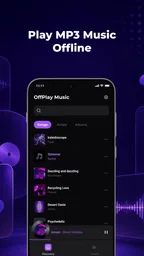
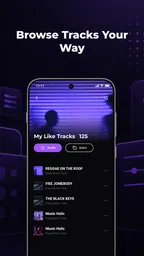
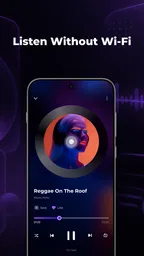
The app’s central appeal is its offline MP3 playback, with playlists and lock-screen listening as part of the experience. In everyday use, that means you can prepare a small selection before leaving home and keep listening without depending on a mobile connection. It is a useful distinction from streaming apps, where having a subscription or a saved album does not always mean the music exists as a regular file you can open elsewhere.
One practical limitation follows from that focus: the app is most useful when you already have music files you can access. If your listening mainly happens through online catalogs, podcasts, or playlists maintained by a streaming service, a dedicated MP3 player will not replace those services. I would treat it as a companion for a personal collection, not as a universal destination for every kind of audio.
Check the basics before changing anything
When a track is missing or silent, I would work through a short sequence rather than changing several things at once. Confirm the file is on the phone, try another known MP3, and reopen the player. If one file fails while another plays, the issue is more likely to be tied to that particular file than to the whole library. Keeping the test simple makes the next step clearer.
Also check whether the phone itself is producing sound where you expect it. A connected speaker or headset, a muted volume level, or audio routed to another device can make a working player seem broken. These are ordinary phone-level checks, but they are especially easy to overlook when switching from a streaming app that was already playing through a particular output.
OffPlay Music is a free music and audio app from jadid-lyoum. It is rated for Everyone, and its current version is 1.0.3, with Android 8.0 as the minimum operating system. Those details make it a candidate for a broad range of Android devices, though the sensible first step is still to see whether it behaves well with your own files and phone rather than assuming every library is arranged the same way.
Make playlists useful before you need them
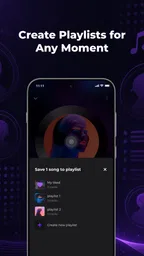
Playlists are most valuable when they solve a specific listening problem. I would make one for a commute, another for a longer trip, or a compact set of tracks for exercise instead of building a single oversized list that takes effort to navigate. This is a small workflow choice, but it makes an offline library feel intentional: when you are away from a connection, you can pick a mood or situation without searching through every folder.
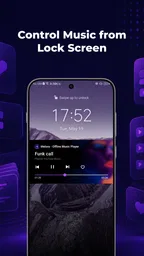
A helpful habit is to test a playlist while you are still at home. Start it, lock the phone, and make sure the listening flow suits you before relying on it during a journey. Since lock-screen playback is part of the app’s intended use, this is a sensible way to catch a phone-specific interruption early. It also lets you decide whether you prefer a short queue or a longer playlist for hands-free listening.
For example, before a train ride I would choose a handful of albums or tracks, check that they appear in the library, and start the playlist before leaving. If a station has unreliable coverage, the local files remain the point of the setup: there is no need to wait for a stream to load. The trade-off is that preparation matters. Unlike browsing a vast online catalog on the spot, you need to have the music you want on the device already.
Recover the listening routine without guesswork
If playback stops unexpectedly, I would first check whether the phone has switched audio output or whether another app has taken over the sound. Then I would reopen OffPlay Music and try one track directly before restarting a whole playlist. That order avoids unnecessary changes to the collection and helps identify whether the interruption is isolated to one file, one playlist, or the phone’s audio routing.
If the library appears out of date after adding music, a useful recovery step is to close and reopen the app, then look for the files again. If that does not help, verify that the new tracks are saved locally and use the expected MP3 format. I would avoid deleting and copying the entire collection as a first reaction; testing one newly added file is faster and reduces the chance of creating duplicate folders or losing a tidy arrangement.
There is also a useful distinction between a song that cannot be found and one that can be found but does not play. The first points toward where the file is stored or how the library is being viewed. The second makes it worth trying another track and checking phone audio output. This kind of step-by-step diagnosis is more dependable than repeatedly tapping play and hoping the problem clears itself.
For longer listening sessions, I would keep the phone’s battery and audio setup in mind. Offline playback removes the need for a data connection, but it does not mean the phone stops using power or that a connected accessory will always behave as expected. If you are relying on music for a flight, a long walk, or a work shift, test the exact arrangement beforehand and keep a backup way to listen if the audio matters to your plans.
Know when the phone or file is the real obstacle
Not every playback problem begins inside the player. A file may be incomplete, stored somewhere unexpected, or simply not be an MP3. A phone may also send sound to a headset or speaker you are no longer using. When the same track behaves differently across apps, that is a reason to inspect the file and device setup before concluding that OffPlay Music is at fault.
Conversely, if several familiar MP3s are present but none play in this app, while the phone’s sound works elsewhere, it is reasonable to close and reopen the player and test again. If the problem persists, updating the app through the app store or checking the device’s basic settings is a sensible next move. I would keep troubleshooting general and reversible: avoid wiping the music library or changing system settings unless there is a clear reason.
This is where a local player differs from a streaming service in both a good and a frustrating way. You are not dependent on a catalog being reachable over the network, but you are responsible for keeping your own files organized and available. That control is attractive if you have albums, recordings, or carefully chosen MP3s; it is less convenient if you expect an app to discover and supply music for you.
Who will get the most from it
I can see OffPlay Music working well for someone with a personal MP3 collection who wants a simple way to play it offline, arrange listening into playlists, and continue playback from the lock screen. It also makes sense as a secondary player for travel: you can reserve local files for places where streaming is inconvenient and keep your main music service for discovery and online listening.
It is less suitable if you want one app to search a large online catalog, manage podcasts, sync a collection across multiple devices, or do more than play the files you already have. Those needs point toward a streaming platform or a broader media manager. I would not choose a local MP3 player expecting it to behave like a cloud library; its usefulness comes from doing a narrower job with music stored on the phone.
The app has an average rating of 4.0 from around 500 ratings, and it has passed over a million installs. That gives a new user some context about its reach, but I would weigh fit more heavily than popularity: if your music is already in accessible MP3 files, the basic idea is directly relevant; if it is locked inside other services, the install count will not solve that mismatch.
A practical verdict for everyday listening
My recommendation is conditional but clear: try OffPlay Music if you want a free, focused player for MP3s you already keep on your Android device. Before depending on it, test a familiar file, build a small playlist, and try lock-screen playback with your usual headphones or speaker. Those checks take little effort and answer the questions that matter most for your routine.
Its best quality is the straightforward offline use of a personal music library. The trade-off is equally straightforward: you need to bring the files and keep them accessible, and it is not a substitute for online discovery or a streaming catalog. I would recommend it to someone who values a ready-to-go selection of owned or personally stored tracks, while steering a listener who wants everything automatically available toward a different kind of music app.
Overall, OffPlay Music feels most useful when treated as a practical tool rather than an all-in-one audio hub. Prepare the music before you leave, keep playlists focused, and check the phone’s audio route if playback seems to fail. With those habits, its offline approach can fit naturally into commutes and trips; without a local MP3 collection, there may simply be too little for it to do.
What we like
- Plays local audio without requiring a music subscription.
- Supports common audio formats including MP3 and FLAC.
- Background playback lets you use other apps while listening.
- Offline playback works without a network connection.
- A built-in sleep timer can stop playback automatically.
What could be better
- Some features may require a paid upgrade.
- The free version may include advertising.
- It cannot stream tracks from major music services.
- Audio quality depends on the files stored on your device.
- Library organization can take time with large collections.





