

Offline Player: Local Music review
 Analysis by Appsdrops
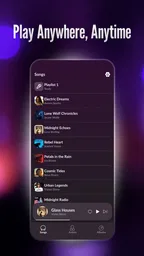
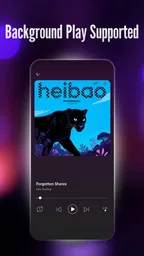
I like the idea behind Offline Player: Local Music: keep the music you already have on your device within reach, without relying on a connection. That makes this Music & Audio app a practical option for commutes, travel, and places where mobile data is unreliable. Its promise is deliberately focused, though. It is a local player, not a substitute for a streaming library, so the experience depends on having audio files available on your phone and being able to find them there.
Getting past the first playback hurdle
The most common point of friction with a local music player is often not pressing Play; it is getting from “I have music” to “the app can see the music I want.” If your library is already stored on the device, start by opening the player and checking whether your tracks appear. If the list is empty or incomplete, first confirm that the files are actually present on the phone, rather than only in a cloud account or another service.
That distinction matters. A track visible in a streaming app or a cloud folder may not be a locally stored audio file that an offline player can play. Before troubleshooting the player, check the folder or file location using the tools already available on your device. If the music is still online-only, download or transfer it through the service or method you normally use, then check the player again.
I would also test with one familiar track before trying to organize a large collection. A single known file makes it easier to tell whether the issue is that the app cannot find the library, that a particular file is unavailable, or that playback itself is not working. Once that basic check succeeds, it is much easier to judge whether the app suits your everyday listening habits.
Offline playback is useful only when the audio is truly on the device. That sounds obvious, but it is an easy detail to overlook when music is spread across downloads, cloud storage, and streaming apps. If you are preparing for a flight or a long stretch without reception, check your local files while you still have a connection and time to sort out anything missing.
Simple setup checks before you blame playback
If a song does not show up, check the file’s location and whether it has finished transferring. A partially copied file or a track left in an unexpected folder can make a library look incomplete. I would also close and reopen the player after adding music, then look again. That gives the app a fresh opportunity to reflect the files now on the phone without turning a small setup issue into a lengthy troubleshooting session.
When only one track is affected, compare it with another file you know plays elsewhere on the device. If the second track appears and works, the problem may be specific to the first file rather than the whole library. If neither appears, focus on whether the files are local and accessible. This is a more useful first distinction than repeatedly tapping the same missing song.
For a new phone or a recently changed music collection, make a short test playlist in your own routine: add or transfer a few tracks, open the player, and verify that they are available before moving the rest. This approach is especially helpful if you are copying music from a computer or changing where files are stored. It keeps a long transfer from ending with an unexpected empty or partial library.
The app is free, and its developer is SUPER MM Ltd. It is rated for Everyone, which makes it suitable for a broad audience, though that age label says nothing about whether the player will match a particular listener’s preferred controls or library tools. The useful question is more personal: do you want straightforward access to local audio, or do you need a service that supplies and manages music for you?
A sensible listening workflow for everyday use
For a commute, I would prepare the tracks before leaving home: make sure they are stored locally, open the player, and test playback while a connection is still available. Then the trip becomes a genuine offline test rather than a discovery that a favorite album was only available through a streaming account. This small routine is more dependable than assuming that any music visible on the phone is ready to play without data.
It can also help to keep a compact group of frequently played tracks easy to locate in your file organization. For example, someone who uses music for a run might keep a dedicated set of workout tracks together, while a traveler may want a separate collection for a long journey. I am not assuming the app offers special playlist or sorting tools; the practical point is to organize the local files in a way that makes sense before opening the player.
That workflow has a trade-off. Local listening gives you independence from signal quality, but you are responsible for deciding what to store and keeping it available. A streaming app usually makes discovery and access to a broad catalog easier, while a local player makes more sense when your own collection is the priority. If you switch between the two, treat them as complementary: use streaming to explore, and keep locally stored favorites for situations where a connection is inconvenient.
One less obvious benefit of this arrangement is predictability. When you have checked that a particular set of files is on the device and plays, you can rely on those files in a low-signal setting without making your listening plan depend on a live connection. The trade-off is that new releases and music you have not downloaded will not simply appear as part of a streaming catalog. This is best for a prepared collection, not spontaneous browsing.
When playback trouble comes from somewhere else
Not every interruption points to the player. If a track is missing, the file may not have been copied to the phone. If audio is absent only for one song, that file may be incomplete or otherwise different from tracks that work. If the entire device has sound problems, check whether audio works in another app before concluding that this player is responsible.
A useful recovery sequence is to test one known local file, restart the player, and then compare playback in another app. If the same file fails everywhere, investigate the file or its transfer. If other apps also have no sound, look at the device’s usual audio controls and output selection. If other local tracks work in this player, narrow the issue to the one file rather than rebuilding the whole library.
For a trip, a more robust check is to switch off connectivity briefly after confirming the tracks are on the device and try them again. This is not a fix for a missing file; it is a rehearsal that shows whether your planned listening actually works without the network. Do it before departure, not when you are already somewhere with no easy way to retrieve music.
There is also a practical limit to what an offline player can solve: it cannot make an online-only track local simply because you want to listen without service. If your collection lives entirely in a streaming account, a streaming app with offline downloads may be the better fit. If you already own or keep audio files on your phone, this app’s narrower purpose is much more relevant.
How it fits among music apps
In a category crowded with streaming services, Offline Player: Local Music is appealing precisely because its job is different. It focuses on playing local music rather than presenting a large online catalog. That distinction can mean less dependence on reception and a clearer role for listeners who already manage their own files. It also means the app is not the obvious choice for anyone who expects recommendations, artist discovery, or a ready-made library of songs.
The app has an average rating of 4.5 from around 3,400 ratings, with roughly 137 written reviews and over 500,000 installs. Those figures suggest that many people have tried it, but they do not tell me whether its approach fits your particular collection. I would use them as a little context, not as a replacement for checking whether your music is stored locally and whether the player’s basic experience suits you.
Version 1.0.2 is listed as the current version, and the minimum operating-system requirement is 7.0. If you are considering installing it on an older device, check that the device meets that requirement first. That is a more useful compatibility check than assuming every phone that can store music will necessarily be able to run this particular release.
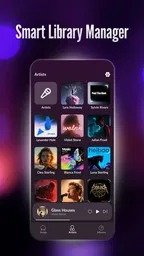
It may not be right for listeners who keep their music only in cloud services, want a constantly updated catalog, or expect a dedicated solution for managing a large collection. A streaming app can be better for discovery and broad access; a more specialized library manager may be preferable if detailed organization is central to your routine. I would choose this player when offline access to my own stored tracks matters more than those extras.
My practical verdict
I see this as a straightforward choice for someone who already has local music and wants a way to listen without depending on Wi-Fi or mobile data. Its strongest use case is not complicated: prepare a few favorite tracks, confirm they are on the phone, and use them when a connection is weak, expensive, or unavailable. That makes it a sensible companion for travel, exercise, and everyday listening in places with patchy reception.
My main caution is to set expectations before installing. This is not a shortcut to an online music library, and it cannot fix missing or inaccessible files on its own. If your music is already on the device, try a small test collection and see whether the player handles your normal routine comfortably. If most of your listening depends on streaming and discovery, another kind of music app will probably serve you better.
Overall, I would recommend it to a friend who wants a free, focused local music player and is happy to manage the files they listen to. The key to a smooth experience is preparation: verify the tracks, test one before relying on it, and keep offline listening separate in your mind from online music access. With that realistic expectation, the app has a useful and clearly defined place in a music setup.
What we like
- Plays music stored on your device without an internet connection.
- Keeps playback available when mobile data or Wi-Fi is unreliable.
- Useful for listening without streaming subscriptions.
- Local playback can help reduce mobile data use.
- A practical option for music files you already own.
What could be better
- You need to add or download music files before listening.
- The app cannot provide a streaming catalog of new releases.
- Available features may vary by device and app version.
- Your music library may need manual organization.
- Local playback does not include cloud syncing by default.





