
NovelSpark - Read Good Stories review
 Analysis by Appsdrops
I would approach NovelSpark as a place to explore stories, not as a guaranteed match for every reader’s tastes. It is a free Books & Reference app from NovelSpark, aimed at adults: its content rating is Mature 17+. That makes it a better fit for someone comfortable browsing mature-themed reading than for a family looking for a children’s library. The app’s promise is straightforward, but the useful question is whether it can become a pleasant part of your reading routine. My advice is to start with a little curiosity and modest expectations, then decide based on the stories you actually find.
What to expect from a story-first reading app
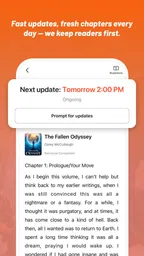
The name suggests a focus on discovering and reading stories, and that is the lens I would use when trying it. Unlike a general e-book reader, which is mainly a shelf for books you already own, a story-focused app is most appealing when you want to browse for something to read next. That distinction matters: if you arrive with a particular title in mind, a conventional ebook shop or library app may be more direct; if you want to find a new story for a spare moment, NovelSpark is the more natural experiment.
There is not enough reason to assume every reader will find the same kind of material appealing. I would treat the first session as a taste test: look through what is available, sample a story that genuinely interests you, and pay attention to whether its style and subject suit your mood. The best first goal is finding one story you want to continue, rather than trying to judge the whole app from its name or promotional wording.
The audience figures offer some context without deciding the question for you. NovelSpark has a 3.4 average from around 1,100 ratings, with 168 written reviews, and has passed 100,000 installs. That points to a real reader base, but the middling average is a reason to judge your own experience rather than assume the app will be a perfect fit. Reading preferences are personal, and a useful first session should tell you more than a popularity figure can.
For a realistic everyday test, imagine waiting for a train or taking a quiet break between tasks. Open the app when you have enough time to read a few pages, choose something that catches your attention, and see whether the experience makes it easy to settle into the story. If you only have a minute, browsing without committing may be more sensible. This simple test helps separate a genuinely enjoyable reading habit from an app you open once and forget.
Before you install, check the fit
The app is free to install, but it includes in-app purchases priced from $0.49 to $129.99 per item. That is a broad range, so I would inspect any purchase prompt carefully and avoid treating “free” as a promise that every possible reading choice has no cost. You do not need to decide about spending before you know whether you like the stories. First browse and read what you can comfortably access; consider a purchase only if the app makes its terms clear and the specific item is worth it to you.
The mature rating is also worth taking seriously. If you are choosing a reading app for a younger person, I would not rely on the fact that it is in a book category to assume its content is suitable. A different service with a clearly youth-oriented catalogue would be a safer choice. For adult readers, the rating is a prompt to use personal judgement about subject matter, not a guarantee that every story will suit every preference.
On the technical side, the listed minimum operating-system requirement is Android 7.0, and the current version is 1.2.1. If you are using an older or shared device, check compatibility before making plans around the app. Those details tell you whether it may run, but they do not determine whether its selection or reading experience will work for you. That is why I would keep the first trial short and focused.
Make the first session useful
After installing, I would avoid rushing through the catalogue just to see how much is there. Instead, pick a clear reading mood: something light for a short break, or a story you can give more attention to later. Then choose a candidate and read enough to notice whether the writing, premise, and pacing hold your interest. This gives you a practical answer to the most important first-time question: “Would I open this again?”
A small habit can make discovery less random. When a story catches your eye, take a moment to remember its title or where you found it before leaving the app. If you are interrupted, return with that one choice in mind rather than restarting a broad search. This is a simple reader’s workflow, not a claim about a special bookmarking or tracking feature; it helps you stay oriented whether the app provides a dedicated tool or not.
Another useful test is to compare two different story openings rather than spending all your time on the first one. A premise can sound appealing while the actual voice does not suit you, and the reverse can happen too. Sampling briefly before settling in is a better use of a first visit than assuming the first result represents everything NovelSpark offers. If nothing feels right, close it and try another day rather than forcing yourself to read on.
For a commuter, this approach works best when the phone is already comfortable for reading and the session is long enough to get past the opening setup of a story. For a reader at home, the same first test can be more deliberate: compare a couple of options, then continue the one that feels most absorbing. These are different situations, but both keep the decision grounded in your own reading rather than in a promise that any app can make.
Where first-time readers may get confused
The most common point of uncertainty is likely to be the difference between discovering a story and paying for access to something. Because the app is free while individual in-app purchases can be substantial, pause whenever a purchase screen appears. Read what the item costs and what it is for before confirming. If you are unsure, back out and continue exploring. A good reading experience should not require you to make a rushed decision in the middle of choosing a story.
It is also easy to mistake a large catalogue—or a busy browsing screen—for a guarantee that the right story is immediately available. I would use a narrower approach: choose the kind of mood or premise you want, inspect a few options, and stop once one earns your attention. Browsing endlessly can make discovery feel like work. If the app does not quickly give you a promising starting point, that is useful information about how well its current offering matches your habits.
Another potential mismatch is expecting NovelSpark to replace every reading tool you use. A dedicated ebook reader may be better for managing a personal collection, while a public-library app may be preferable if borrowing is your priority. NovelSpark makes more sense as an additional place to look for stories. That role is valuable when you want fresh reading material, but less compelling if your main need is organizing books you already have or finding a specific published title.
Ratings can cause confusion too. A 3.4 average is neither a reason to dismiss the app automatically nor a promise that you will enjoy it. Written reviews may help identify recurring frustrations, but your own test should focus on concrete questions: did you find a story you wanted to continue, could you understand when a purchase was involved, and did reading fit comfortably into your routine? Those answers matter more than trying to infer a universal verdict from other people’s tastes.
Who is likely to enjoy it—and who should look elsewhere?
I would recommend trying NovelSpark if you are an adult reader who likes browsing for stories, is open to sampling unfamiliar material, and does not need one specific book to be available. It may be especially useful as a low-commitment option for breaks: you can see whether a story holds your attention before making it part of your regular reading. The free installation lowers the barrier to that experiment, though paid items mean you should keep an eye on purchase decisions.
I would skip it, or at least choose another app first, if you are seeking a carefully curated children’s collection, a personal library manager, or a dependable route to a particular ebook. Someone who dislikes browsing may prefer a service where they can search for a known title or borrow from a library. Likewise, if you prefer not to encounter mature-rated material, a different catalogue with a more appropriate audience focus is a better starting point.
The app’s developer is NovelSpark, and its current release is version 1.2.1. I would not let a version number alone influence the decision: what matters is whether the app runs properly on your device and gives you a satisfying reading session. If anything feels inconvenient, note exactly what caused it—finding a suitable story, understanding a cost, or returning to a choice after a break. That makes it easier to decide whether the friction is a minor first-day adjustment or a reason to use another service.
What to do after you find a story
If your first choice works, turn that success into a repeatable routine. Return to the same story when you have a proper reading window, and keep a simple mental note of what made it appealing: the premise, the tone, or the fact that it suited a short break. That observation can guide your next browse. If you did not enjoy it, do not conclude that all the app’s material will feel the same; try one clearly different option before deciding whether the overall selection is for you.
Keep spending separate from discovery. Read first, decide later, and only consider an in-app purchase when you understand the item and have already established that the app suits you. The available purchase range runs from $0.49 to $129.99 per item, so checking the amount is especially important. If you do not want to spend, treat that as a firm boundary and use only the options you are comfortable with.
My overall view is that NovelSpark is best approached as an adult story-discovery app, not as a complete replacement for an ebook library or a guaranteed source for a particular title. Its appeal depends on whether browsing leads you to a story worth returning to; its main cautions are the mature rating, the middling user average, and the need to pay attention to in-app purchase prompts. Give it one focused session, test a couple of openings, and continue only if you find a genuine reading match. That is a reassuring, low-pressure way to decide whether it deserves a place on your phone.
What we like
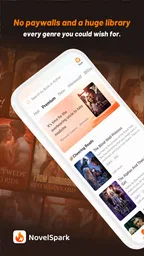
- A broad range of stories makes it easy to find something to read.
- Short chapters suit reading during brief breaks.
- The clean interface keeps attention on the story.
- New releases can give readers fresh stories to explore.
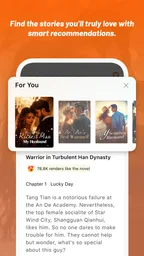
- Personalized recommendations can help uncover suitable reads.
What could be better
- Some stories may require in-app purchases to continue.
- The free selection may be more limited than the full catalog.
- Story quality can vary between authors.
- Frequent notifications may interrupt reading.
- A network connection may be needed to access some content.





