Nova Weather - News review
 Analysis by Appsdrops
I judge a weather-and-news app by how easily I can get the information I need when I am in a hurry, not by how many panels it can fit on a screen. Nova Weather brings local forecasts and breaking news together, which is a useful idea for anyone who wants a quick sense of both the day ahead and what is happening nearby. Its value depends on whether that combination feels clear in real situations—and whether the app works for people with different reading, movement, and attention needs.
Finding the important information at a glance
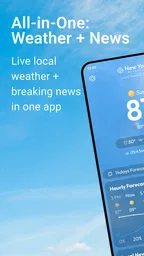
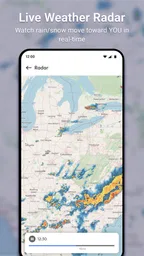
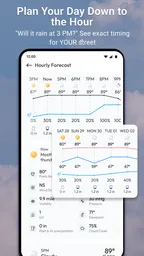
Nova Weather is a free News & Magazines app from Build4world. It is aimed at people who would rather check weather and local headlines in one place than switch between separate apps. I can see the appeal: before leaving home, I may want to know whether the weather could affect my plans and whether a local development deserves attention. The combined purpose is easy to understand, even for someone who does not want a complicated setup.
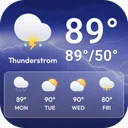
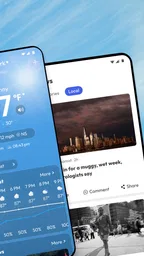
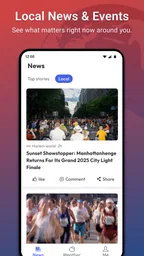
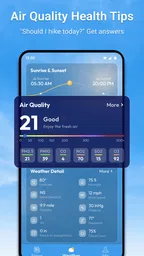
For readability, the main test is whether weather and news remain distinct enough to scan without effort. These are different kinds of information: a forecast helps me make a practical decision, while a headline may ask me to stop and read more. Putting them together can save a step, but it also creates a risk of visual competition. I would use the app as a quick briefing rather than assume every headline or forecast detail will be equally easy to spot at a glance.
The version available is 1.1.6, and the app requires Android 8.0 or later. It has a 4.5 average from around 350 ratings, with over 50,000 installs. Those figures suggest that people are using it, but they do not tell me whether the layout suits my eyesight or preferred reading style. I would make that personal check early: open the app in ordinary daylight and in a dim room, then see whether I can locate the local forecast and distinguish it from the news without repeated hunting.
A practical habit is to decide what I am opening the app for before I start scrolling. If I am checking whether to carry a rain jacket, I should focus on the forecast first and leave the headlines for later. If I am catching up on local events, I can treat the weather as useful context rather than another item I must process. This small separation helps keep a two-purpose app from turning into a crowded morning feed.
Navigation that fits a short check-in
The strongest use case for this combination is a brief, purposeful visit. I might check the local conditions while waiting for a lift, then glance at breaking news before choosing a route or deciding whether to leave early. For that to work well, the app needs to make the two kinds of content recognizable without requiring me to read every item. I would not treat a quick glance as a substitute for checking details that matter to a journey or an important decision.
Compared with a dedicated weather app, Nova Weather offers a broader context in the same visit, but a specialist forecast tool may be a better fit when I need detailed weather information or a highly familiar layout. Compared with a general news app, the local-weather angle can make a short check more relevant to the day I am planning. The trade-off is straightforward: convenience comes from combining subjects, while depth and control may be better served by separate tools.
Reading, touch, and sensory comfort
Different abilities affect how comfortable an app feels even when its purpose is simple. Someone with low vision may need clear text and strong separation between forecast information and headlines; someone with limited dexterity may prefer controls that are easy to target rather than closely packed. I cannot assume those needs are met just because the app has a straightforward concept. I would check how comfortably I can read and navigate it on my own device before relying on it for time-sensitive updates.
There is also a sensory consideration: breaking news can compete with the calm, practical role of a weather check. If I open the app only to plan the morning, headlines may be distracting, especially when I am already rushed or trying to limit upsetting content. A useful personal approach is to check the forecast first and leave the news portion until I have the time and attention to engage with it. That turns the combined feed into a choice rather than an obligation to absorb everything at once.
For people who prefer less screen time, the app’s two subjects can be either an advantage or a trap. One opening may answer two questions, but it may also encourage a longer browse than intended. I would set a simple boundary: check the forecast, read only the headlines relevant to my area or plans, and close the app. That is especially helpful when the goal is a quick decision rather than a full news session.
When and where a combined briefing helps
Imagine I am getting ready to walk to work. I check local weather before choosing what to wear, then scan the news for a nearby disruption that could change my route or schedule. Having both topics together can make that routine more efficient than opening one app for the forecast and another for headlines. The benefit is strongest when I want a broad local snapshot, not when I need exhaustive reporting or precision weather analysis.
It can also suit someone who has recently moved or is trying to pay closer attention to events around them. The weather gives an immediate, everyday reason to open the app; the news can add local context during the same visit. I would still compare the headlines with a dedicated news source when a story is important, because a short feed is best treated as an entry point rather than a complete account of a developing issue.
For people with limited time or energy, combining the two topics may reduce app switching. But it does not automatically make the experience accessible in every context. Outdoors, glare can make any phone screen harder to read; in a noisy place, spoken or visual attention may be limited; while moving, reading a feed is a poor substitute for stopping somewhere safe. I would use the app before setting off or after arriving, rather than trying to read while walking or driving.
Where the experience may not be enough
The main limitation is built into the concept: weather and news are not always best consumed together. A person who wants only a detailed forecast may find the news element unnecessary, while a reader who follows national or specialist reporting may prefer a dedicated news app with a broader editorial focus. If I need a particular accessibility arrangement, such as a display or interaction style tailored to my needs, I would test the app directly and keep a familiar alternative available until I know it works comfortably.
Another point to consider is how much information I want in a single glance. A combined app can make a morning routine shorter, but it can also ask me to filter two streams of content when I only came for one. I would skip it if that kind of mixed feed makes it harder for me to focus, or if I rely on features that I have not confirmed work well on my device. A specialist app remains the safer choice when a particular forecast detail or news-reading workflow is essential.
Nova Weather is rated for Everyone, so its stated audience is broad. That does not mean every person will find the reading and navigation equally comfortable. I would treat age suitability and individual accessibility needs as separate questions: the first concerns who may use the content, while the second depends on how the interface works for a particular reader and device. A quick hands-on check is more useful than assuming either a perfect fit or a barrier.
A measured recommendation
Build4world’s app has a clear reason to exist: it combines local weather with breaking news for people who want a compact daily check-in. I would recommend it to someone who values that pairing and is comfortable reading a mixed information feed. Its free price makes it easy to try, and the general-audience rating broadens its potential usefulness, but neither point replaces checking whether the presentation suits your eyesight, attention, and preferred way of using a phone.
My inclusive verdict is positive but conditional. Nova Weather may make everyday planning simpler when a forecast and local headlines are both useful, especially if I can scan each without losing track of the other. I would choose a dedicated weather or news app instead when depth, a specific reading workflow, or a more focused screen matters more than convenience. The best test is practical: open it for a real morning check, see how comfortably you can find what you need, and keep it only if the combined view helps rather than adds friction.
What we like
- Provides local forecasts for quick daily planning
- Weather news adds context to changing conditions
- A straightforward layout is easy to navigate
- Useful at-a-glance details reduce the need to browse
- Combines forecasts and weather updates in one app
What could be better
- Forecast accuracy can vary by location
- Weather updates may not cover every region equally
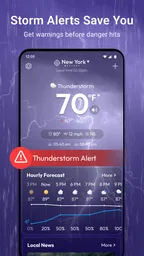
- Frequent news can distract from checking the forecast
- Some features may depend on an internet connection
- Notifications may feel unnecessary to users who prefer a quiet app





