




Notepad, Notes, Easy Notebook review
 Analysis by Appsdrops
I like a notepad best when I can open it, capture a thought, and get back to what I was doing without turning the moment into a project. Notepad, Notes, Easy Notebook aims for that kind of everyday simplicity: it is a productivity app for quick notes, lists, and reminders rather than a full planning system. In my experience, that makes it appealing for small jobs that would otherwise end up scattered across scraps of paper, messages to myself, or a more complicated task app.
Notepad, Notes, Easy Notebook is made by Simple Design Ltd. and is free to download, with optional in-app purchases. It has a 4.8 average from around 474,000 ratings, and more than 10 million installs. Those figures suggest that its straightforward approach suits many people, but they do not mean it will fit every workflow. The important question is whether a simple place for everyday notes is enough for you.
When a quick note meets a network-dependent moment
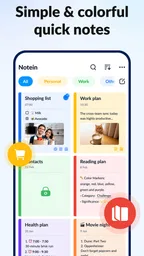
A note-taking app feels most useful when it gets out of the way. You might be walking through a shop and want to remember an item, sitting down to make a short to-do list, or trying to capture an idea before it disappears. This app’s focus on notes, lists, and reminders gives it a clear role in those moments: keep the information small, readable, and easy to return to.
Connectivity can still shape how comfortable that routine feels. If a note or reminder matters, I would avoid assuming that every part of the experience behaves the same way with a weak connection. A sensible habit is to open the app and check that a time-sensitive item is present before relying on it, especially when you are about to leave home or switch networks. That is less about expecting trouble and more about treating reminders as useful prompts, not as the only safeguard for something important.
For ordinary reference notes, the stakes are lower. A grocery list or a short packing checklist can be checked while planning, then revisited when needed. For a deadline, appointment, or anything that could cause real inconvenience if missed, I would keep a second cue in whichever calendar or reminder system I already trust. The app’s simplicity is a strength, but simplicity also means it should not automatically replace every tool in a person’s routine.
A useful workflow is to give each note one clear purpose. Keep a shopping list focused on items to buy, and put errands or calls in a separate to-do list rather than turning one long note into a jumble. This makes scanning easier on a small screen and reduces the chance of overlooking the one item you opened the app to find. It is a small discipline, but it matters more than elaborate organization when the app is designed for quick capture.
Small-screen use is where restraint helps
On a phone, a notepad has to serve brief bursts of attention. I can imagine using this one between errands, at a desk, or while waiting for someone, when there is no appetite for arranging projects or maintaining a complicated system. A compact note-taking habit works particularly well for temporary information: a few groceries, a short list of things to ask, or a reminder to bring something along.
The trade-off is that a plain notebook-style approach can become messy if every thought goes into one running note. When a list grows, I would split it by purpose and remove items once they stop being useful. That keeps the app practical without asking it to behave like a database. If you regularly need searchable archives, linked documents, shared workspaces, or a broad structure for long-running projects, a more capable notes platform will probably feel better.
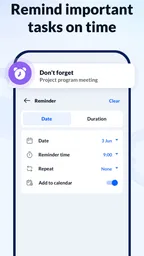
There is also a difference between collecting information and acting on it. A to-do list helps when it contains concrete next steps, such as “buy batteries” or “call the clinic,” rather than vague headings that need more interpretation later. I find that this is a good match for a basic notepad: write the action in plain language, keep it short, and use reminders for the items that genuinely need a prompt. Avoid adding a reminder to every line, or the feature can lose its usefulness through sheer noise.
For shopping, a practical approach is to prepare the list before entering a store, then keep it limited to what you actually intend to buy. If the list is shared informally with another person by reading it aloud or sending its contents elsewhere, remember that this is not the same as a collaborative list that updates for everyone in real time. People who routinely coordinate household shopping with several users may prefer a dedicated shared-list app.
What to do when access or a reminder does not go as planned
When a note seems missing or a reminder does not appear when expected, I would start with simple checks rather than immediately rewriting everything. Reopen the app, look through the relevant notes and lists, and confirm that the item was saved in the place you intended. If the issue coincides with a network change, check again after connectivity is stable before deciding the information has vanished. This kind of calm verification is useful in any app that holds small but important details.
For anything that cannot be missed, use a backup cue. A calendar entry, a second reminder method, or a written note may feel redundant, but that redundancy is reasonable for medication timing, travel arrangements, or an appointment. I would not make a lightweight notebook the sole record for information whose loss would have consequences. That is not a knock against the app; it is a sensible boundary for a tool built around straightforward personal notes.
Recovery is easier when you have not made the app responsible for everything. Keep critical details in a place you can independently verify, and use the notepad for the quick lists and prompts that benefit from being close at hand. If you are switching phones or setting up a new device, check your important notes before relying on the new setup. That simple habit avoids treating an app transition as a guaranteed, invisible handoff.
One non-obvious benefit of keeping notes short is that it makes recovery from confusion easier too. If a reminder title says exactly what needs doing, you can understand it at a glance; if it says only “later” or “important,” you may have to reconstruct the context. I would include the object and action in the note, such as “return library book,” rather than relying on memory to fill in the blanks.
Use data thoughtfully, without making the app do every job
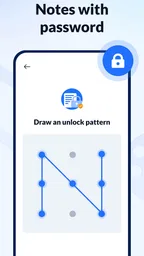
Simple notes generally contain more personal context than they appear to at first. A shopping list might reveal routines, and a reminder can include an address, appointment detail, or another private fact. I would avoid putting sensitive information into a casual note unless I had a clear reason to keep it there. For passwords, financial details, or confidential work information, a purpose-built secure tool is a better choice.
Connectivity-conscious use is mostly about being deliberate. If you are on a limited or unreliable connection, do not assume that every feature will be equally available in every situation; prepare important lists when you have a dependable connection and check that they are ready before you need them. This is especially useful before a trip or a busy day, when you may have fewer chances to troubleshoot. I would not plan around an unverified offline workflow for a time-sensitive task.
Another practical choice is to keep the app’s contents lean. A notepad can become a dumping ground for everything, but old reminders and abandoned lists make current information harder to spot. I would periodically clear out completed tasks and rewrite lists that have become stale. This is a manual habit rather than an elaborate filing system, and it suits the app’s low-friction purpose.
Some readers will also want to know whether it costs anything to try. The app is free, while in-app purchases range from $3.99 to $30.99 per item. I would start with the basic experience and only consider a purchase if a specific option addresses a need you have. Its age rating is Everyone, and the current version is 1.4.4.103, with Android 8.0 as the minimum operating system requirement.
Where it fits among other note and productivity tools
Compared with a paper notebook, a phone app is easier to carry and can put a reminder beside the note itself, but paper has the advantage of working without a device or battery. Compared with a full-featured digital notebook, this app asks less of you: it is better suited to a quick list than to research notes, long documents, or a structured project archive. The right comparison depends on the job, not on which tool has the longest feature list.
I would recommend it to someone who wants a personal, uncomplicated place for everyday notes and short lists, and who is happy to keep the organization modest. It can also suit a person who finds elaborate productivity apps distracting and wants to capture a thought without choosing a project, tag, or workspace first. The app’s standing in the productivity category and its broad audience are reassuring context, though my recommendation is still based on matching the tool to the work.
I would skip it if your routine depends on live collaboration, detailed project management, rich document formatting, or a verified offline workflow. Those needs call for a tool built around them, not a simple notebook stretched beyond its purpose. If reminders are central to your day, make sure your chosen setup is dependable for the way you use your phone, and keep a backup for high-stakes commitments.
A practical verdict on staying connected
My overall view is that Notepad, Notes, Easy Notebook makes sense as a lightweight companion for capturing ordinary details, provided you keep expectations realistic. Its appeal is not that it replaces every productivity tool; it is that a short note or checklist can be easier to manage than a larger system. I would use it for groceries, quick errands, and reminders that benefit from being written down, while keeping complex or sensitive work elsewhere.
What we like
- Quick note creation makes it easy to capture ideas on the go.
- A simple layout keeps everyday note-taking straightforward.
- Useful for jotting down reminders and short lists.
- Lightweight design is suited to basic writing tasks.
- Notes can be organized for easier access later.
What could be better
- It may lack advanced formatting options for detailed documents.
- Cloud backup may not be available across devices.
- Large note collections could be harder to manage.
- It may not support collaboration with other users.
- Some features may require ads or in-app purchases.





