


Norton360 Antivirus & Security review
 Analysis by Appsdrops
I would choose Norton 360 when I want more than a one-off virus scan but don’t want to assemble several security tools myself. It brings malware protection and a VPN together in a familiar mobile security app, which can make the first steps feel less daunting. The important caveat is that “one app” does not necessarily mean every useful feature is free: Norton 360 is free to install, while in-app purchases range from $0.99 to $464.99 per item.
What to expect from Norton 360
Norton 360 is a tools app from NortonMobile, built around protecting a phone rather than replacing every privacy or maintenance app on it. Its store summary highlights AI-powered malware protection, a virus scanner, and a fast VPN. I’d think of it as a security starting point: install it, look at what it can check, and decide which protections matter to you before buying anything.
There is a strong reason many people will recognize the name. The app has a 4.6 average from around two million ratings, and it has passed over 100 million installs. Those figures tell me it is an established choice, but they don’t tell me whether a particular feature is included in a plan or whether it suits your phone. For that, the practical details on the screens you actually use matter more than popularity.
The app is free to download and is rated for Everyone. It has been available since June 8, 2010, and its current version is 26.21.0.261103359, with Android 10 as the minimum operating system. Those details make it relevant to a broad range of Android users, though an older phone still needs to meet the minimum requirement. If you use iOS, check the relevant app store for the version and compatibility details for your device rather than assuming Android requirements apply.
One useful expectation to set early: a scanner and a VPN serve different purposes. A malware scan is about checking for security risks on the device; a VPN is about routing network traffic through a protected connection. Neither is a magic fix for every risky link, weak password, or account-security problem. I’d use Norton as one layer of sensible habits, not as permission to ignore warnings or tap anything that looks suspicious.
Start with a clear setup, not every offer
After installing, I’d take a minute to orient myself before enabling or purchasing anything. Look for the main security check and the VPN controls, then read what each screen says it will do. If the app presents a plan or purchase prompt, pause and compare its terms with what you actually need. That small bit of patience is worthwhile because the price range for in-app purchases is broad, and a free download should not be mistaken for every feature being free.
For a first-time user, the best setup is the one you understand. Begin with the basic protection flow and follow the on-screen instructions. If Android asks you to grant a permission or change a system setting, read the explanation rather than approving automatically. Security apps may need access to perform specific checks, but the right choice depends on the feature and the prompt in front of you. I wouldn’t grant access just because an app asks; I’d match the request to the action I’m trying to use.
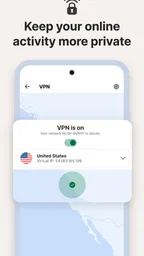
Before relying on the VPN, check its status in the app and make sure you understand when it is active. A common misunderstanding is to treat a VPN as a general antivirus shield. It can help protect traffic on a network, but it does not mean a downloaded file is harmless or that a fake sign-in page is genuine. Conversely, a clean device scan is not a reason to assume every public Wi-Fi connection is private. Keeping those jobs separate makes the app easier to use well.
It can also help to decide your priorities before exploring every menu. If your concern is a suspicious download, start with the scanner. If you are joining a network you don’t trust, look at the VPN. If you mainly want reassurance, run the security check and read the result rather than repeatedly scanning without a particular concern. This simple workflow keeps the app from becoming another dashboard you open without knowing what you want it to do.
Your first useful result: run a scan and act on it
For a first meaningful success, I’d run the virus scanner after setup and take time to read the result. The point is not just to see a reassuring status; it is to learn where Norton places its findings and what it recommends next. If it identifies an issue, follow the explanation in the app instead of guessing at a fix. If it reports no problem, treat that as a useful check at that moment—not a permanent guarantee that future downloads or links are safe.
A realistic example is installing a phone security app before a trip. At home, I’d complete the initial check and make sure I know where the VPN control is. Later, when I need to use public Wi-Fi, I can open Norton and check the VPN state before browsing. If I then download a file or receive an unexpected link, I still use ordinary caution rather than assuming the VPN has approved it. That is a more reliable routine than expecting one tap to cover every kind of risk.
Another useful workflow is to scan after installing an app from a source you are unsure about, then review the result before continuing to use it. The trade-off is that a scanner can only help with what it detects; it cannot judge whether an app’s claims are trustworthy or whether you have entered a password into a convincing fake page. I’d pair the scan with checking the app’s source and being careful with account prompts. That combination is more practical than repeatedly scanning without changing risky behavior.
If your main goal is safer browsing on an unfamiliar connection, use the VPN for that specific purpose and check that it is actually connected. Don’t infer its status from having opened the app earlier. If your main goal is checking the phone itself, use the scanner instead. This distinction is one of the most useful habits to learn early, because it prevents disappointment when a network tool and a malware check are expected to solve the same problem.
Where new users can get confused
The first likely point of confusion is the difference between installing for free and getting every protection without payment. Norton 360 costs nothing to download, but it also offers in-app purchases, with individual items listed from $0.99 up to $464.99. Before subscribing or buying, I’d inspect exactly what the offer includes, how long it lasts, and whether it covers the feature I came for. Don’t decide based on a security label alone; choose based on the specific benefit and the terms shown at purchase time.
The second is interpreting a clean scan too broadly. A scan result is a snapshot of a particular check, not a promise that a phone can never be compromised. Avoiding suspicious attachments, keeping your device updated, and using strong, unique account passwords still matter. Norton may help with its stated protection tools, but I would not use it as a substitute for those basic steps.
The VPN can also be misunderstood as anonymity. I would use it as a privacy and connection tool, not as a guarantee that websites cannot identify me or that every online activity is hidden. The app’s summary says it includes a fast VPN, but real-world performance and usefulness depend on the connection and what you are doing. If a particular service blocks VPN traffic or a page behaves unexpectedly, turning the VPN off temporarily may be the sensible troubleshooting step.
Finally, a large security suite may be more than a minimalist user needs. If you only want a quick, occasional check and already rely on built-in phone protections, you may prefer a simpler scanner or the device’s own security settings. If you want malware checking and a VPN in one place, Norton is a more convenient fit. I’d avoid installing overlapping security apps that all claim to monitor the same things, since multiple dashboards can make alerts harder to interpret rather than making your routine clearer.
Who will get the most from it
I’d recommend Norton 360 to someone who wants a recognizable security app with both device scanning and a VPN available in one place, especially if they are new to mobile security and appreciate a guided starting point. Its long history and broad adoption can offer reassurance, but the real benefit is having distinct tools for distinct situations. Use the scanner when you want a device check; use the VPN when you want a protected connection; don’t confuse either with a complete defense against every online scam.
It is less compelling for someone who wants a completely free, very small utility and does not need a VPN or paid extras. The in-app purchase range makes it sensible to check costs before committing, and anyone who dislikes subscriptions or security prompts should take time to inspect the offer and settings. People with older Android devices should also confirm their operating system meets the minimum of Android 10 before trying to install it.
Compared with the usual alternatives, Norton’s appeal is the combination of a malware scanner and VPN rather than a single-purpose tool. A built-in security feature may be enough if you only want basic device checks, while a dedicated VPN may suit someone focused on network privacy and who already has another way to check for malware. Norton is the middle ground for people who prefer those jobs together, provided they are comfortable reviewing its purchase options and using each feature for its intended purpose.
A sensible next step after installation
Once the first scan is complete, I’d keep the routine simple: understand the result, use the VPN when the connection calls for it, and revisit the app if a warning or purchase prompt appears. There is no need to open every screen or pay for something before you know what problem you are solving. That approach makes the first session calmer and leaves you with a clear next action instead of a pile of unfamiliar settings.
Overall, Norton 360 is a credible choice if you want a familiar mobile security tool that combines device checks with a VPN. Its strongest point for a newcomer is that it gives you a straightforward place to begin, while its main friction is deciding which features and purchases are worth using. I’d install it when I want those tools together, read the prompts carefully, and keep realistic expectations: useful protection is a layer in a careful routine, not a reason to stop paying attention.
What we like
- Includes a VPN for added privacy on public Wi-Fi.
- Can alert you when personal information appears in data breaches.
- Offers parental controls for monitoring children’s online activity.
- Provides tools to help locate a missing device.
- Supports protection across multiple devices with eligible plans.
What could be better
- Many features require a paid subscription.
- The VPN may have limits depending on the selected plan.
- Parental controls require setup and may not cover every app.
- Some alerts may need manual review to judge their importance.
- Renewal pricing can differ from the initial subscription price.





