





Norton VPN – Fast & Secure review
 Analysis by Appsdrops
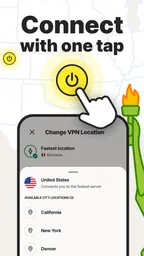
When I use a VPN, I care less about grand promises than about whether it gets in the way: does a page load normally, can I keep working when I move between networks, and is the extra privacy worth another app running on my phone? Norton VPN is aimed at that everyday balance. It is a free-to-install Android tools app from NortonMobile, and its basic purpose is to give you a more protected route to favorite apps and websites while you are out and about.
My overall impression is that Norton VPN makes most sense as a convenient layer for routine browsing, especially when you use public Wi-Fi or want a VPN available without much setup. It is not a magic fix for slow connections, and a VPN cannot make an unreliable network reliable. I would treat it as a practical privacy tool rather than a speed booster or a substitute for careful account security.
What everyday speed should you expect?
A VPN sends your internet traffic through an additional connection, so some speed variation is a normal trade-off. The result depends on the network you already have, the route being used, and what you are doing online. I would not install this app expecting it to make a weak café connection feel fast. Its more useful promise is that you can keep browsing through a VPN connection without having to think about the technical details every time.
For ordinary activities such as reading news, checking messages, or using a website, the difference may be less noticeable than it is during large downloads or high-quality video. That is a general expectation for VPN use, not a performance guarantee for this app. If a page is slow, I would first compare the same task with and without the VPN on a trusted network. That quick check helps distinguish a weak Wi-Fi signal from a VPN-related slowdown.
There is also a trade-off people sometimes overlook: the fastest choice is not always the one that best fits a privacy-minded routine. If you are using a sensitive service, I would prioritize having the VPN enabled over chasing the last bit of speed. For casual browsing on a stable home connection, meanwhile, you may decide that the extra routing is unnecessary. The useful habit is to choose based on the situation rather than leave the app on by reflex.
Where it fits in a normal day
Picture checking a travel booking or reading email while waiting at a station. You join the available Wi-Fi, open Norton VPN, and then continue with the task. That is the sort of low-effort use case I think about first: a short session in a place where you do not control the network. The app’s value is the security-minded step it adds to that routine, not a promise that the station connection will suddenly be fast or private in every respect.
For a smoother workflow, I would decide before opening an important service whether I want the VPN active, rather than toggling it repeatedly during a form submission or payment. A change in network routing can sometimes prompt a site or app to refresh or ask you to sign in again; that is a possible consequence of using VPNs generally, not a confirmed Norton-specific behavior. If a transaction is time-sensitive, I would use a connection I trust and avoid changing network settings halfway through.
Heavy use calls for realistic expectations
Long video sessions, cloud backups, large file transfers, and online games place more demands on a connection than a quick search. With any VPN, adding another leg to the route can make latency or throughput more noticeable in those situations. I would test the particular activity that matters to me instead of assuming that an app’s name or reputation predicts how it will feel on my network.
For gaming, the key question is often responsiveness rather than whether a page eventually loads. If a game already feels delayed, adding a VPN may not help and could make the connection less suitable. For a large upload, I would consider whether privacy is important enough to accept a slower transfer, and, if not, wait until I am on a trusted connection. Norton VPN is better approached as a security choice than as a performance-tuning tool.
Streaming needs a similarly practical test. I would try the exact service and network I plan to use, since access and playback can depend on the service’s own rules and how it handles VPN traffic. I would not rely on a VPN to guarantee that a particular catalog, stream, or app will work. If entertainment is the main reason you want a VPN, compare your actual viewing experience before building your routine around it.
Stability and getting back online
A VPN is most useful when it fits quietly into the way you use your phone. If you move from home Wi-Fi to mobile data and back, you want to know whether your browsing continues as expected. I cannot promise a particular reconnection behavior for every device or network, so my practical advice is to check the VPN connection after a major network change before sending sensitive information. It is a small habit that avoids assuming the protection is active just because the app is installed.
If a site stops loading or an app behaves strangely, I would troubleshoot in a simple order: check that the underlying internet connection works, temporarily compare the behavior with the VPN disconnected, then reconnect and retry. If the problem appears only while using the VPN, the service or network may be reacting to the changed route. If it persists either way, the cause is more likely elsewhere. This method is more useful than repeatedly restarting the phone without first isolating the issue.
Occasional sign-in checks are another reasonable expectation. Some online services treat a change in apparent network location or route as unusual and may ask for an extra verification step. That does not necessarily mean anything is wrong with your account. For a work or banking app that is particularly sensitive to connection changes, I would test it in advance and keep an alternative trusted connection available.
Phone demands and compatibility
Norton VPN is an Android app with a minimum operating-system requirement of Android 10. If your phone runs an earlier version, this is not the right choice for that device; check compatibility in the app store before planning around it. A VPN also needs to remain involved in network traffic while active, so some additional background activity is inherent to the category. I would pay attention to battery behavior during my own normal day rather than assume every phone will be affected equally.
In practical terms, if you are trying to preserve battery on a long day away from a charger, consider whether you need the VPN for every task or mainly for networks you do not trust. That is not an argument to use public Wi-Fi carelessly; it is a way to make an intentional choice about when the extra layer matters. If your phone is already struggling with battery life or limited resources, any app that stays active in the background deserves a trial period before becoming part of your always-on routine.
The current release is version 26.20.0.261030325. Version details can change as an app is updated, so I would check the app store on the device I plan to use rather than rely on an old installation file or a remembered compatibility note. The app is rated for Everyone, but that age classification does not tell you whether it suits your individual privacy needs; those depend on how and where you use your phone.
How it compares with other VPN choices
Compared with a VPN built into a browser, a phone-level VPN is appealing when I want protection to apply beyond one browser session. A browser-only option is simpler if I only care about websites opened in that browser, while a phone VPN is the more natural category to consider when I also use other apps on public networks. The exact scope and controls depend on the product, so I would check Norton’s in-app settings before assuming which traffic is covered.
Compared with manually configuring a VPN, an app is generally the easier route for someone who does not want to choose technical connection details. The trade-off is that you are relying on the app’s available controls rather than tailoring every part of the setup yourself. A person who needs specific network rules for work may prefer a company-managed service or a configurable alternative. For everyday personal use, I value a straightforward app more than a pile of settings I am unlikely to understand or maintain.
There are also situations where no VPN is the better answer. If you are on a trusted home network and mainly need faster downloads, adding a VPN may offer little practical benefit. If you need a business VPN with access to an employer’s internal systems, a consumer app is not automatically a replacement. And if your priority is a particular streaming service or game, test that service directly rather than choosing any VPN on the assumption it will work with it.
Cost, reputation, and the choice to install
The app is free to download, while in-app purchases range from $9.99 to $129.99 per item. I would look carefully at the purchase screen and the terms shown there before paying, so I understand what a particular option includes and how it fits my needs. The free download makes it easy to assess the app on your own phone, but it does not mean every available service or level of access is free.
Its public reception is substantial: Norton VPN has a 4.4 average from around 312,000 ratings, alongside over 10 million installs. Those figures suggest that many people have tried it, but they cannot tell me whether it will be fast on my connection or suit my preferred apps. I use ratings as context, not as a substitute for checking compatibility, testing the services I care about, and deciding whether the purchase options make sense.
NortonMobile is the developer, and the app first appeared on May 9, 2016. Its established presence may be reassuring if you are looking for a familiar name, but I would still judge the product by its current behavior and the details presented in the app. A well-known developer does not remove the need to understand when a VPN helps and when it adds an unnecessary step.
My performance verdict
Norton VPN is worth considering if you want an accessible Android VPN for everyday browsing, especially when you regularly use networks you do not manage yourself. I like the straightforward role it fills: add a VPN option to the phone and make a more deliberate choice about browsing on the move. Its biggest practical strength is convenience, while its main limitation is the same one that applies to VPNs broadly: speed, stability, and compatibility depend on your network and the services you use.
I would install it, test a few normal tasks on both a trusted connection and public Wi-Fi, and see whether the extra protection feels worth any change in speed or battery use. Keep an eye on whether important apps ask you to sign in again, and verify the connection after switching networks before doing something sensitive. If your top priority is gaming latency, very fast transfers, a work-specific configuration, or guaranteed access to a particular streaming service, a different solution—or no VPN for that task—may suit you better.
For someone who wants a familiar, general-purpose privacy tool and is willing to make that small connection trade-off, it is a reasonable option. I would not treat it as an invisible shield or expect it to repair poor Wi-Fi. Used thoughtfully, it can be a useful part of a mobile browsing routine; used without checking what it changes, it can become another background app whose benefits you never really evaluate.
What we like
- Offers a straightforward interface that is easy for VPN beginners to navigate.
- Includes a kill switch to help protect traffic if the VPN connection drops.
- Provides split tunneling on supported devices for choosing which apps use the VPN.
- Can automatically connect on unsecured Wi-Fi networks.
- Supports multiple devices under eligible subscriptions.
What could be better
- Access to all features requires a paid subscription.
- The free trial may require payment details and renew automatically if not canceled.
- Streaming access can vary and is not guaranteed for every service.
- Some advanced settings are limited compared with specialist VPN apps.
- VPN use may reduce connection speeds depending on the server and network.





