






NordVPN – fast VPN for privacy review
 Analysis by Appsdrops
I notice the value of a VPN most when I’m tired of thinking about the network I’m using. A café connection, a hotel’s shared Wi-Fi, or an unfamiliar hotspot can turn a simple task into a small security worry. NordVPN is built to make that routine less fiddly: open the app, connect, and carry on. In my view, that convenience is its strongest everyday argument—not a promise that every online risk disappears.
Making uncertain connections less of a chore
NordVPN is a privacy and network tool from Nord Security, and it has been available since May 16, 2016. It has a 4.6 average from around 1.4 million ratings, with more than 100 million installs. Those figures suggest it is a familiar choice, but popularity alone doesn’t tell me whether a VPN suits a particular person. The more useful question is whether its routine fits the way you actually use your phone.
A VPN routes your internet traffic through an encrypted connection to a VPN server. That can make it harder for people sharing a local network to inspect your traffic, and it can change the apparent location from which services see your connection. It does not make you anonymous in every sense, prevent phishing, or stop you from handing information directly to a website. I find that distinction important: a VPN reduces some network-level exposure, rather than replacing sensible account and browsing habits.
The app is listed as free to install, with in-app purchases ranging from $2.99 to $199.99 per item. That means I’d treat the free download as a way to get the app, not assume every useful connection or subscription benefit is included at no cost. Before relying on it for a trip or a longer-term privacy routine, check the plan and renewal terms shown in the app store. The age rating is Everyone, though the practical audience is anyone who understands that a VPN is a tool with limits.
Start with one clear job
When setting up NordVPN, I’d begin with the simplest use case: protecting a phone on networks I don’t control. Install it from the app store, review the prompts the app presents, and connect before opening sensitive apps on public Wi-Fi. The exact controls can change across versions and platforms, so I wouldn’t follow a rigid menu recipe from an old guide. Instead, look for the connection action and confirm that the app indicates an active VPN before you continue.
That small check is more useful than turning on every option without understanding it. A VPN can only help with traffic that is actually using the VPN connection. If the app is disconnected, switching Wi-Fi networks or restarting the phone may leave you browsing normally until you reconnect. I make a habit of checking the connection status after moving between networks, especially before signing in to email, banking, or work accounts.
It’s also worth testing your essential apps while you still have time to troubleshoot. Some services may behave differently when they see traffic coming from a VPN server, and a connection that is fine for browsing might not suit a particular work or streaming setup. If an app fails, disconnecting briefly can help identify whether the VPN is the cause. I’d avoid making that trade-off on public Wi-Fi for sensitive activity; switching to mobile data is often a better fallback.
Where it earns a place in my routine
Picture a common travel day: I’m waiting for a train, using station Wi-Fi to check a booking, and then moving to a café to answer messages. With a VPN already connected, I don’t need to treat each unfamiliar network as a fresh decision about whether to browse. I still avoid entering details on suspicious pages, but I spend less time worrying about other people on the same hotspot seeing my connection traffic.
At home, the case is more selective. If I’m on a trusted network and simply reading news or watching familiar services, leaving a VPN on may add little practical value for me. When I want the extra privacy, or need a different apparent network location for a legitimate reason, it can be useful. The key is not to regard permanent connection as a universal improvement: VPN routing can introduce compatibility or speed trade-offs, and some websites may challenge unfamiliar sign-ins.
For remote work, I’d think of NordVPN as one layer, not a substitute for an employer’s secure access tools. A company may require its own VPN or device-management setup, and a personal VPN could conflict with that arrangement. I’d follow workplace instructions first. For personal email and browsing on a shared connection, a consumer VPN can be a sensible extra; for access to internal company systems, use the method your organization has approved.
Another useful habit is to separate location needs from privacy needs. If you connect to a server in another region, sites may show different content or ask for extra verification because your sign-in location has changed. I wouldn’t switch regions casually in the middle of a payment or account recovery. For ordinary public-network protection, choosing a nearby option is usually the less disruptive starting point than chasing a faraway location without a specific reason.
Less hesitation, with a few trade-offs
The main friction a VPN removes is the repeated decision about whether a shared network feels safe enough. A quick connection is easier to remember than a long checklist, and an app dedicated to this job is more practical than trying to adjust network settings manually every time. That matters most for people who travel, work in cafés, or regularly connect to guest Wi-Fi. If you mostly use a trusted home network and mobile data, the everyday benefit may be modest.
The trade-off is that VPN routing can affect how a connection feels. Traffic takes an extra route, so performance can vary with the server and network conditions; I wouldn’t assume that a VPN will always make browsing faster. If a video call becomes unstable or a service refuses to load, try another available connection or temporarily switch the VPN off when the network is trusted. For sensitive activity on a public hotspot, I’d prefer moving to mobile data over accepting a connection I don’t trust just to avoid a delay.
There is also a subscription decision behind the simple install. In-app purchases span a wide range, so I’d compare the plan duration, renewal conditions, and features shown at checkout rather than choosing based on a promotional screen alone. A free app-store listing does not mean an ongoing VPN service is automatically free. If you only need occasional protection, consider whether the commitment makes sense for your pattern of use before paying.
NordVPN is a tools app, and its scale is evident in the broad audience using it, but I don’t think that makes it the right choice for everyone. A person who wants only a basic way to browse on public Wi-Fi may prefer an option bundled with a service they already pay for, if it meets their needs. Someone who needs a company-managed connection should use their employer’s solution. And anyone expecting a VPN to block every scam, conceal every online action, or guarantee access to region-restricted services is likely to be disappointed.
My take for a real-world decision
I’d recommend NordVPN to someone who regularly moves between networks and wants a straightforward way to add a privacy layer without configuring a connection from scratch each time. Its strongest use is practical and unglamorous: connect before using shared Wi-Fi, verify it is active, and get on with the task. The app’s large user base and long availability make it an established option, while the paid-plan choices mean I would still read the checkout details carefully.
I’d skip it if your needs are already met by a trusted work VPN, if you rarely leave a secure home connection, or if you expect it to solve problems that belong to password security, device updates, and careful browsing. For me, the best test is simple: does it remove enough hesitation from the places where I use my phone to justify the subscription and occasional compatibility checks? If the answer is yes, NordVPN can earn a useful spot in the routine; if not, installing another utility just to leave it unused adds friction rather than removing it.
What we like
- A large server network offers plenty of connection locations.
- Specialty servers support Tor access and peer-to-peer traffic.
- Threat Protection can block ads and malicious websites.
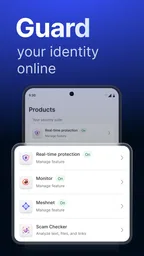
- Meshnet lets you connect securely to your own devices.
- The app includes a kill switch to help prevent data leaks.
What could be better
- The subscription can be costly without a promotional deal.
- Renewal prices may be higher than the initial offer.
- Some servers can slow connections during busy periods.
- Threat Protection features vary by platform.
- The app may require extra battery and background data use.





