


NetBenefits - Fidelity at Work review
 Analysis by Appsdrops
I see NetBenefits as a focused workplace-finance companion, not a general-purpose banking or investing app. Its usefulness depends on whether your employer’s retirement or other workplace accounts are handled through Fidelity. If they are, having account access on a phone can make routine checks easier; if you are looking for an app to manage a household budget, pay everyday bills, or bring every financial institution into one place, this is probably the wrong fit.
That distinction is the key to judging its value. Fidelity Investments makes the app available free, and it is designed around managing workplace accounts rather than selling a broad set of financial tools. I would consider it most useful as a convenient window into benefits I already have, not as a reason on its own to move accounts or change providers.
Workplace account access, with a clear purpose
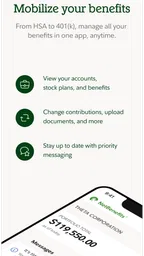
The app’s name, NetBenefits - Fidelity at Work, signals its central role: helping people keep up with Fidelity workplace accounts away from a computer. That narrow focus can be an advantage. Instead of trying to serve as a complete financial command center, it concentrates on the relationship between an employee and workplace benefits managed through Fidelity.
For me, that is a practical distinction. A workplace account often sits alongside checking, credit cards, personal investments, and household expenses, but it is not necessarily something I need to interact with every day. A mobile app is valuable when it makes occasional tasks less cumbersome: checking in when I have a question, reviewing account information during a break, or keeping a benefit in mind when I am planning longer-term finances.
The app belongs to the finance category, and Fidelity Investments is its developer. It has been available since April 24, 2013, and its current version is 4.38.0. Those details suggest an established product with ongoing version changes, but I would not treat longevity or a version number as proof that every workplace plan offers the same experience. Access and the information available are tied to the accounts a user has through Fidelity.
That employer connection is worth checking before downloading. The app is not a general portal for every company’s benefits, nor does its name mean that it can display accounts held elsewhere. If your workplace uses a different provider, this app is unlikely to solve your account-access problem. If you are unsure which company administers a workplace plan, confirming that first can save time and avoid setting up an app that does not apply to you.
What free access means in practice
NetBenefits is free to download. That is a straightforward benefit for someone who already has a Fidelity workplace account: there is no purchase price for getting the mobile access itself. I would describe that as free access to an account-management tool, not as evidence that every investment, plan service, or financial product connected to an account is cost-free. Those are separate questions, and a person should look at the terms of their particular plan or account when making financial decisions.
In other words, the app’s price makes trying it a low-commitment choice, but the value comes from relevance. If I have workplace benefits with Fidelity and want to check them from my phone, free access can be useful even if I only open the app occasionally. If I do not have a compatible workplace relationship, the same zero price does not create much practical value.
Its audience is substantial: the app has more than five million installs, around twenty-five thousand ratings, and an average rating of 4.0. It is rated for Everyone. I see those figures as broad signs that many people use it, rather than a promise that it will suit every employer’s plan or every user’s preferred way of handling money.
Where a mobile view can earn its place
The best case for a workplace-account app is not constant screen time. It is reducing the friction around specific moments. Imagine that you are reviewing monthly expenses and remember that a workplace account is part of your longer-term financial picture. Being able to check it on your phone may help you bring that account into the conversation instead of postponing the task until you are at a desktop.
A second useful situation is a quick check when you need to orient yourself before a more careful review. A phone is convenient for looking up account information while away from home, but convenience should not turn into rushed decision-making. I would use a mobile view to keep informed, then take more time before making consequential choices about savings or investments.
There is also a useful mental distinction between monitoring and planning. A workplace account can be only one part of a person’s finances, so an app centered on that account is not automatically a complete planning tool. I would avoid assuming that a balance or account view tells the whole story about cash flow, debt, emergency savings, or other retirement accounts. The app can help bring one slice of the picture into view; it does not replace the broader picture.
That makes the app particularly suited to employees who prefer checking account information on a phone rather than signing in from a computer for every small question. It may also help someone who is trying to stay engaged with benefits that are easy to forget between enrollment periods. The practical win is easier access, not a guarantee of better financial outcomes.
The tradeoffs I would keep in mind
The first tradeoff is scope. NetBenefits is built around Fidelity workplace accounts, so it should not be judged against a full-service personal-finance app as though the two were interchangeable. A budgeting app is usually the more natural choice for categorizing day-to-day spending, while a brokerage app may be better suited to someone whose main need is managing non-work investments. NetBenefits makes the most sense when workplace benefits are the reason for opening an app in the first place.
The second tradeoff is that a mobile interface is not always the best place to do deeper financial work. Checking on an account and making a complex decision are different tasks. I prefer a larger screen when I need to compare several pieces of information carefully, read plan documents, or think through how a choice fits into a household’s finances. The phone is convenient, but convenience is not the same as context.
A third consideration is that workplace accounts are shaped by the employer’s plan. Two people can use the same app and still have different accounts and options available to them. A user should therefore judge the experience by what appears for their own plan, rather than assuming a colleague’s access or choices will be identical. When something important is unclear, it is sensible to confirm details through the appropriate plan information rather than infer them from an app screen.
Finally, an app can be a poor fit for someone who does not want another financial login or who rarely needs mobile access. If you are comfortable managing workplace benefits on a computer and check them infrequently, installing a separate app may add little. Likewise, if you want one place to see accounts from many providers, a broader financial dashboard may suit that goal better, though its available connections and terms should be assessed separately.
Who is most likely to get value
I would recommend giving NetBenefits a try if your employer’s workplace accounts are with Fidelity and you genuinely want to check those accounts from your phone. The strongest case is for someone who values quick access between planned reviews, wants workplace benefits to feel less out of sight, or would otherwise put off looking because the task requires sitting down at a computer.
It is also a reasonable choice for a person who keeps their financial life organized in separate tools. You might use one app for spending, another for personal investing, and NetBenefits specifically for work-related accounts. That setup is not as unified as a single dashboard, but it can keep each tool focused on what it handles. I would choose that deliberate separation over expecting a workplace app to become a complete financial organizer.
I would skip it if your workplace account is handled elsewhere, if your main goal is tracking everyday spending, or if you need a broad view across unrelated institutions. I would also think twice if you tend to make financial decisions too quickly when information is always a tap away. In that case, using a desktop for occasional, deliberate reviews may encourage a more thoughtful routine.
Before relying on it, I would make sure I can access the relevant workplace account and check that the information I care about is available for my plan. Then I would decide what role the app should play: quick reference, occasional account check, or a companion to more careful financial reviews. That small bit of intention helps prevent a convenient app from being mistaken for a complete plan.
My verdict on the value
For a Fidelity workplace-account holder, NetBenefits offers a clear and practical kind of value: free mobile access to a specific part of your financial life. Its focus is also its main limitation. It is not the app I would choose for budgeting, consolidating unrelated accounts, or replacing careful research before a major financial decision.
My recommendation is conditional but positive. If your workplace uses Fidelity and you will benefit from checking those accounts on the go, the free download is an easy option to consider. If that connection is missing or you want a broader money-management tool, another app—or simply the desktop route you already use—will likely serve you better. The app is at its best when you treat it as a convenient workplace-account companion, not as an all-in-one solution.
What we like
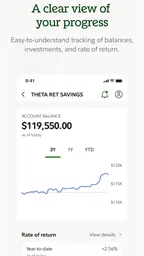
- View workplace retirement balances and investment details in one place
- Check vesting schedules for eligible workplace plans
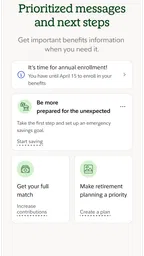
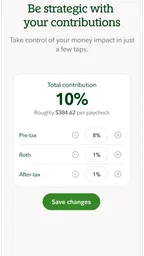
- Review contribution rates and make changes when supported
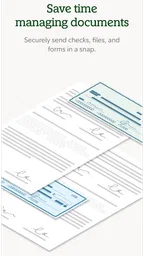
- Find plan documents and account information on your phone
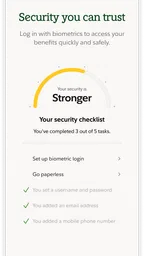
- Biometric sign-in can make account access more convenient
What could be better
- Available features vary by employer and plan
- Some account changes may require the website or employer approval
- Investment choices may be limited to your workplace plan
- Account access depends on a reliable internet connection
- Financial and personal data require careful device security





