



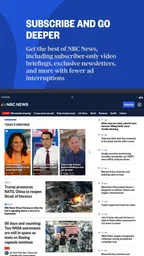
NBC News: Breaking News & Live review
 Analysis by Appsdrops
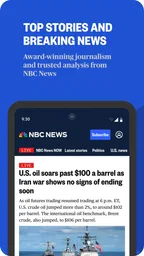
When a major story breaks, I want to find out what happened without spending several minutes sorting through unrelated posts. NBC News: Breaking News & Live is built for that kind of quick check: it brings NBC News reporting, alerts, political coverage, election results, and live video together in one news app. I find it most useful as a familiar reporting source to open during a busy day, rather than as a complete replacement for every way I follow the news.
Getting oriented when news moves quickly
The app is a free news and magazines app from NBC News Digital LLC, with optional in-app purchases priced from $5.99 to $59.99 per item. Its audience rating is Everyone 10+. It has a 4.4 average from around 111,000 ratings, with roughly 23,000 written reviews, and has been installed over 5 million times. Those figures suggest it has a substantial audience, but they do not tell me whether its reporting style or alert pace will suit you; that depends on how you prefer to keep up.
My practical starting point is to treat the app as two things: a place to read about a developing story and a way to notice that something important has happened. Those jobs overlap, but they are not identical. An alert can be useful for awareness while still leaving the context, evidence, and consequences to explore in the article or live coverage afterward.
That distinction matters most during fast-moving events. A short notification has to be brief, so I would not use one as the whole account of a complicated political decision or breaking incident. I use it as a prompt to check the fuller coverage, then decide whether the story deserves more of my time. This simple habit helps avoid mistaking the first update for the final explanation.
Where people can get stuck
The first likely point of friction is deciding how much interruption is helpful. Breaking news alerts can keep an important event from passing unnoticed, but a phone that announces every development can become tiring. I recommend starting with a conservative approach to notifications, if the app and your device offer relevant controls, and broadening them only if you find that you are missing stories you genuinely care about. That keeps the app useful without letting headlines dictate every moment of the day.
Another common snag is opening a story expecting every detail to be settled. News changes as reporting develops, and early coverage may be less complete than later updates. When a headline concerns a consequential event, I look for the article’s fuller explanation and return to it later if the situation is still unfolding. That is a better workflow than repeatedly reacting to short alerts or assuming that one brief update captures the whole story.
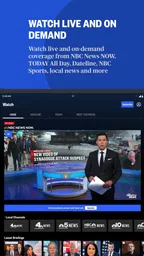
Live video brings a different trade-off. It can help when seeing a press conference or live event matters more than reading a summary, but it is not always the convenient choice in a quiet room, on a limited connection, or when I only have a moment. I would use text for quick context and reserve video for occasions when watching the event itself adds something. If playback is not practical, that does not make the app useless; the written reporting can still serve the purpose.
Setup checks that make everyday use easier
Before relying on alerts, I check the phone’s notification settings as well as the app’s own available options. A news app cannot notify me in the way I expect if the device is silencing or restricting its notifications. I also consider whether I want news alerts during work, sleep, or family time. These are ordinary setup checks, not a promise that every device presents the same menus or controls.
I also make a small distinction between access and preference. If the app opens but the feed is not what I hoped to see, that is different from the app failing to load. First I check whether the connection is working elsewhere; then I reopen the app and see whether the issue persists. If only a particular video or story is slow, I switch to another item or try again later rather than repeatedly tapping the same control.
For election coverage, I find it useful to separate the result from the explanation. Results are time-sensitive, while analysis and background help explain what the numbers mean. I would check the results when an update matters, then read the accompanying reporting for context instead of treating a changing tally as a final conclusion. This is especially helpful when following an election in short visits throughout the day.
There is also a useful choice about how to consume the app: use it as a quick check-in or sit down for a longer read. If I have only a minute, I focus on the lead story and avoid opening every alert. If I have more time, I follow the article’s explanation and related coverage. That deliberate split keeps a news app from turning a short check into an unplanned scroll through the day.
Recovering a disrupted news routine
If a story or video does not appear to load, I use a simple sequence rather than assuming the whole service is down: check the connection, close and reopen the app, and try again after a short pause. If other apps are also struggling, the problem may be the connection or device rather than NBC News. If the rest of the phone works normally but the same item continues to fail, I move to another story and revisit it later.
When alerts stop appearing, I check whether notifications are enabled at the device level and whether a focus or quiet setting is suppressing them. I then consider whether I changed the app’s notification preferences. These checks are more useful than reinstalling immediately, because they address common ways a phone can silence alerts without changing what the app itself contains.
For a live event, I avoid making video my only route to the news. If playback is inconvenient, I can read the coverage and return to the stream when conditions are better. That fallback is especially practical on a commute or during a busy workday: a written update is easier to pause and resume than a live broadcast, while the video remains valuable when the visuals or remarks are central to the story.
When the app may not be the cause
A missing notification does not always mean the app has stopped working. Device-level settings, a temporary connection problem, or a quiet mode can all affect what reaches the screen. Likewise, a story that changes after I first read it is not necessarily an error; breaking coverage can develop as journalists learn more. I try to distinguish a technical problem from the normal uncertainty of an evolving report.
It is also worth remembering that one outlet cannot provide every perspective a reader may want. NBC News is a sensible choice if you want reporting from this organization in a single app, but I would compare coverage with another trusted source when a story is especially complex or consequential. That is not a reason to dismiss the app; it is a healthy habit for news consumption, particularly when early details are still changing.
The app may also be a poor fit if you want a quiet, highly customized reading experience or prefer to assemble news from many publications in one place. A general news aggregator may suit that preference better. If your main interest is watching live coverage, a television or streaming option may be more comfortable for longer sessions. I see this app’s advantage as direct access to NBC News reporting, not as a universal solution to every news habit.
How it compares with other ways to follow news
Compared with checking headlines on social platforms, a dedicated news app gives me a more direct route to a newsroom’s articles and live coverage, without making a social feed the starting point. Social posts can surface eyewitness discussion quickly, but they can also mix reporting with reaction and speculation. For a developing story, I prefer using a recognizable news source to establish what has been reported, then seeking other perspectives where appropriate.
Compared with a multi-source aggregator, NBC News is narrower by design. That can be a benefit when I want to follow one newsroom’s coverage without sorting through a bundle of publishers, but it is a limitation if I want contrasting headlines in the same view. I would choose it for a straightforward NBC News check-in and choose an aggregator when breadth across outlets is the main priority.
The free price makes it easy to try as a regular news source, while the listed in-app purchases mean some optional items may involve a charge. I would review any purchase prompt carefully before confirming it, especially if I only want basic news access. The app’s free availability is a useful starting point, but it should not be confused with a guarantee that every optional item has no cost.
Who will get the most from it
I would recommend the app to readers who want timely NBC News coverage, follow politics or elections, and appreciate having live video available when an event is unfolding. It also makes sense for someone who wants a quick way to check a major story between other tasks. The strongest use case is not constant monitoring; it is having a reliable place to turn when a headline matters and you want more than a notification.
I would be more cautious about recommending it to someone who dislikes breaking-news interruptions, wants coverage from many outlets in one feed, or rarely watches live video and already has a news routine they like. Those readers may find an aggregator, a publication with a different editorial focus, or simply a browser-based reading habit more comfortable. Picking the tool that matches your attention and interests matters more than installing another source by default.
My practical verdict
NBC News: Breaking News & Live works best for me as a focused companion for major headlines, politics, election developments, and live reporting. Its useful side is the combination of written coverage and video from one established newsroom; its main trade-offs are the need to manage alerts, the limits of relying on a single outlet, and the fact that live video is not convenient in every situation.
If you install it, I would begin with the notification settings you actually want, use alerts as pointers rather than complete reports, and keep a second trusted source in mind for stories where perspective matters. With those habits, the app can fit naturally into a daily routine without demanding constant attention. If you want a calmer, broader, or more customized news experience, another option may suit you better; if NBC News is a source you already value, this is a practical way to keep its reporting close at hand.
What we like
- Custom alerts can help you follow developing stories that matter to you.
- Live video coverage adds context to major news events.
- The app offers local news alongside national and international reporting.
- Saved stories make it easier to return to articles later.
- Video clips provide a quick way to catch up on key updates.
What could be better
- Breaking news alerts can feel frequent if you follow many topics.
- Some live streams or videos may require a reliable connection.
- Ad placements can interrupt browsing and reading.
- The volume of coverage may make important stories harder to find.
- Some features or content may vary by location.





