
Nara - Baby & Mom Tracker review
 Analysis by Appsdrops
When a baby’s day is broken into short stretches of feeding, sleep, and diaper changes, it is easy to lose track of what happened when. Nara - Baby & Mom Tracker is a parenting app built around keeping those everyday notes together, with room for postpartum health as well. I see its main value as reducing the mental bookkeeping: instead of relying on memory or scattered notes, a parent can keep a running record in one place.
That convenience also makes trust important. Notes about a baby’s routine and a parent’s recovery can feel personal, even when they are practical. I would approach this app as a useful organizer, not as a substitute for medical advice or as a place to record anything I would not want in a digital log. That cautious distinction is especially helpful during the exhausting early weeks, when convenience can make it tempting to enter every detail without thinking about how much information is necessary.
A practical tracker, with a personal side
The app comes from Nara Organics and sits in the parenting category. It is free to download, with optional in-app purchases listed from $6.99 to $99.99 per item. Its audience rating is Everyone, and it has an average rating of 3.0 from around 7,400 ratings, alongside roughly 1,900 written reviews. That mixed reception is a reason to judge it by your own needs rather than assume it will suit every household.
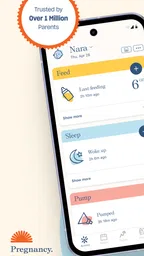
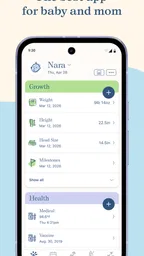
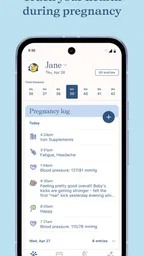
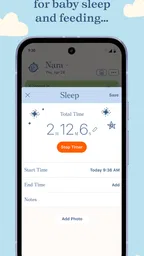
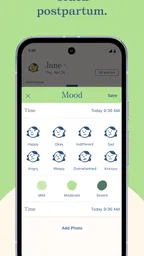
Its focus is broader than a baby-only diary. Feeding, sleep, and diaper changes are the kinds of events parents may want to note repeatedly, while postpartum health gives the recovering parent a place in the picture too. In my view, that combination is the app’s clearest point of difference from a simple timer or notebook: it treats caregiving and recovery as parts of the same demanding period.
The app has been available since January 30, 2019, and its current version is 2.9.0. It has passed 100,000 installs, which suggests that many families have tried it, though popularity alone does not tell me whether its interface or approach will match your preferences. It supports Android 7.0 and newer, so it may work on older devices that still meet that requirement.
Where a shared log can help
A tracker is most helpful when several people care for the same baby or when tiredness makes time feel slippery. Imagine one parent handles an early-morning feed, then gets a few hours of sleep while another takes over. A clear record can help the next caregiver understand what has already happened without waking anyone to ask. That is a modest benefit, but in a household running on interruptions, avoiding repeated questions can make handoffs calmer.
There is also a useful distinction between recording an event and interpreting it. A log can help you describe a pattern to a pediatrician or remember what you have already tried, but it cannot determine whether a pattern is healthy. I would use Nara to support a conversation with a clinician, not to make a diagnosis or change feeding and sleep plans on its own.
One practical tip is to decide in advance what you actually need to track. If the immediate goal is remembering feeds and diaper changes, begin with those rather than trying to document every part of the day. A smaller, consistent record is often more useful than an ambitious diary abandoned after a few tiring days. You can add postpartum notes when they serve a real purpose, rather than turning tracking into another responsibility.
Trust starts with what you can verify
For a personal tracker, I look for clear choices about what gets recorded, who can see it, and how an account is managed. I cannot make claims about particular permissions, storage practices, sharing controls, or deletion options without being able to verify them. That is not a reason to assume the worst; it is a reason to check the app’s visible settings and current privacy information before entering sensitive details.
My advice is to open the app’s settings and the app-store privacy information before building a long history in it. Look for choices you can actually see and understand, especially around account access and data handling. If the available controls do not answer your questions, keep your notes minimal or choose a paper record until you feel comfortable. This is a sensible habit for any app that may hold intimate details about a family’s routines and health.
It also helps to treat a shared phone as a shared space. If a partner, relative, or babysitter uses the device, consider whether its screen could reveal something you would rather keep private. A baby’s feeding record may feel ordinary, while a parent’s recovery notes may be more sensitive. Before entering the latter, think about who can unlock the device and whether the app offers controls that fit your household.
Use the record without letting it run the day
Tracking can lower mental load, but it can also create pressure to log everything perfectly. I would not let missed entries turn into a source of guilt. If you forget to record a nap or a diaper change, the app is still useful as a rough reference; it does not need to become a complete account of family life. The most valuable workflow is one that survives interruptions.
For example, a caregiver could use the app to note a feed before handing the baby to someone else, then leave less urgent observations for later. That keeps the immediate handoff useful without requiring a phone to be in hand during every moment. For postpartum health notes, I would be more selective still: record information that helps you remember a concern or prepare for a healthcare conversation, and keep urgent symptoms out of a routine logging workflow.
That balance matters because a tracker is not automatically a private journal, a medical record, or a secure family communication channel. Those are different jobs with different expectations. If your household needs detailed clinical documentation, ask a healthcare professional what records are appropriate. If you mainly need to coordinate who did what, a shared calendar or written handoff may be simpler, depending on the controls you need.
How it compares with simpler alternatives
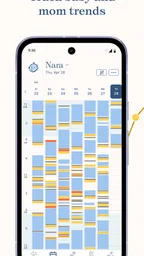
Compared with a paper notebook, an app can make repeated entries easier to organize and carry around, while paper gives you direct control over where the notes are kept. A basic timer may be quicker for a single routine, but it is less suited to keeping several kinds of care notes together. A general notes app offers flexibility, though it may require more setup and can become messy when feeding, sleep, diaper, and recovery details are mixed together.
Nara’s appeal is that it is designed for parenting rather than being a blank note-taking tool. The trade-off is that a dedicated tracker asks you to trust its design and controls, and optional purchases mean the free starting point may not include everything you eventually want. Since the listed purchase range spans from $6.99 to $99.99 per item, I would check what each paid option actually provides before committing. Do not assume that a feature you expect is included in the free experience.
The rating also calls for a measured expectation. An average of 3.0 is neither a clear endorsement nor a reason by itself to dismiss the app. I would pay attention to whether its day-to-day workflow suits you and whether the visible account and privacy choices meet your standards. A tracker that is easy to use but leaves you uneasy about your notes is not the right fit.
Who is likely to find it useful
I would consider it if you want one parenting-focused place to keep routine baby-care notes and also want to remember postpartum health observations. It may be particularly handy for parents who trade caregiving shifts and need a simple record to make those transitions less dependent on memory. The free download makes it possible to explore its basic appeal before deciding whether optional purchases are worthwhile.
I would skip it, or keep tracking elsewhere, if you want a purely private paper journal, need a specific privacy control that you cannot confirm in the app, or dislike entering routine details on a phone. It is also not the right choice if you expect an app to tell you what a baby’s symptoms mean or to replace advice from a clinician. For a household that only needs occasional reminders, a simple shared note or calendar could be less work.
A cautious recommendation
Overall, I think Nara can be a practical companion when the goal is to remember everyday care events and keep the recovering parent in view. Its strongest case is not elaborate analysis; it is having one parenting-oriented place to consult during a handoff or before discussing a concern with a professional. The app’s broad scope is useful, but it makes thoughtful choices about what to enter especially important.
I would try it with a light touch: start with the few entries that solve a real problem, review the controls you can verify, and avoid treating the record as a medical authority. If the workflow feels natural and its visible choices earn your confidence, it may ease some of the mental load. If not, a notebook or simpler tool is a perfectly reasonable alternative. For me, that is the right standard for a tracker this personal: helpful enough to support care, but never something you have to trust blindly.
What we like
- Tracks feeding sleep diapers and pumping in one place.
- Custom reminders help keep daily routines on schedule.
- Shared tracking lets caregivers stay up to date.
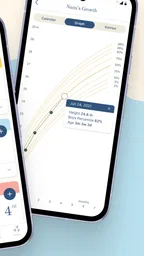
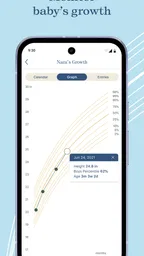
- Growth charts make changes easier to follow over time.
- Offers a simple way to record notes about your baby.
What could be better
- Some features may require a paid subscription.
- Manual logging can become repetitive during busy days.
- Shared access may require caregivers to set up accounts.
- Tracking data is not a substitute for medical advice.
- Frequent reminders may feel distracting to some users.





