



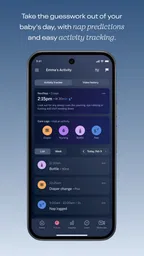



Nanit review
 Analysis by Appsdrops
When I think about a baby-monitoring app, the first question is not how many features it lists but whether it helps me check in without adding another source of stress. Nanit is a parenting app from Nanit, built around keeping an eye on a baby and helping parents make sense of their routine. Its value depends on using it alongside Nanit’s monitoring setup; it is not a general-purpose baby journal or a standalone solution for every family.
Where setup and everyday use can get stuck
The app is free to download, but that does not mean the complete experience is free: in-app purchases range from $69.99 to $349.99 per item. I would treat the app as the companion to a broader Nanit setup and check which equipment and paid options suit my household before building a routine around it. If I only want a simple way to jot down feeds or naps, a basic tracking app may be a better fit.
With a connected monitoring system, there are several links in the chain: the app, the phone, the home network, and the camera or other Nanit equipment. If the view does not appear, I would avoid assuming straight away that the app itself is broken. First, I would check that the monitoring equipment has power, that the phone is online, and that I am opening the right account and screen. These are ordinary checks, but they can save time when a late-night check-in is already making me anxious.
A useful habit is to test the setup while the baby is settled and I have time to troubleshoot, rather than waiting until I am away from the room or in a hurry. I would also keep the phone’s app updated and reopen it if a screen seems stuck. Nanit’s current app version is 4.90.0, and the app requires Android 10 or later. On an older phone that cannot meet that requirement, the practical fix may be using a compatible device rather than repeatedly reinstalling the app.
Simple checks before changing settings
If a connection seems unreliable, I would compare what happens on the phone with what the monitoring equipment appears to be doing. A problem that occurs only on one phone points toward that device or its connection; a problem that persists across devices is more likely to involve the home network or equipment. This is not a diagnosis, but it gives me a sensible order for checking things instead of changing several settings at once.
I would make one change at a time and then test again. For example, reconnecting the phone to a stable network and reopening the app is easier to evaluate than changing account details, network settings, and device placement together. If those basic steps do not help, I would consult Nanit’s official support materials or contact the developer rather than guessing at advanced network changes.
Recovering a disrupted routine
Parents rarely use a monitor in a perfectly tidy sequence. I might open the app during a nap, get interrupted by a delivery, and return later to check again. For that kind of stop-and-start use, I find it helpful to make the app part of a small routine: open it before settling down, confirm that the monitoring view is available, and keep the phone somewhere I can reach without carrying it from room to room. That reduces the chance of discovering a problem only when I urgently want to check.
If the app closes or a screen stops responding, I would reopen it and check the connection before repeating setup steps. If I am signed out or the expected view is missing, I would verify that I am using the account associated with the Nanit system. Repeatedly deleting and reinstalling an app can create extra work, so I would reserve that for a persistent issue after simpler checks have failed.
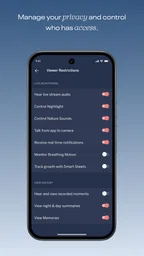
For a shared caregiving routine, it is worth deciding in advance who needs access and how the family will handle check-ins. That is a practical planning point, not a reason to assume every relative needs the app. A smaller group of caregivers can make it clearer who is watching and who is responsible for responding, particularly during a busy evening when several people are helping.
When the app may not be the cause
A monitor is only one part of a baby’s sleep environment, and a phone display cannot replace being physically present when a child needs care. If the app is slow or unavailable, I would use an appropriate direct check rather than waiting on a screen. That distinction matters: the app can support a parent’s routine, but I would not treat a connection problem as a reason to delay attending to the baby.
Some frustrations also come from expectations. Nanit is not the best choice if I want a free app that works independently of dedicated monitoring equipment, or if I only need a bare-bones log for feeding and diaper changes. A simple notebook or lightweight tracker may be quicker for those jobs and avoids paying for a monitoring ecosystem. Likewise, families who prefer not to rely on a phone for check-ins may be more comfortable with a different monitoring arrangement.
Network conditions can also affect how convenient a connected monitor feels. If the phone regularly loses its connection in the places where I need to check in, the issue may be the home network or the device environment rather than a feature inside the app. I would test the setup in the actual rooms and at the times I expect to use it before deciding that the overall approach works for my household.
Who will get the most from Nanit
I can see Nanit making the most sense for parents who already use, or are considering, Nanit monitoring equipment and want a phone-based way to check in as part of everyday care. It is also a more natural fit for households that value having a connected monitoring routine over keeping every task in a separate notebook or app. The developer, Nanit, focuses this product on parenting rather than trying to turn it into a general family organizer.
It may be less appealing to parents who want the lowest-cost route, dislike connected devices, or have an older Android phone that cannot run the current version. The app is free, but paid in-app items can be substantial, so I would decide what I actually need before purchasing anything. It is available to users rated Everyone, but that content rating is separate from whether its hardware costs and setup suit a particular family.
For comparison, a basic audio monitor is often the simpler choice when all I need is to hear a baby, while a general baby-tracking app is better when recording routines is the priority. Nanit sits in a different space: its appeal is the connected monitoring relationship between the app and Nanit equipment. That can be worthwhile if I want that particular workflow, but it is unnecessary complexity if a simpler monitor already meets my needs.
What its reception and ongoing costs suggest
Nanit has an average rating of 3.8 from around 11,000 ratings, with about 3,100 written reviews and over 500,000 installs. I read those figures as a sign that it has reached many families while still leaving room for mixed experiences. With a product that depends on both an app and connected equipment, some dissatisfaction may come from setup or household conditions, so I would look for comments that describe a situation similar to mine rather than relying on the average alone.
The app first appeared on November 24, 2016, and its current version is 4.90.0. That history makes it an established product rather than a brand-new experiment, but an established app is not automatically a perfect match for every phone or home network. I would check compatibility and the available purchase options before committing to the wider setup, especially if I expect other caregivers to use it too.
My practical verdict
My recommendation is conditional but straightforward: choose Nanit if you want its connected monitoring experience and are prepared to set up and maintain the equipment that goes with it. Before relying on it, test the app at home, make sure your phone meets the Android requirement if applicable, and agree on a simple routine for who checks in. Those small steps make it easier to tell an app issue from a network or equipment issue.
I would skip it if I only need a basic sound monitor, a simple sleep log, or a free standalone parenting tool. For the right household, the app can make checking in feel more convenient; for someone who values simplicity above connected monitoring, the extra setup and paid options may not be worth it. My main takeaway is to judge Nanit as a complete monitoring choice, not just as a free download.
What we like
- Live video lets you check the nursery from your phone.
- Two-way audio helps you soothe your baby remotely.
- Sleep insights can reveal patterns in your baby's routine.
- The wall-mounted camera keeps cords away from the crib.
- A multi-user option lets caregivers access the camera.
What could be better
- Some sleep tracking features require a paid subscription.
- Reliable monitoring depends on a stable Wi-Fi connection.
- The camera may not work well with every crib setup.
- Night vision can make the room appear less detailed.
- The camera and accessories can be costly.





