


MySynchrony review
 Analysis by Appsdrops
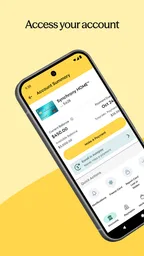
I think of MySynchrony as a practical account-management app for people who already use Synchrony for financing or credit. Its value is less about teaching you how to budget and more about making it easier to check and manage the accounts you have with the company. If that is the job you need done, a dedicated app can be more convenient than repeatedly signing in through a browser. If you want one place to see accounts from many banks, though, this is not meant to replace a broader personal-finance tool.
Developed by Synchrony, this free finance app is rated for Everyone and requires iOS 11 or later. It has an average rating of 4.5 from around 71,000 ratings, and has been installed over 5 million times. Those figures suggest that it serves a sizeable audience, but they do not tell me whether it fits a particular account holder’s needs. I would judge it by a simpler standard: can I get to the relevant account information and take care of routine tasks without turning a quick check into a chore?
What the app is for today
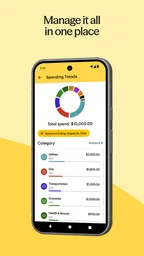
The current version is 6.3.1. The app’s central promise is secure, convenient account management, and that focus matters: MySynchrony is most useful when you already have an account relationship with Synchrony and want a mobile route to it. I would not install it expecting a general banking hub, a complete spending tracker, or an automatic view of unrelated financial accounts.
That distinction is useful before you download anything. A bank’s own app typically concentrates on that bank’s services; a multi-bank finance app tries to pull different institutions into one overview. MySynchrony sits closer to the first model. It is designed around Synchrony accounts, so the experience makes most sense when your goal is to check or manage those accounts rather than compare your finances across providers.
I also like that the app is free to download. That removes a purchase decision from the process, but it does not change the more important question: whether your specific account can be managed in the way you need. Before relying on a mobile workflow for an urgent payment or account issue, I would first sign in and confirm that the account and the actions I care about are available to me.
A useful routine, not a full financial plan
For everyday use, I would treat it as a place to make brief account visits. For example, if I had a Synchrony account tied to a recent purchase, I might open the app while reviewing monthly bills, check the account, and then close it rather than waiting until a paper statement or a desktop session became convenient. That small routine can make account oversight feel less disconnected from the rest of the month.
A less obvious benefit of keeping account checks in a dedicated app is that it encourages a deliberate workflow. I can open it for a specific task, deal with that account, and leave broader budgeting for a tool that is actually designed to combine income, spending, and balances from multiple providers. That separation is helpful if I want to avoid treating one issuer’s app as though it were a complete picture of my finances.
It can also be useful when I am away from my computer and want to review an account at a convenient moment. I would still avoid making a habit of checking every few minutes; frequent refreshes can create unnecessary worry without improving the underlying financial decision. A more sensible approach is to use the app around a real trigger, such as reviewing bills, checking an account after a purchase, or confirming that I have completed a task.
What version 6.3.1 tells me—and what it does not
The version number gives a clear point of reference for the current app, while its release date, September 25, 2017, shows that MySynchrony has been available for years. That history is relevant when choosing between an app and a browser: the product is not a brand-new experiment, and its present identity is that of an established companion for Synchrony account holders.
Still, a version number by itself is not a feature changelog. I would not infer from 6.3.1 that a particular screen, security method, payment workflow, or account feature was newly introduced. The responsible conclusion is narrower: this is the current version, and anyone who wants to evaluate changes should compare what appears in their own app with the update notes presented through their app store.
That distinction matters to existing users. If the app has changed since someone last opened it, the most useful test is not whether the version number looks higher, but whether their normal task remains easy to complete. I would check that I can still reach the account I use, locate the information I depend on, and complete any routine action before making the app my only way to handle that account.
How I would make it part of an account routine
My first practical tip would be to start with one account and one task. Sign in, find the account you intend to manage, and learn where the information you normally need is presented. This is more reliable than downloading the app and assuming every Synchrony product or account will behave identically. It also gives you a quick way to decide whether the mobile layout suits your habits.
My second tip is to pair an app check with an existing monthly routine rather than treating the app as a substitute for a record-keeping system. When I review bills, I can use MySynchrony to look at the relevant account and then note anything important in my usual budget or calendar. That makes the app a convenient access point without making it responsible for tracking obligations across all my accounts.
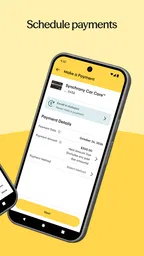
A third useful habit is to keep another route available for important account work. If I am handling something time-sensitive, I would not assume that the app alone is sufficient until I have used it successfully for that specific task. A browser or the appropriate customer-support channel can serve as a fallback if I run into a sign-in problem or cannot locate the action I need. That is ordinary preparation, not a criticism unique to this app.
Where the experience may fall short
The main limitation is the same thing that makes the app focused: it is for Synchrony accounts, not every part of a person’s finances. If I want to see checking, savings, credit cards from other issuers, and household spending together, I would choose a multi-institution finance app or use each provider’s own service alongside a separate budget tool. MySynchrony is not the right choice as a universal dashboard.
There is also a difference between convenient access and a complete financial record. A focused account app can help me inspect or manage that relationship, but it should not be assumed to replace statements, a household budget, or records I keep for planning. For decisions involving several debts or upcoming bills, I would compare the relevant information across providers rather than relying on a single-account view.
Another point to consider is that a mobile app adds a sign-in step and depends on having a compatible device. The minimum operating-system requirement is iOS 11, so people using an older iPhone may need to check compatibility before making it part of their routine. If I prefer not to manage financial matters on a phone, or I find mobile screens uncomfortable for reviewing detailed account information, the browser route may suit me better.
I would also keep expectations grounded around security. Synchrony presents the app as a secure way to manage accounts, but I would still use sensible device habits: protect the phone with its own lock, avoid leaving an account open on a shared device, and sign out when that is appropriate for my situation. An app’s security positioning is not a reason to ignore basic account hygiene.
Who should choose it, and who should look elsewhere
I would recommend trying MySynchrony if you already have a Synchrony account and want a direct mobile way to check or manage it. It is particularly appealing if you prefer handling account tasks on your phone and do not need one interface to summarize several financial institutions. The 4.5 average rating and broad adoption are useful context, but I would treat them as a reason to consider the app, not proof that every user will find every task straightforward.
I would skip it as a primary finance app if you do not have a Synchrony account, or if your main goal is to categorize spending, compare balances across banks, or plan a household budget from a consolidated view. In those situations, a broader finance app is a better match. If you only need occasional access and already find the website comfortable, installing another app may not add enough convenience to justify changing your routine.
For an existing user who is unsure, I would make the decision through a short trial rather than guesswork: install it, confirm that your account is accessible, and test one ordinary task you expect to repeat. If that task feels quicker on your phone, keep it as a convenient companion. If it feels cramped or does not fit your account workflow, return to the channel you already trust.
What I would watch as a user
When I see future updates, I would look for clear explanations of changes that affect everyday account management, especially anything that alters access or a familiar routine. A new version number alone would not tell me whether the app has become more useful. I would focus on the update notes and on whether the task I use most remains easy to find after installing an update.
I would also keep an eye on compatibility as my phone changes. Because the app requires iOS 11 or later, a device upgrade or an older operating system can affect whether it remains a practical option. Checking compatibility before depending on a new phone for account access is a small step that can prevent an unpleasant surprise when I need to review something.
My overall view is that MySynchrony makes the most sense as a focused companion for people who already manage accounts with Synchrony. It is free, has a long-running presence, and offers a straightforward reason to keep it on a phone: access to that account relationship when a browser is inconvenient. I would not ask it to do the work of a complete budgeting platform, and I would keep a fallback for important tasks. Used within those limits, it is a sensible option; outside them, a broader tool or the browser may be the better fit.
What we like
- One account provides access to eligible Synchrony credit accounts.
- The app supports biometric sign-in on compatible devices.
- Payment reminders can help you avoid missing a due date.
- Account details are available without calling customer service.
- You can manage multiple eligible accounts in one place.
What could be better
- Only eligible Synchrony accounts can be managed in the app.
- Some account actions may require additional verification.
- Features can vary depending on the account and card issuer.
- A stable internet connection is needed to access account information.
- App access may be limited during service outages.





