

My Spectrum review
 Analysis by Appsdrops
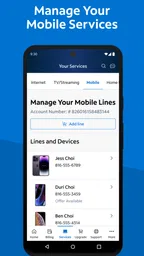
I think My Spectrum makes the most sense when you already rely on Charter/Spectrum and want a single place to handle routine account tasks. It is a free tools app, not a general-purpose network utility: its value comes from managing Spectrum services rather than improving a connection or replacing your router’s controls. If you prefer dealing with bills and service details on your phone instead of searching through separate account pages, it can make everyday upkeep feel more straightforward.
One place for the Spectrum account you already have
The app is developed by Charter/Spectrum, and its focus is practical: bring many of the provider’s customer-facing tasks onto a phone. I would treat it as a companion to your service, not as an app that is useful on its own. If you are not a Spectrum customer, there is little reason to install it; if you are, the appeal is having account management close at hand when you need it.
That distinction matters because people sometimes expect an internet-provider app to be a full Wi-Fi troubleshooting suite. My Spectrum is better understood as an account hub. It is for moments when you want to check or manage your relationship with the provider, not for every question about devices, home networking, or the quality of your connection.
The app has a 4.8 average from around 1.3 million ratings, with more than 10 million installs. That kind of reach suggests it has become a familiar route for many customers, though a strong average should not be mistaken for a promise that every account task will be equally smooth. Provider apps depend on account access and service context, so the usefulness you get is closely tied to whether your Spectrum account is in good order.
Useful when a small task should stay small
The best case for this app is reducing the effort involved in common account chores. Instead of waiting until you are at a computer, you can open the app when a question comes up and handle what is available there. That is particularly convenient for people who check service details while travelling, keep household paperwork on their phone, or simply prefer not to make a call for a basic account matter.
A realistic example: you are reviewing household expenses and notice that you want to confirm something about your Spectrum service. Rather than postponing it until you remember your login at a desktop, you can try the app first. Even if you still need another channel for a complicated issue, having an account-focused starting point can save the initial hunt for the right page or contact route.
I also like the idea of using one provider app as a first stop before deciding what kind of help is needed. If the issue is account-related, the app is the natural place to begin. If the issue is that one laptop keeps dropping off Wi-Fi while other devices are fine, a device-level check or router troubleshooting may be more useful. Knowing which kind of problem you have prevents the app from becoming a catch-all for things it is not designed to solve.
What the current release tells existing users
The current version is 26.22.0, while the app’s release history begins on December 15, 2014. That long span tells me this is an established service companion rather than a newly launched experiment. It has had time to become part of how customers interact with Spectrum, but the version number by itself does not explain which functions have changed or how any particular update affects an individual account.
For an existing user, the practical approach is to judge the app by the task at hand rather than assume a new version means a new workflow. If you already have it installed, check that it is current when something is not behaving as expected, then sign in and see whether the task you need is available. A version update can matter for compatibility and stability, but it is not a reason to expect a specific feature unless the app itself presents it.
The minimum operating system is 11, so a device that cannot run that version may not be suitable for the current app. If your phone is older, it is worth checking compatibility in the app store before planning to rely on it. This is a practical limitation for customers who keep a handset for many years, even if the account service itself has not changed.
My Spectrum is rated for Everyone, and it is free to download. That makes it easy to try without a purchase decision, though the app’s usefulness still depends on having a Spectrum account and services to manage. The free price should not be confused with a standalone service: it is an access point for a provider relationship, not a substitute for subscribing to internet or other services.
Where it fits beside other ways to manage service
Compared with using a provider’s website in a mobile browser, a dedicated app can be a more convenient habit if you check your account often. It keeps the service’s tasks in a familiar place on your phone, instead of asking you to remember which browser tab or saved page you used. A browser can still be preferable for a one-off visit, especially if you do not want another app installed or are using a shared device.
Compared with calling customer support, the app is appealing for tasks that are simple enough to handle without explaining the situation to someone. The trade-off is that a screen cannot always interpret an unusual billing question, a service interruption with several possible causes, or a complicated change to a household account. For those cases, a person or a more detailed support route may be more effective. I would use the app to get oriented, not insist on staying inside it when the problem clearly needs a conversation.
It is also different from a router-maker’s app. Those tools generally focus on the equipment and home network, while My Spectrum is centered on Spectrum services and the customer account. If your concern is a device that will not connect, a router interface may give you more relevant controls. If your concern is your provider account, starting with Spectrum’s app is more logical. Keeping those roles separate helps avoid chasing the wrong solution.
Small habits that make it more useful
One helpful habit is to open the app before you need it urgently. Signing in when you have a quiet moment can reveal whether your account access is ready and whether the app is installed on a compatible phone. That is better than discovering a login problem while standing in a store or trying to answer a household question in a hurry.
Another useful approach is to decide what information you are trying to get before opening it. “I need to deal with my Spectrum account” is broad; “I need to confirm something about my service” is more actionable. Starting with a precise question makes it easier to tell whether the app has solved the problem or whether you should switch to the website or support. This small step also keeps you from repeatedly tapping through screens without a clear goal.
For households where more than one person handles bills or service arrangements, agree on who uses the account and how access is managed. A provider app can be convenient, but account access is still tied to the household’s actual customer relationship. Before handing a phone to someone else or saving access on a shared device, consider whether that person should be able to manage account matters. That is not a special feature claim; it is sensible care whenever a service account is accessible from a personal phone.
If you are troubleshooting, note the difference between a provider issue and a home-network issue before you start. If several devices are affected, the service connection may be relevant; if only one device is struggling, its own Wi-Fi settings may deserve attention first. The app can be a reasonable first stop for Spectrum-related account questions, but it should not replace basic checks on the affected device or router.
Where the experience can fall short
The main limitation is scope. An account app can simplify routine interactions, but it cannot make every service problem self-explanatory. When you need a detailed explanation, have an unusual account situation, or are trying to diagnose a stubborn connection problem, you may have to move to another support channel. I would not choose it as my only way to manage Spectrum if I strongly prefer a human point of contact for anything beyond the simplest task.
There is also the usual trade-off of putting account management on a phone: convenience depends on being able to sign in and use the device you have with you. A dead battery, a replaced phone, or an operating system below the minimum requirement can turn an otherwise handy option into an unavailable one. Keeping another way to access your account in mind is sensible, particularly before travel or a phone upgrade.
People who rarely touch their service accounts may not gain much from installing it. If you are comfortable using a browser once in a while and do not want a provider app taking space on your phone, that is a reasonable choice. Likewise, anyone who is not a Spectrum customer should skip it; the app’s purpose is too tied to that provider to offer much value outside that relationship.
Who I would recommend it to
I would recommend My Spectrum to current customers who want a straightforward mobile starting point for managing their services and who are comfortable handling ordinary account tasks digitally. It is especially fitting for someone who checks household service details on a phone, wants to avoid searching for the right account page, or prefers to begin with self-service before contacting support.
I would be more cautious about recommending it to someone whose main goal is advanced Wi-Fi control, detailed technical diagnosis, or a guaranteed answer to a complicated service question. Those needs call for different tools or a direct support route. The app may still help orient you, but it should not be mistaken for a complete replacement for router controls, a browser, or customer support.
Overall, I see it as a sensible convenience rather than a must-have for every phone. Its scale—supported by around 115,000 written reviews—and its long presence since 2014 make it a well-established part of Spectrum’s customer experience, but the right test is whether it saves you effort in your own routine. I would install it if I were already a customer and wanted account tasks within easy reach, then keep a browser or support option available for anything more involved. Its strongest quality is being a focused doorway into Spectrum service management, not trying to be every tool a household might need.
What we like
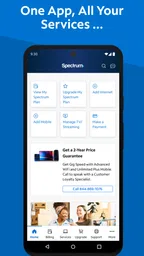
- Check your Spectrum account details from your phone.
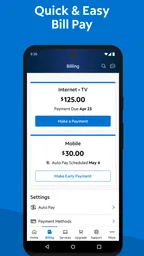
- Review current and past bills in one place.
- Make payments without visiting a store.
- Find nearby Spectrum stores and Wi-Fi hotspots.
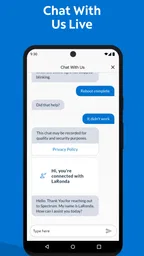
- Contact support through the app.
What could be better
- Requires a Spectrum account to access most features.
- Some account changes may still require customer support.
- Payment options depend on your billing setup.
- Features may vary based on your Spectrum services.
- App access relies on a stable internet connection.





