
Music Player Offline & MP3 review
 Analysis by Appsdrops
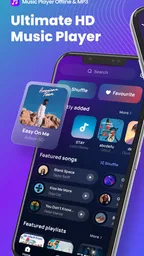
I judge a music app by what it lets me do when I’m away from a signal, short on time, or tired of digging through a crowded library. Music Player Offline & MP3 is built for that straightforward job: playing music stored on your device, with tools for shaping playback and organizing listening through an equalizer, lyrics, and playlists. It isn’t a recording studio or a publishing tool, and I wouldn’t choose it to create tracks. Its value is in making a personal music collection easier to enjoy and manage.
A practical starting point for a local music library
As a Music & Audio app from AceTools Team, Music Player Offline & MP3 takes a different approach from streaming services. You bring the music files; the app gives you a place to play and arrange them. That distinction matters. If you expect a built-in catalog of songs, recommendations, or cloud access to a streaming library, this is not the right starting point. If you already keep MP3s on your device and want a player focused on them, the idea is much more appealing.
I like the offline-first emphasis because it suits situations where dependable playback matters more than discovery: a commute through patchy coverage, a flight, a workout with a carefully chosen set of tracks, or a long stretch of listening without mobile data. Offline playback also makes the app feel like a tool for a collection you control, rather than a window into a service that can change its catalog or require an active connection.
The app is free, rated for Everyone, and has reached over 10 million installs. Its average rating is 4.6 from around 222,000 ratings, with about 5,200 written reviews. Those figures suggest that local playback has a broad audience, but they don’t tell me whether it will suit a particular library. The useful question is simpler: do you have music files ready to play, and do you want listening controls rather than a subscription-based discovery experience?
It helps to think of the initial setup as preparing a working library. Before relying on the player for a trip or workout, check that the tracks you expect to hear are actually available on the device and that your playlists reflect how you listen. A little organization at the outset can save repeated searching later, especially when you want a specific mood or activity rather than a single album.
Where it fits among the usual choices
Compared with a streaming app, this player is better suited to music you already own or have saved locally, and less suited to finding unfamiliar artists. Compared with a basic file player, the equalizer, lyrics, and playlist support give listening more structure. That middle ground is its strongest case: it’s more focused than opening random audio files, while avoiding the broader catalog and recommendation machinery of streaming services.
There is a trade-off to that focus. A local player depends on the quality of the collection you bring to it. If your files are scattered, missing, or poorly organized, the app cannot turn that into a polished listening library by itself. And if your main habit is searching for new releases, curated mixes, or music across several devices, a streaming service will usually be the more convenient option.
Turning playback into a deliberate listening setup
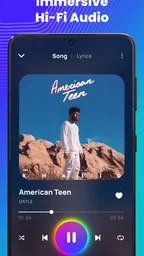
The equalizer is the feature I’d use when the same tracks need to work in different settings. A playlist for headphones on a quiet walk may benefit from a different listening balance than one played through a speaker at home. Rather than changing how a song is stored, an equalizer gives you a way to adjust playback to the situation. I’d make changes gradually and compare a familiar track before settling on a setting; dramatic adjustments can make one song sound more exciting while leaving the rest of a playlist uneven.
That makes the equalizer useful for everyday listening, but I wouldn’t treat it as a substitute for mixing or mastering tools. It’s a playback control, not a way to edit the audio file or prepare a finished recording for release. If your goal is to improve a track for everyone who hears it, you need an editing or production app. If your goal is to make your own listening more comfortable, this is the more relevant kind of control.
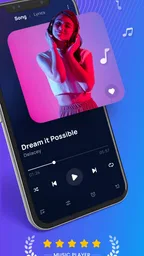
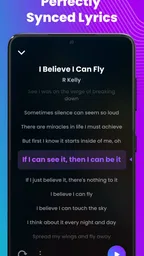
Lyrics can make the player more engaging when you want to follow a song rather than leave it running in the background. They can also help when you’re learning a familiar chorus or paying attention to words you’ve never quite caught. The practical caveat is that lyrics are only useful when they are available and align with the track you’re playing. I’d treat them as a helpful companion to listening, not a guaranteed feature for every file in a collection.
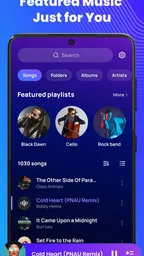
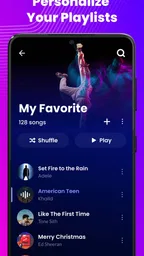
Playlists are where the app’s organizing role becomes clearest. Instead of rebuilding a queue every time, I’d make separate groups for a walk, focused work, exercise, or winding down. A small number of purpose-driven playlists is often easier to maintain than one enormous list with no clear use. This is a simple workflow, but it gives a local library a more intentional feel: the collection stays yours, while the playlist answers the question of what you want to hear now.
Making changes without losing the thread
One useful way to refine a library is to keep the original collection broad and use playlists to create narrower listening sessions. For example, I’d leave all the tracks I enjoy together in my library, then create a shorter playlist for a particular activity. If that selection stops working, I can adjust the playlist without having to reorganize every song. It’s a low-effort way to experiment with order and mood while keeping the underlying collection intact.
The same approach helps when an equalizer change seems to improve one track but not another. I’d test it against a few different songs instead of judging it from a single favorite. This small check can prevent a setting from becoming a distraction during a longer session. It also highlights a genuine limitation of any playback-focused tool: personal adjustments depend on listening conditions, headphones, and taste, so there isn’t one perfect setup for every user.
For a realistic daily example, imagine getting ready for a run in a place where coverage drops along the route. I’d prepare a playlist from music already on the device, check it before leaving, and use the player for the session rather than relying on a stream. If the headphones make the sound feel thin, I could try a modest equalizer adjustment. Lyrics would be less important while running, but might be useful later when listening more closely to the same songs. The point is that the features serve different moments rather than needing to be used all at once.
There is also a useful boundary between managing music and managing creative work. The app can help a listener arrange tracks into a sequence and make playback more personal, but it is not a workflow for writing, recording, editing, collaborating on, or delivering original audio. If you are a musician trying to move a project from an early idea to a finished release, choose a dedicated creation tool. This player makes more sense after the creative work is done, when you want to listen to files on your device.
What to check before depending on it
Before an offline session, I’d verify that the music I want is present locally and that the intended playlist is ready. That is especially worthwhile before travel or a workout, when troubleshooting is inconvenient. The app’s offline focus is most valuable when the user has already taken this small step; it should not be mistaken for automatic access to a streaming catalog without a connection.
I’d also decide whether lyrics are central to the way I listen. If following words is the main reason for choosing a player, test the songs that matter most to you rather than assuming every track will display them as expected. For someone who mostly wants uninterrupted background music, lyrics may be a pleasant extra. For someone studying songs closely, their usefulness will depend on the particular tracks in the library.
Version 2.6.0 is the current release, and the stated minimum operating-system requirement is 7.0. That makes the app relevant to a range of devices, though I’d still consider how well a particular phone handles its own stored music and whether the collection is organized in a way that suits the listener. The app’s Everyone age rating also makes it broadly appropriate as a music player, while the content of any individual music library remains a matter of personal choice.
The most common reason I’d skip it is not a missing advanced feature; it’s a mismatch in expectations. Someone who wants a huge searchable catalog, automatic discovery, synced listening across devices, or tools to edit and publish audio should look elsewhere. Someone who prefers a locally stored collection and wants straightforward playback with a few useful listening controls is much closer to its intended audience.
A clear handoff from collection to listening
For me, the app’s handoff is simply the moment a music collection becomes a usable listening session. I’d choose a playlist, make any small playback adjustment that helps in the current setting, and let the music run. That is a modest but worthwhile form of organization: the app does not turn songs into finished creative output, but it can make a personal collection easier to reach and enjoy without depending on a stream.
The developer, AceTools Team, has kept the app’s identity centered on local music playback rather than presenting it as an all-purpose media workspace. That focus is helpful for deciding whether to install it. I would not expect the feature set of a desktop music library manager or a mobile audio editor. I would expect a phone-based player whose main appeal is keeping playback, playlists, lyrics, and equalizer controls together.
Who I’d recommend it to
I’d recommend Music Player Offline & MP3 to someone with a collection of audio files who wants a dedicated player for everyday listening, especially if offline access and personal playlists matter more than finding new music. It also makes sense for listeners who like to adjust playback or occasionally follow lyrics. The combination is practical without asking the user to treat a music player as a creative suite.
I’d steer a discovery-first listener toward a streaming service, and I’d point a creator toward an audio editor or production app. Those alternatives are better when the need is access to a changing catalog or the ability to make and deliver original work. For my own recommendation, the decision comes down to one question: do you want to play and organize music that is already on your device? If so, this is a focused, approachable option. If not, its offline strengths won’t make up for the different job you need done.
My verdict: this is a useful local music player when you want control over how your own tracks are played, arranged, and heard. Its equalizer, lyrics, and playlists add meaningful options to the basic act of pressing play, while its offline orientation suits travel and routines where a connection is unreliable. The limits are equally clear: it is not a music-discovery service and not a tool for producing or publishing audio. If that boundary matches your needs, I’d give it a try; if your music life depends on streaming catalogs or creative editing, another kind of app will serve you better.
What we like
- Plays music without an internet connection
- Supports common audio formats such as MP3
- Keeps playback available while other apps are open
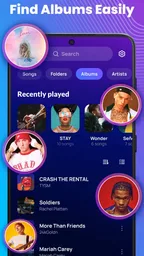
- Makes it easy to browse tracks stored on your device
- Lets you create playlists for different listening moods
What could be better
- Requires music files to be stored on your device
- May not include tools for discovering new music
- Playback quality depends on the source audio files
- Some features may vary across Android devices
- Local music libraries can take time to scan





