
Music Player & MP3 - DDMusic review
 Analysis by Appsdrops
I would choose Music Player & MP3 - DDMusic when I want to listen to audio files already on my device, rather than browse a streaming catalogue. Its appeal is practical: keep a personal music collection together, make playlists for different parts of the day, and follow lyrics when they are available. That makes it a useful fit for commutes, workouts, or stretches without a dependable internet connection. It is a music and audio app from Hitchhike Tech, and the basic idea is easy to understand even if you have never used a dedicated local music player before.
What to expect from a local music player
DDMusic is built around music you have access to on your device, so it works differently from services where the first step is searching a large online library. If you already have audio files, the most satisfying route is to open the app, find a track you recognize, and start listening. The app’s focus on offline playback can be especially helpful when you want your listening to rely less on a mobile connection.
The store identifies the current release as version 2.11.1, with Android 7.0 as the minimum operating-system requirement. It is free to install, with in-app purchases ranging from $1.99 to $23.88 per item. Its content rating is Everyone. Those details make it straightforward to consider, though I would still check the purchase screen carefully if I decide to buy anything; free installation does not mean every optional item is free.
There is reassuring evidence of broad adoption: the app has more than 100 million installs, an average rating of 4.6 from about 1.6 million ratings, and roughly 15,000 written reviews. I see those figures as useful context rather than a guarantee that it will suit every music library. A local player is only as convenient as its handling of your own files, so the first useful test is whether you can locate familiar tracks without extra fuss.
One difference from the usual streaming alternative is that a player centered on local music does not ask you to build your listening around an online catalogue. That can be a plus if you keep downloaded or personally collected audio, or if you prefer having a playlist ready before leaving home. If you mainly discover new releases through a subscription service, however, a streaming app will probably feel more complete and require less collection management.
Start with a small, familiar collection
On first opening a music player, it is tempting to judge it by how quickly it shows every song. I recommend starting with a handful of tracks you know are already available on the device. That gives you a simple way to see whether the app can find your music and whether its basic listening workflow feels comfortable, without confusing a missing file with a complicated library.
If you are moving from another player, resist the urge to recreate every playlist immediately. First check a few familiar songs, then make one short playlist for a real task—such as a walk or a quiet evening. That small test tells you more about everyday usability than a long setup session. It also gives you a clear next step if the library needs tidying: locate the audio files you intend to use, then return to the app and try again.
Make the first listening session count
A useful first success is not simply seeing a track title; it is getting a known song to play, then arranging a few more tracks into an order that suits an actual moment. I would try this before relying on the app for a long trip. If the playlist works while you are at home, you can use the same preparation habit before heading somewhere with weak coverage.
Playlists are most valuable when they solve a small decision. A short selection for a commute, for example, saves you from choosing tracks one by one while you are already on the move. Another playlist can keep workout music separate from slower listening. These are modest routines, but they make a local collection feel intentional rather than like an undifferentiated pile of files.
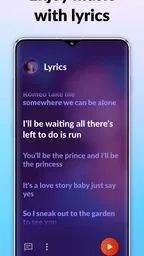
Lyrics can add another layer to that first session. When synced lyrics are available, following the words can make a familiar song more engaging; it can also help if you are trying to catch a line you have never quite understood. I would treat lyrics as a bonus rather than assume every track will have them. The practical approach is to try the feature on a song you know well and see whether the timing and presentation suit the way you listen.
Where first-time users can get confused
The most common point of confusion with an offline player is the difference between music stored on a device and music available through an online service. Installing DDMusic does not, by itself, tell you where your personal tracks are or organize an untidy collection for you. If a song is not showing up, first check that the audio file is actually accessible on the device. This is a more useful first troubleshooting step than repeatedly searching inside the player.
Another expectation to manage is that “offline” describes a listening use case, not a promise that every part of the experience behaves like a streaming catalogue. A local library is personal: what appears depends on the music you have. For someone with a carefully maintained collection, that is a strength because the listening choices are familiar and controlled. For someone expecting to tap a newly released album and immediately find it, it may feel like a limitation.
Lyrics also deserve realistic expectations. Their presence can vary from track to track, so a song without them does not necessarily mean the player is broken. I would use the feature when it appears and keep playback itself as the main test of whether the app is doing its job. That prevents one optional extra from becoming a frustrating obstacle to listening.
Finally, distinguish the free app from its optional in-app purchases. You can start by testing the central music-player experience without committing to a purchase. If a paid item catches your eye, pause to consider whether it solves a need you actually have. The price range is broad enough that I would not treat every item as a casual add-on, especially before confirming that the basic workflow fits your routine.
Build a routine that suits your listening
For a realistic everyday example, imagine preparing for a commute the night before. I would open the app, choose a few tracks already on the device, and put them in a short playlist. In the morning, I could start that selection directly instead of depending on a connection or spending time deciding what to play. If I want to sing along, I can check whether lyrics are available for the tracks I chose. The value is not elaborate automation; it is removing a few small points of friction from a familiar routine.
For workouts, a separate playlist can make the same idea more useful. Keeping energetic songs together means I do not have to skip through slower tracks halfway through a session. For focused work, a calmer selection can stay apart from that workout mix. These are practical ways to use custom playlists without needing to reorganize the whole collection. I would make each list for a specific occasion and adjust it only after noticing what I actually skip.
There is also a trade-off in how much you want to curate. If you enjoy choosing and arranging your own music, local playback gives that collection a clear role. If you would rather have an app recommend something new whenever you open it, a streaming service is likely the better companion. I would not expect a local player to replace discovery features that belong to a different kind of music service.
Who will enjoy it, and who may prefer another option
I think DDMusic is best suited to listeners who already have audio files on their devices and want a focused way to play them, create custom playlists, and make use of synced lyrics when available. It is also a sensible option for people who often listen where connectivity is unreliable, provided their chosen tracks are stored locally. The first-time setup is manageable if you begin with a few known songs rather than expecting the app to solve every library problem automatically.
I would suggest looking elsewhere if your main requirement is a huge searchable catalogue, constant recommendations, or effortless access to music you have not already collected. A streaming service is designed around those needs and can spare you the work of keeping local files organized. Likewise, if you rarely listen to music saved on your device, a dedicated offline player may add an extra step rather than simplify your routine.
The app was released on December 8, 2022, and the version shown is 2.11.1. I mention that because it helps set expectations when you are comparing it with other players, not because a version number alone says how well it will work with your particular library. The more important question is whether you want a personal-file player at all. If you do, testing a few familiar tracks is the quickest way to answer it.
My recommendation after the first test
My advice is to give the app a small, practical trial: find a song already on your device, play it, make a short playlist for a real occasion, and check whether lyrics appear for a track where they would be useful. That sequence tests the core experience without demanding a big commitment. If it makes your existing music easier to reach, you have a clear reason to keep using it; if your collection is empty or you rely on online discovery, you will know early that another kind of music app suits you better.
Overall, I see Music Player & MP3 - DDMusic as a straightforward choice for people who want to listen to their own music rather than turn every session into a search through a streaming catalogue. Its strongest case is simple: familiar tracks, playlists shaped around your day, and offline listening when your music is already on hand. If that matches how you listen, it is worth trying before your next commute or workout.
What we like
- Supports common audio formats including MP3.
- Lets you create playlists for different listening moods.
- Includes shuffle and repeat playback controls.
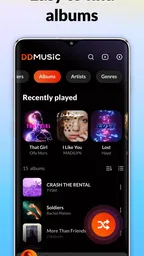
- Offers an easy way to browse music stored on your device.
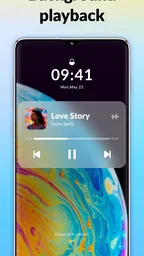
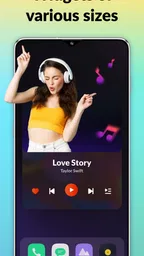
- Provides playback controls from the notification panel.
What could be better
- Cannot stream songs from online music services.
- Requires music files to be stored on your device.
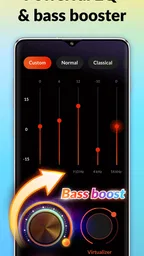
- Audio quality options may be limited compared with advanced players.
- Interface may include advertisements.
- Music library organization depends on your device's file tags.





