



MoneyLion: Banking & Cash Back review
 Analysis by Appsdrops
When I think about a money app, I want a clear path from “I need to get organized” to “I know what to do next,” not a pile of financial products competing for attention. MoneyLion: Banking & Cash Back is built around that broader role: it brings banking tools together with cash-back offers, cash advances, and loan offers. That range can be useful if you prefer to explore several money tasks in one place, but it also means you should take a moment to understand which option you are choosing and what it will mean for your finances.
Starting with a financial task, not a product
MoneyLion is a free finance app from MoneyLion Inc. Its broad appeal is easy to understand: instead of opening separate apps just to check banking options, look for cash back, or investigate borrowing, you can begin in one place. The app has an average rating of 4.4 from around 221,000 ratings, and it has been installed over 5 million times. Those figures suggest a substantial audience, though popularity alone does not tell you whether its mix of services fits your needs.
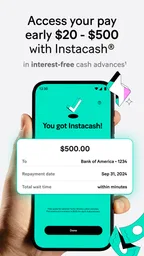
I’d approach it by naming the problem first. If you want to explore a loan offer, focus on the terms and the total cost before treating the offer as a solution. If you are looking for a cash advance, think about how you will cover the next bills and repay what you borrow. If your goal is cash back, compare the offer with what you would have bought anyway. That simple discipline helps prevent a financial app’s variety from turning into extra spending or unnecessary debt.
The practical starting point is to decide whether you need a short-term option or a longer-term habit. A cash advance may seem relevant when an expense lands before payday; cash back is more useful when it rewards an ordinary purchase you had already planned. Loan offers belong to a different decision altogether, because borrowing should be assessed against repayment ability, not just the amount available. Keeping those purposes separate makes the app easier to evaluate.
Following a decision from need to outcome
A realistic example is a household bill arriving before expected income. I would first check whether moving money between existing accounts, adjusting the timing of a non-urgent purchase, or contacting the biller could solve the gap without borrowing. If those options do not work, I could use MoneyLion to explore whether a cash advance or a loan offer is available and appropriate. The important step is not simply finding an offer; it is comparing the repayment obligation with the next few weeks of expenses.
Before accepting any borrowing option, I would read the full terms shown for that particular offer, including any fees, repayment timing, and conditions. Availability and terms can depend on the offer and a person’s circumstances, so I would not assume that a product will be available to everyone or that one option has the same cost as another. If the total repayment would make the following pay period harder, the advance may only move the problem rather than solve it.
For cash back, I’d use a different workflow. I would look for an offer only after deciding what I genuinely need to buy, then check whether the reward is worth any extra effort or change in shopping choice. A reward is not a saving if it persuades me to spend more than I intended. This is a useful distinction in an app that places rewards alongside borrowing: they may sit in the same financial environment, but they should not be treated as interchangeable ways to improve a budget.
For banking, I would judge the experience by whether it helps me handle everyday money clearly, not by the number of features visible on screen. Before shifting routine transactions to any new banking setup, I’d confirm how deposits, payments, account access, and support work for the specific product I plan to use. I would also keep my existing account available until I had tested the essentials and understood the handoffs. That cautious transition is more practical than changing every financial routine at once.
Where the handoffs matter
The app’s useful promise is bringing several financial routes together, but a unified starting point does not mean every route is the same product. A loan offer, a cash advance, a banking service, and a cash-back reward each have different purposes and decision points. I would treat the app as a place to discover and manage options, then judge each one on its own terms. That distinction matters especially when an offer leads into an application or another step that requires a separate decision.
There is also a handoff between finding an option and making it part of a workable budget. A cash advance can address a timing mismatch, but it does not create more income. A loan may provide funds, but repayment still competes with rent, utilities, food, and other priorities. Cash back can offset a qualifying purchase, but it is not a substitute for checking the underlying price or avoiding an unnecessary purchase. The app can help surface possibilities; the user still has to connect each possibility to the real household cash flow.
My practical tip is to write down the outcome you need before exploring offers: for example, “cover this specific bill without making next month’s budget unmanageable.” Then compare available options against that outcome rather than browsing until one looks attractive. For a reward, the equivalent test is whether you would make the purchase without the offer. These small checks reduce the chance of confusing activity inside the app with actual progress toward financial stability.
Another useful habit is to keep a simple record of decisions made through the app. Note what you borrowed, when repayment is expected, and whether a reward depended on a particular purchase or condition. This is not a special feature claim; it is a way to keep several financial activities from blending together in your memory. When an app covers multiple money needs, a personal record can make it easier to see whether the overall result is helping or adding complexity.
What the experience can deliver
At its best, MoneyLion can reduce the effort of exploring different kinds of financial tools. Someone who wants to compare a borrowing option, look for cash back on planned spending, and consider banking in one app may appreciate the broader scope. It is also a reasonable starting point for people who are curious about alternatives to their current setup, provided they are comfortable reading terms carefully and making independent comparisons.
It is less compelling for someone who wants a single-purpose app with no borrowing offers, or who already has a banking service that meets their needs and prefers to keep financial tools separate. A dedicated bank app may be a better everyday choice if the main priority is straightforward account management. A budgeting app may be more suitable if the real need is tracking spending and planning bills rather than finding financial products. And if you are trying to avoid debt, an app that includes cash advances and loan offers may require extra self-control, even when you only intend to use its other tools.
Compared with the usual alternatives, MoneyLion’s strength is breadth rather than a narrow focus. A single bank app typically centers on account activity; a cash-back service centers on rewards; a lending platform centers on borrowing. MoneyLion puts several of those paths under one roof, which may save app switching but can make the decision-making environment busier. I would choose it for convenience when I genuinely expect to use more than one area, not merely because having everything together sounds appealing.
The result of a good workflow is not necessarily taking an offer. It may be discovering that a planned purchase qualifies for a reward, confirming that a borrowing option is too costly for the current budget, or deciding to keep an existing bank arrangement. Those are useful outcomes too. I value an app more when it helps me make a considered choice than when it simply presents another product to tap.
Where the workflow can break
The main friction is the need to distinguish convenience from suitability. Having borrowing and banking options close together may make it tempting to act quickly when money feels tight. I would slow down before accepting anything that creates repayment obligations, and I would avoid relying on a cash advance as a routine way to cover recurring expenses. If the same shortfall appears every month, a budget review or a conversation with the relevant biller is likely a better first move than repeatedly borrowing.
Cash-back offers also require attention. Their value depends on the terms and on whether the purchase was already worthwhile. I would not assume that every transaction earns a reward or that every offer works the same way. Checking the conditions before spending is a better habit than expecting a reward to appear automatically. For someone who does not want to monitor offers or change shopping habits, a simpler card or account arrangement may be less demanding.
There is a learning curve in deciding where to go within an app that serves several financial needs. If you open it with no clear task, the range of options may feel distracting rather than helpful. I’d start with one objective, finish that task, and then decide whether another feature is relevant. This keeps the app from becoming a collection of half-explored products and makes it easier to tell whether it is genuinely useful in day-to-day life.
MoneyLion is free to download and is rated for Everyone. It was released on May 19, 2016, and version 7.163.0 lists Android 7.0 as its minimum operating-system requirement. I would still check the app store for compatibility with my own device before installing, and I would review the terms for any financial product separately from the app’s download price. A free app does not make borrowing or other financial services cost-free.
Who I’d recommend it to
I’d recommend MoneyLion to someone who wants a single place to explore banking, cash back, and borrowing options, and who is willing to compare terms rather than accept the first available choice. It is most useful when you arrive with a specific need, keep rewards tied to purchases you already planned, and treat advances or loans as decisions with consequences beyond the immediate cash flow.
I’d skip it if you want a clean, single-purpose banking experience, if you prefer not to see borrowing options, or if you need a tool focused mainly on building a detailed spending plan. In those cases, a dedicated banking or budgeting app may suit you better. My overall view is that MoneyLion’s breadth can make a practical financial workflow easier to start, but the quality of the outcome depends on the user’s judgment at each handoff. Use it to compare and organize choices, not as a reason to borrow or spend more than you otherwise would.
What we like
- Offers cash-back rewards at eligible retailers.
- Includes tools for tracking spending and budgets.
- Provides access to credit-building features.
- Supports mobile check deposit for eligible users.
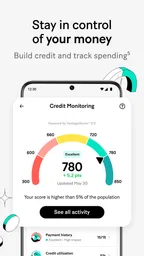
- Lets users monitor their credit score in the app.
What could be better
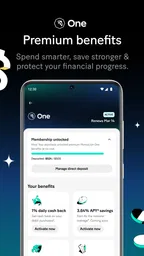
- Some features require a paid membership.
- Cash-back offers may vary by retailer and user.
- Eligibility rules apply to credit products.
- Not all services are available in every state.
- Customer support may be slower during busy periods.





