

Momo: AI Photo & Video Maker review
 Analysis by Appsdrops
I judge a photo app less by how many effects it can promise than by how quickly it helps me get from an ordinary picture to one I actually want to use. Momo: AI Photo & Video Maker is aimed at that practical moment: making polished profile images, experimenting with stylized portraits, and giving an existing photo another chance. It is a free photography app from ScaleUp, though some purchases are offered inside it. My overall impression is that it suits casual, goal-oriented editing better than people who want complete manual control over every detail.
What the editing experience is built for
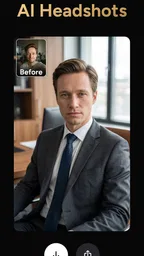
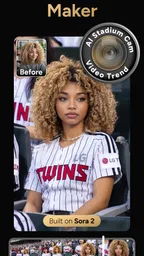
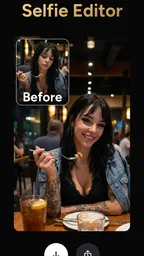
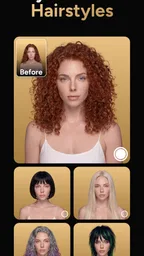
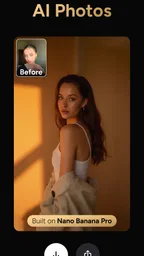
The app’s appeal is its mix of portrait-focused tools rather than a broad, professional editing workspace. Its range includes business-style headshots, Polaroid-inspired looks, photo retakes, profile pictures, and AI-generated imagery. That combination makes sense for someone who starts with a specific purpose—say, a refreshed account photo or a more formal-looking portrait—instead of someone who wants to adjust every color, mask, and layer themselves.
I would treat AI photo editing here as a way to explore alternate presentations, not as a guarantee that every result will look natural or match a precise brief. Portrait effects can be appealing at a glance but still change the mood or character of a face more than I would want for a work profile. I recommend checking the finished image at normal size, not only zoomed in or viewed as a tiny avatar, where small distortions are easier to miss.
The different creative directions also make the app more useful for personal experiments than for a single narrow task. A business headshot and a nostalgic instant-photo treatment ask for very different results, and having both kinds of options in one photography app can save time when I am deciding what suits a picture. The trade-off is that a collection of ready-made looks may not offer the fine-grained control of a dedicated editor.
How quickly can I get to a usable result?
I expect the quickest sessions to be the simple ones: choose a suitable portrait, try a focused treatment, and decide whether the result is worth keeping. That is a more realistic speed expectation than assuming every AI transformation will be immediate. Processing time can depend on the device and the operation, so I would not plan around a fixed wait or assume that every effect responds identically.
To avoid wasting time, I would begin with a clear, well-lit photo where the face is easy to see. That gives portrait-oriented tools a better starting point and makes it simpler to judge whether an edit has improved the image. If the source is blurred, poorly framed, or crowded with distractions, trying several treatments may not solve the underlying problem. Retaking or choosing a better original is often the more efficient move.
A useful workflow is to keep the first pass conservative. I would compare the edited portrait against the original before trying a more dramatic style, especially for a profile picture that needs to look recognizably like me. For a playful Polaroid-inspired image, a stronger effect may be the point; for a professional headshot, restraint is usually safer. The right result depends on where the photo will appear, not just on which option looks most striking in the editor.
When repeated editing becomes demanding
The app is likely to feel more demanding during a long session in which I test several transformations on multiple images. AI-style processing and repeated previews are naturally heavier tasks than choosing one straightforward treatment, although I would not assume a particular battery drain or memory use without testing the exact device. If an older phone starts to feel sluggish, I would close other demanding apps and work through one image at a time rather than queueing up a large batch.
That one-at-a-time approach has another advantage: it helps me keep track of which source photo and edit produced the version I like. Portrait experiments can look similar when viewed quickly, and it is easy to lose the best candidate among a string of near-duplicates. I would settle the crop and basic framing first, then test styles, rather than repeatedly applying effects to versions that are already changed.
For everyday use, a realistic scenario might be updating a profile image before applying for a role or refreshing a small business page. I would select a clean portrait, test a professional treatment, and inspect the face, hair edges, and clothing before using the result. If the image will represent a real person in a formal setting, I would favor a believable finish over a dramatic transformation. A polished picture should still feel like an honest likeness.
For social posts, the balance changes. A stylized look may be more valuable than strict realism, and a Polaroid-like treatment can give an otherwise ordinary snapshot a distinct mood. Even then, I would keep the original photo so I can revisit a less processed version later. That is a small habit, but it matters whenever an edit is difficult to reverse or when I may want the same picture in different contexts.
Reliability and avoiding disappointing results
My practical test for reliability is not just whether the app opens; it is whether I can make a result I trust and repeat the process without confusion. With AI portrait tools, the most important source of inconsistency may be the input itself. A face turned away from the camera, uneven lighting, or objects crossing the subject can make a transformation less convincing. I would try a second source photo before concluding that a particular style is unusable.
I would also treat retake tools as a chance to improve an image, not as a substitute for careful selection. If a photo has an expression or pose I dislike, a retake-oriented option may be worth trying, but the finished image still deserves a close check. In particular, I would look for details that matter to the intended use: whether the face remains recognizable, whether the framing feels natural, and whether the overall treatment fits the audience.
If a process seems to stall or a result does not appear as expected, my first steps would be simple: wait briefly, check that the app is still responsive, and try again with a different image or a less demanding edit. I would avoid repeatedly tapping controls while a transformation is in progress, since that can make it harder to tell what the app has actually completed. These are sensible habits for any photo workflow; they are not a promise that every interruption can be recovered automatically.
Choosing it over a conventional editor
Compared with a general-purpose photo editor, Momo is more appealing when I want a portrait concept or a ready-made visual direction without building the look from individual adjustments. A conventional editor is usually a better fit when I need precise cropping, detailed color correction, controlled retouching, or consistent treatment across a large set of images. I would choose based on the job: quick profile experimentation favors Momo’s focus, while careful production work calls for more hands-on control.
It is also different from simply using a camera’s built-in filters. Those filters can be the fastest choice for a casual snapshot, but they may not address the specific goal of creating a business-style portrait or reworking a profile image. Momo’s portrait-centered approach is valuable when the intended use matters. On the other hand, if I only need a basic brightness adjustment or a simple crop, opening a larger creative app may be unnecessary.
One practical trade-off is the cost boundary. The app is free to install, but in-app purchases range from $3.99 to $39.99 per item. I would explore the free experience before relying on a paid option, and check the purchase screen carefully so I understand what a particular item offers and what it costs. If I only need one profile image, a paid item may be harder to justify than it would be for someone who expects to use portrait treatments regularly.
Device fit, expectations, and who should choose it
The current release is version 3.0.8, and the minimum operating-system requirement is 7.0. That gives people with compatible devices a clear starting point, but a minimum requirement does not tell me how smooth every AI operation will feel on every phone. Newer or more capable devices are generally the safer choice for repeated image processing; on an older compatible device, I would keep sessions short and avoid judging performance from one unusually complex picture.
Momo is rated for Everyone, and its broad reach is reflected in a 4.4 average from around 350,000 ratings, alongside more than five million installs. Those figures suggest that it has found a substantial audience, but they do not mean every style will fit every taste. The app’s developer, ScaleUp, has built a product that makes sense for casual portrait work, while the best outcome still depends on choosing a suitable photo and applying an effect with the right level of restraint.
I would recommend trying it if you want a straightforward way to experiment with profile portraits, business-style presentation, or playful photo treatments, and you are comfortable reviewing AI-edited images before sharing them. I would skip it if you need dependable manual controls, exact retouching, batch consistency, or a guaranteed natural likeness for professional use. In those cases, a conventional editor—or a real portrait session—may serve you better.
For me, the strongest reason to keep Momo: AI Photo & Video Maker in mind is that it turns a specific portrait problem into a quick creative experiment: try a different presentation, compare it with the original, and decide whether it genuinely improves the image. Its speed will vary with the task and device, and heavy repeat editing calls for patience and a tidy workflow. If you approach it as a focused photo tool rather than a substitute for a full editing suite, it is a useful option to try.
What we like
- Combines photo and video creation in one app
- AI effects make it easy to try different visual styles
- Can help create polished social media content
- Offers a quick alternative to manual editing
- Useful for users without advanced editing skills
What could be better
- Some features may require a paid subscription
- AI results can vary in quality
- Processing may take longer for complex creations
- An internet connection may be needed for AI tools
- Generated content may not match every user's preferences





