
Microsoft Family Safety review
 Analysis by Appsdrops
Managing a family’s screen time can feel like a constant series of small negotiations: one more video, one more game, and one more reminder to put the device down. Microsoft Family Safety is designed to help parents keep an eye on screen time and encourage healthier digital habits. I see its main appeal in having a shared tool for family oversight rather than relying on reminders alone.
From a busy household to a clearer routine
The app’s focus is straightforward: monitor screen time and support healthy habits. That makes it relevant for parents who want a better sense of how devices fit into the day, whether the challenge is winding down in the evening or keeping entertainment from crowding out other activities. It is a parenting app, but the real-world task it addresses is familiar to many households: setting expectations and trying to follow them consistently.
Getting started with Microsoft Family Safety makes most sense when I have a practical goal in mind. Instead of treating it as a general-purpose family organizer, I would approach it as a place to support conversations about device use. A parent can begin by identifying what feels difficult at home, then use the app as part of a routine for checking screen time and discussing habits. That human context matters: a monitoring tool can inform a conversation, but it cannot have that conversation for you.
The app is free, and its age rating is Everyone, which makes it accessible as a family-oriented option. It has been available since July 17, 2020, and its current version is 2.1.1.1252. On the store, it has an average rating of 3.8 from around 53,000 ratings, with roughly 2,400 written reviews and over 5 million installs. Those figures suggest broad reach, though they do not tell me how well it will fit any particular family’s routines.
Starting with the household’s needs
Before opening a screen-time app, I find it helpful to agree on what “healthy habits” means in the household. For one family, the priority might be noticing how much time goes to screens; for another, it might be making device use easier to discuss without turning every reminder into an argument. Having a clear aim gives the app a job, rather than making it another icon that gets checked without changing anything.
That starting point also helps keep expectations realistic. Family Safety is described around screen-time monitoring and habit-building, so I would judge it on whether it helps parents stay informed and make routines easier to talk through. I would not treat an app as a substitute for household rules or as a guarantee that a child will follow them. Its value is more grounded: it can be part of a deliberate approach to device use.
Following the screen-time workflow
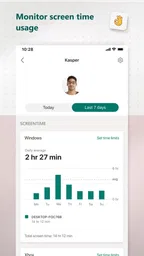
The basic flow begins with a parent wanting more visibility into screen time. From there, the app is intended to help monitor use and build habits around it. In practice, I would make checking the app part of an existing routine instead of opening it only after a disagreement. A regular check-in gives the family a chance to notice patterns and talk about them while the conversation is still calm.
The next step is turning awareness into an outcome. If screen time is becoming a point of friction, a parent can use the monitoring goal as a prompt to revisit expectations with the family. That might mean discussing when devices fit into the day and what balance feels reasonable at home. The important part is that the information leads to a shared conversation, rather than becoming a number that is viewed in isolation.
The strongest use case is a steady loop: check in, talk about what you notice, and adjust the household routine together. That approach gives the app a role without asking it to do more than its stated purpose. It also gives children a chance to understand the reason behind expectations, which can make family rules feel less arbitrary than a sudden instruction to stop using a device.
Where the handoffs matter
Family routines involve more than one person, so the handoff between parent and child is central. A parent may use the app to keep screen time in view, but the result depends on how that awareness is communicated. I would use it to open a practical discussion: what is working, what feels out of balance, and whether the family should revisit its routine. The app can support that exchange, but the relationship and the agreement remain the family’s responsibility.
There can also be a handoff between adults who share caregiving. A monitoring tool is most useful when the adults involved have a common understanding of the routine and how they want to talk about it. If one person treats screen-time expectations as firm and another treats them as flexible, the child may receive mixed signals. A little coordination outside the app can make the overall process feel more consistent.
For parents who already use Microsoft services, the developer may feel familiar: Microsoft Corporation makes the app. Still, I would focus less on the name and more on whether the family can make the app part of a routine. A recognizable developer and a large install base can make an app easy to consider, but practical fit comes from whether it supports the conversations and habits a household actually wants to build.
Turning awareness into a useful result
A good outcome does not have to mean perfect compliance or a screen-free household. For me, a more realistic result is that parents have a clearer basis for discussing device use and children know what the household expects. If using the app helps a family move from vague concern to a more intentional conversation, it is doing something useful.
It also helps to review the routine rather than assuming the same arrangement will always work. Family schedules change, and what feels balanced at one point may need a fresh conversation later. A screen-time tool is most valuable when it supports that ongoing process: observe, discuss, and decide whether anything needs to change. That makes the goal healthy habits, not simply watching a device for its own sake.
Parents should also consider how they introduce monitoring. Explaining the purpose in plain language can make the experience feel more collaborative. If the app is presented only as a way to catch someone doing something wrong, it may add tension instead of easing it. Framing it as one part of a family plan gives the tool a clearer and more constructive role.
Where the flow can break down
The workflow can lose momentum when checking screen time becomes an occasional reaction rather than a routine. If nobody looks at the app until there is already an argument, it may feel like a disciplinary tool instead of a habit-building aid. Setting a consistent time to review device use and talk about it can make the process calmer and more predictable.
Another friction point is expecting the app to settle disagreements on its own. Monitoring can help inform a parent, but it cannot decide what is fair for a particular child or household. Those decisions still require judgment, context, and communication. A family that expects technology to enforce every boundary may find the experience less helpful than one that uses it to support clear agreements.
There is also the everyday challenge of consistency. A tool only becomes part of a routine if family members remember to use it and understand why it is there. If the goal is unclear, or if expectations shift without discussion, the app may not change much. Keeping the purpose simple—greater awareness and healthier screen-time habits—makes it easier to judge whether the effort is worthwhile.
Who may find it useful
I can see Microsoft Family Safety being worth considering for parents who want support with screen-time awareness and family discussions about device habits. It is especially relevant when the household wants a shared starting point for reviewing how screens fit into everyday life. The app is free, and its focus is easy to understand, which makes it a straightforward option to explore.
It may be less satisfying for someone expecting an app alone to resolve every screen-time conflict. The most realistic way to approach it is as a supporting tool: use it to stay informed, bring observations into a conversation, and agree on routines that make sense for the family. That keeps the emphasis on the outcome—healthier habits—rather than on monitoring for its own sake.
Overall, I think Microsoft Family Safety is best judged by the quality of the routine it helps a family create. It offers a focused approach to screen-time monitoring and habit-building, with broad adoption reflected in over 5 million installs. If parents are ready to pair that oversight with calm, consistent communication, it can be a useful part of a family’s digital-life toolkit. The app will not do the parenting for you, but it can give the conversation a more practical place to start.
What we like
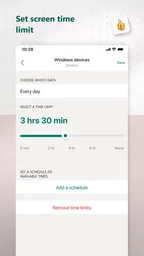
- Screen time limits work across supported Windows devices.
- App and game filters help set age-appropriate boundaries.
- Location sharing can help families coordinate outings.
- Driving reports provide useful details for teen drivers.
- Parents can manage settings through a mobile app.
What could be better
- Some features require a Microsoft 365 Family subscription.
- Location features may be unavailable in certain regions.
- Web filtering works best with Microsoft Edge.
- Activity reports can take time to update.
- Children may need Microsoft accounts to use key features.





