
MeShot: GPS Camera & Geo Stamp review
 Analysis by Appsdrops
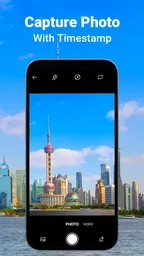
Sometimes a photo needs more context than the image itself can provide. A street scene, a work visit, or a memorable stop on a trip can be much easier to identify later when the time and place are attached. MeShot: GPS Camera & Geo Stamp is built around that simple idea: its store summary describes an app for adding timestamps and location information to memory photos. I see its appeal in the way it focuses on documenting a moment rather than turning photography into a complicated editing project.
A camera tool for photos with context
MeShot is a photography app from HAWKS Technologies, presented under the short name MeShot. Its central promise is practical: add a timestamp and location to a photo so the image carries details that may otherwise be forgotten. That makes it worth considering for people who take pictures as records, not just as polished images to share.
The distinction matters when choosing a camera app. Some alternatives are primarily about filters, retouching, or creative effects; others are intended to help organize or document what a picture shows. MeShot sits in that second, more utility-focused category. If you regularly look back at photos and wonder when or where you took them, a GPS camera and geo stamp concept may be more useful than another set of decorative editing tools.
I would approach it as a small companion to everyday photography, rather than as a replacement for every camera or image editor. The point is not to make a photo look more dramatic. It is to give a memory a little extra information at the moment it is captured, which can be handy for travel snapshots, personal records, or pictures where location is part of the story.
What matters when choosing a GPS camera
Before installing any location-stamping camera app, I would start with one question: do I actually want the place and time to appear with my photos? If the answer is yes, convenience becomes the main decision criterion. A direct tool for timestamps and location can be a better fit than taking a picture first and trying to add context later through a separate workflow.
The next consideration is the kind of photography you do. Someone who mainly takes portraits for social media may care more about filters and touch-ups. Someone documenting a trip, a site visit, or the details of a day may value a clear record of when and where an image was made. Neither approach is universally better; the useful choice depends on what you want the photo to do for you.
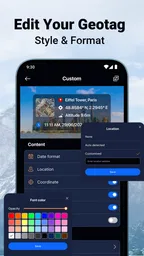
It is also sensible to think about how you want to use the finished image. A visible stamp can make context easy to read, but it also becomes part of the picture’s presentation. If you prefer clean, unmarked images, a separate camera or editing workflow may suit you better. If you like photos that function as quick visual notes, the stamp-oriented idea is more compelling.
Where MeShot makes the most sense
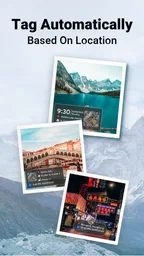
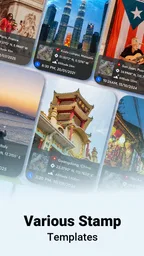
For photos where time and place are part of the memory, a location stamp can make the image more useful later. That is the strongest reason to consider MeShot. Instead of relying entirely on memory to identify a snapshot, the app is designed to attach those details to the photo itself. The benefit is straightforward, and the concept does not require a photographer to be chasing elaborate effects.
I can see the appeal for people who document outings, keep visual records, or take pictures as reminders. A photo of a place can be more meaningful when its location is obvious, especially when a camera roll contains many similar-looking scenes. Likewise, a timestamp can help distinguish one moment from another. These are modest additions, but they can make ordinary pictures easier to revisit and understand.
The app is free to install, with in-app purchases listed from $3.99 to $29.99 per item. That makes it possible to try the basic idea without an upfront purchase, while the optional purchases are something to weigh if you decide the app belongs in your regular camera routine. I would judge the value by how often you genuinely need stamped photos, not simply by how many tools an app appears to offer.
MeShot has reached over five million installs and holds an average rating of 3.6 from around four and a half thousand ratings. Those figures suggest that it has found an audience, but they are not a substitute for deciding whether its specific purpose matches your own habits. For me, the clearest reason to try it remains the focused use case: recording a photo with time and location context.
When another kind of app may fit better
MeShot is not the obvious choice for every photographer. If your priority is expressive editing, an app built around filters, color adjustments, or creative composition may be a closer match. If you mainly want to store and sort pictures, a gallery or photo-management tool may better address that need. Those alternatives belong to different categories, so the comparison is less about which app is best overall and more about which job you want done.
There is also a presentation trade-off. A stamp can add useful context, but it can change the look of an image. People who want photographs to remain minimal or broadly shareable may prefer keeping location details separate from the visible picture. By contrast, anyone who wants an image to act as a self-explanatory record may find that visible context helpful. I would decide based on the intended audience and purpose of the photo.
Another alternative is simply to use a general-purpose camera and rely on whatever organization habits already work for you. That may be enough if you rarely need to identify a photo’s exact context. A dedicated GPS camera becomes more attractive when the information should be immediately apparent without searching through notes or trying to reconstruct the occasion later.
In other words, the choice is not between a good camera and a bad one. It is between different priorities: visual creativity, image organization, or documentation. MeShot is most persuasive when the last of those is near the top of your list. If it is not, a different photography app may feel more natural in day-to-day use.
Thinking through the switch
Trying a new camera app can involve more than installing it. You may need to decide whether you want stamped images to become part of your normal camera routine, and whether that format suits the photos you keep. I would start by using it for a few pictures where the added context is genuinely valuable, rather than changing every photography habit at once.
That gradual approach also helps clarify whether the app is a good fit. If you find yourself reaching for it whenever you want a photo to serve as a record, it may earn a place alongside your usual camera. If the stamps feel unnecessary or make images less appealing to you, there is little reason to force the change. A focused app is valuable when its focus solves a recurring problem.
MeShot is listed for everyone, and its current version is 1.2.6. It requires Android 10 or later. Those practical details make it straightforward to assess compatibility before installing, while the free download gives interested users a low-commitment way to explore the app’s central purpose. Optional purchases are worth considering only after you know whether you want to keep using it.
My recommendation
I recommend MeShot to people who want timestamps and location context attached to memory photos, especially if their pictures often serve as records of places, trips, or everyday events. Its appeal is its clear, specific purpose: it is a GPS camera and geo-stamp option, not a general promise to transform every part of photography.
If you mainly want filters, detailed image editing, or a cleaner look without visible context, I would compare it with apps centered on those priorities instead. But if you have ever revisited a photo and wished you could immediately recall where and when it was taken, MeShot is a sensible app to try. Its free entry point makes that decision easier, while the optional purchases leave room to judge its ongoing value for yourself.
Overall, I see MeShot as a practical choice for photographers who value memory and documentation over decoration. It will not be the right fit for every camera roll, but it has a clear role for users who want their pictures to carry more context. If that describes your needs, this focused photography app is worth a look.
What we like
- Adds GPS coordinates and location details directly to photos.
- Can display the capture date and time on each image.
- Useful for documenting site visits and travel memories.
- Combines camera use with location stamping in one app.
- Stamps can make photos easier to sort by where they were taken.
What could be better
- Accurate stamps depend on location services being enabled.
- Indoor GPS signals may produce missing or imprecise locations.
- Location details in shared photos can reveal sensitive information.
- Stamped text may obscure parts of the image.
- Some features may require permissions for camera and location access.





