
Merlin Bird ID by Cornell Lab review
 Analysis by Appsdrops
Bird identification is often a small puzzle with an inconvenient setting: the bird is moving, the light is changing, and the sound you heard may already be gone. I find Merlin Bird ID most useful because it gives you several ways to approach that puzzle instead of demanding one perfect photo or a confident name. You can work from what you noticed, try a picture, or listen for a call. That flexibility makes it a thoughtful field companion, although it does not remove every barrier to identifying a bird.
Getting from a first clue to a possible bird
Developed by Cornell Lab of Ornithology, Merlin Bird ID is a free birding reference app for curious beginners as well as people who already know their way around a field guide. It has a 4.9 average from around 184,000 ratings, and has been installed over 10 million times. Those numbers suggest broad appeal, but what matters in practice is how the app handles a very ordinary question: “What did I just see?”
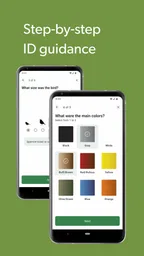
The question-led identification route is a good starting point when I have no useful photo or recording. Rather than needing to know technical birding terms, I can narrow the possibilities by answering prompts about the bird. This suits a quick walk, a garden visit, or a child asking about something at the feeder. The app is less intimidating than opening a dense reference book and flipping through illustrations without knowing where to begin.
That guided approach is also a useful check on impulse. A flash of color alone can be misleading, especially when a bird is partly hidden or the light is poor. I get more value by combining what I remember about size, shape, colors, and where I saw it than by treating one striking detail as decisive. The app can help organize those observations; I still need to judge whether the suggested bird fits the whole scene.
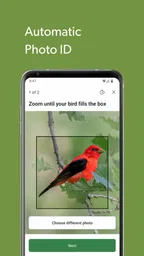
For a bird that stays still long enough, photo-based identification offers another route. I would treat a result as a shortlist rather than a verdict: check whether the suggested bird’s shape and markings match the image, and consider whether it makes sense for the place and moment. A photograph taken from far away, through glass, or in shadow may leave too little detail for a confident match. That is not a failing unique to this app; it is a practical limit of identifying wildlife from an imperfect image.
Readable guidance without assuming prior knowledge
The app’s strongest inclusive choice is its range of entry points. Someone who knows the bird’s song but not its appearance can approach the task differently from someone who has a clear picture but cannot describe the call. Someone who has only a few remembered details can begin with questions. In my view, that is more welcoming than a reference tool built around a single search box or a long list of species names.
Navigation works best when I have a moment to focus. The guided questions give the process a clear direction, while the photo and sound options make the basic choices easy to understand. A first-time user can start without learning birding vocabulary, then gradually get better at noticing the distinctions that matter. It is a useful learning loop: look carefully, make a guess, compare possibilities, and remember what to watch for next time.
Still, the app is not a substitute for a large-print field guide or an audio-only resource for every person. Small images and visual details are central to photo identification, while answering questions about appearance may be difficult for someone with low vision or color-vision differences. I would not assume that a screen-based identification tool will be equally comfortable for every reader simply because its prompts are approachable.
Different senses, different ways into the same task
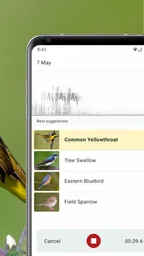
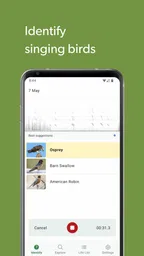
Sound identification is especially helpful when foliage blocks the view or a bird is calling from somewhere beyond the path. It can turn an otherwise fleeting moment into something I can investigate afterward, provided I can make a recording while the sound is happening. The practical tip is to pause and capture a short, clean sample rather than walking on while trying to record. Nearby voices, traffic, wind, and several calling birds can all make the result harder to interpret.
This option broadens access for people who find listening easier than visually tracking a bird, but it is not a universal solution. It depends on being able to hear and distinguish the call, and on having a recording that is clear enough to be useful. A person who is deaf or hard of hearing may get more from the question or photo routes, while someone with limited vision may prefer the sound route if recording and navigating the app are manageable. Those are practical alternatives, not a promise that every task is accessible in every situation.
Motor comfort matters outdoors, too. If I am holding binoculars, a phone, and perhaps a leash or a child’s hand, a multi-step identification can feel awkward. The app is most pleasant when I can stop somewhere safe, settle the phone, and work through the clues without rushing. I would not try to operate it while crossing a road, cycling, or walking over uneven ground; attention belongs on the surroundings first.
Using it in the places where birding actually happens
One realistic use is a short neighborhood walk. I notice an unfamiliar bird in a tree, make a quick mental note of its size and colors, and later use the question route while stopped on a bench. If it calls again, I can try the sound route; if it appears nearby, a photo may help. Having more than one path means a missed photograph does not end the attempt.
At home, the app can make ordinary observations more satisfying. A bird at a window feeder may be visible for longer than one passing overhead, making it easier to compare its markings with suggestions. I would avoid pressing the phone close to the glass if that frightens the bird or produces reflections; a calm observation from a little distance is usually a better starting point. The app works as a prompt to observe more carefully, not as a reason to disturb wildlife for a better result.
Outdoor conditions can change what is practical. Glare can make a screen difficult to read, cold hands can make phone controls cumbersome, and wind or background noise can undermine a recording. In those moments, I may simply note the bird’s appearance and return to the identification later. Merlin is useful because it offers different approaches, but it cannot make a noisy park quiet or make a moving bird hold still.
For a trip where mobile connectivity is uncertain, I would prepare before leaving rather than assume every part of the experience will be available wherever I go. I would also keep a written or mental note of the location and what I observed, since context can help me assess a suggestion later. This is a sensible habit with any field reference app: the phone is a tool, and the observation itself remains valuable even if I cannot complete the lookup on the spot.
Where it fits beside books and general search
Compared with a conventional bird guide, Merlin is quicker when I have a vague clue and do not know which pages to turn to. A printed guide can be better for browsing many species side by side, studying a full illustration, or reading without relying on a phone screen. I would happily use both: the app to narrow the field, then a book or another trusted reference to examine a difficult distinction more carefully.
Compared with a general web search, the app keeps the task focused on bird identification rather than asking me to sift through unrelated pages and images. That is particularly helpful for beginners who may not know the right search terms. Search engines and specialist reference books can still be preferable when I want broader background reading, detailed comparisons, or a second opinion after receiving an uncertain match. Merlin’s strength is getting me started, not replacing every reference I might want.
Its category is Books & Reference, and that feels right: I use it as a practical guide, not as a game or a social feed. The developer, Cornell Lab of Ornithology, is named directly in the app’s identity, which gives the experience a clear connection to bird study. It is rated for Everyone, costs nothing to download, and its current version is 4.3. It first appeared on June 26, 2014, and supports operating systems from version 7.0 onward.
Small frictions that matter in the field
The most important limitation is uncertainty. A suggested identification can be wrong, or several birds may fit the clues. I avoid treating an answer as proof when the sighting was brief, the image is blurry, or the recording contains overlapping calls. When the result does not fit what I saw, I would rather revise my clues or consult another reference than force the first suggestion to work.
There is also a difference between identifying a species and learning to notice it. A quick result can satisfy curiosity, but it may encourage tapping through without studying the bird. I get more out of the app when I pause to compare a suggestion with the actual observation: what feature supports it, what feature does not, and what should I look for next time? That approach makes the tool more educational and less like a name generator.
People who need a fully hands-free experience, who cannot comfortably use a visual phone interface, or who want exhaustive written species accounts may find a different tool better suited to them. A printed guide, help from an experienced birder, or an audio resource can fill gaps depending on the need. Merlin is not a bad choice in those cases, but it should not be the only option someone relies on.
A flexible companion, with realistic expectations
I recommend Merlin Bird ID to anyone who wants an approachable way to investigate birds without already knowing their names. Its question, photo, and sound routes give different kinds of observers a chance to begin with the clue they actually have. The best results come from taking a moment to observe, using the route that fits the situation, and treating suggestions as evidence to consider rather than unquestionable answers.
Its flexibility is meaningful, but not the same as universal accessibility. Visual identification still depends on seeing useful details; sound identification depends on hearing or capturing a recognizable call; and outdoor phone use can be tiring or unsafe when conditions are poor. I would choose it as a free, practical first reference, while keeping a book or another source in reach for cases where more detail, a different format, or a second opinion matters.
For a casual walk, a backyard sighting, or a child’s sudden bird question, it makes curiosity easier to act on. For someone who expects certainty from every blurred photo or needs a fully accessible experience across all tasks, it may disappoint. Used thoughtfully, though, it helps turn a passing glimpse into a closer look at the birds already around us.
What we like
- Step-by-step questions can help identify unfamiliar birds.
- The sound ID feature can suggest species from recorded calls.
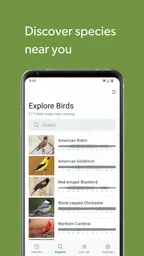
- Regional filters make suggestions more relevant to local sightings.
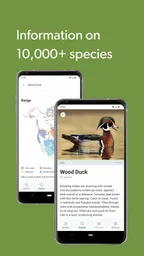
- Bird profiles include photos and recordings for comparison.
- Core identification tools are available without a subscription.
What could be better
- Sound ID results can be unreliable with background noise.
- Some features require an internet connection.
- Rare species may be difficult to identify accurately.
- The app may use substantial storage for downloaded content.
- Its extensive options can feel overwhelming to beginners.





