
Melody Beat - Offline Music review
 Analysis by Appsdrops
Melody Beat is an Android music app whose appeal, to me, is simple: it is aimed at people who want to play music they already have available, including when a reliable internet connection is not part of the plan. That makes it a different proposition from streaming services built around online discovery and vast catalogs. I would consider it for travel, exercise, or ordinary listening away from Wi-Fi, while keeping expectations focused on straightforward playback rather than a full-featured streaming experience.
Offline listening is the point
The central idea behind Melody Beat - Offline Music is listening without depending on a live connection. In practical terms, that shifts the preparation to you: have the music you want available on your device, then use the app when you are ready to listen. It is a useful distinction if you often lose signal on a commute, want to avoid relying on mobile data, or simply prefer to keep a familiar collection close at hand.
I like this approach because it makes the app’s role easy to understand. A streaming service can be convenient when I want to search for something new, but it also ties the experience to a catalog and, often, an internet connection or a downloaded-playlist setup. An offline-focused player starts from a different assumption: the music is already yours to play, and the app is there to make that listening practical.
That focus also sets a sensible boundary. I would not choose it expecting the discovery tools, editorial playlists, or broad online catalog associated with major streaming platforms. If I want to find an unfamiliar artist on the spot, a streaming app is likely the better fit. If I already know what I want to hear and want it available without a network, Melody Beat’s purpose is more relevant.
What offline changes in everyday use
The benefit is most noticeable when connectivity is unpredictable rather than merely slow. On a train route that moves in and out of coverage, for example, a locally available track does not need to wait for a connection to recover. The same logic applies in a gym with poor reception or during a trip where I would rather not spend time troubleshooting playback. The useful habit is to prepare the music before leaving, instead of discovering mid-journey that the songs I expected to hear are not on the device.
Offline listening can also make a routine feel more dependable. I might choose a few albums or playlists before a workout, so I am not searching for music between exercises or relying on a signal in the building. That is not a special trick so much as a small workflow improvement: decide what suits the activity in advance, make sure it is available, and let the listening session stay focused on the activity.
There is a trade-off in that preparation. An offline player cannot conjure a track that is not available locally, so the experience depends on what I have put on the device. That is less spontaneous than streaming, but it can be a fair exchange for listeners who prefer predictable access to a smaller, familiar selection. For a long trip, I would check the collection before setting out rather than treating the app as a substitute for downloading or organizing music.
A practical travel and workout routine
For a realistic travel day, I would use Melody Beat as the playback option for music I had already chosen, not as the place to plan the whole trip’s soundtrack at the last minute. Before leaving, I would decide whether I wanted a relaxed album for the ride or an energetic selection for walking through a station, then confirm those tracks were on the phone. That simple division—selection beforehand, playback on the move—avoids the common frustration of having a music app open but no dependable way to reach the music.
For workouts, the same approach helps with pacing. I would prepare a short, familiar set for a run or gym session rather than searching through a large collection while moving. Familiar tracks can be a better match for a repeated routine than a recommendation feed, especially when I want the same mood each time. The downside is that a carefully chosen offline set can become stale; if I rely on the same songs for weeks, I will need to refresh my selection myself.
One useful point to keep in mind is that “offline” describes the listening situation, not a guarantee that every music source is automatically available. The dependable workflow is to make sure the audio you want is on the device before you need it. That makes the app a better choice for planned listening than for spontaneous requests such as “play the new song I just heard.”
How it compares with streaming and other players
Compared with a streaming service, Melody Beat is appealing when ownership or local availability matters more than catalog size. Streaming is usually stronger for trying unfamiliar music, moving quickly between artists, and letting recommendations guide the next listen. An offline-focused app is more compelling when I want to play a known collection without depending on a network. These are different jobs, so the better choice depends on whether I am bringing music with me or looking for music in the moment.
Compared with a generic phone music player, the main reason to consider this app is its clear offline-listening identity. A phone may already include a basic player, and if that handles local music comfortably, switching may not be worthwhile. I would try Melody Beat when the existing player feels inconvenient for the way I listen away from a connection, rather than assuming that a separate app automatically improves sound or adds controls. No listening app can compensate for a collection that is not ready when the connection disappears.
That distinction is important for managing expectations. People often use “music app” to mean everything from a radio service to a library manager. Melody Beat is best approached as an option for playing music in situations where offline access is the priority. If your main need is cloud syncing across devices, social sharing, or a continually updated stream of recommendations, compare those specific needs against your current service before making it your everyday player.
Where the friction may show up
The most obvious limitation is the need to plan. If I forget to have my preferred music available, the advantage of offline playback cannot help me in that moment. This is not a flaw unique to one player; it is the natural cost of relying on music stored for use without a connection. Still, it matters if I am used to opening a streaming app and searching for any song that comes to mind.
A second consideration is library upkeep. Listeners with a large or frequently changing collection may prefer a service that handles discovery and playlist updates for them. With an offline-first routine, I have to be more deliberate about what I want to carry and when to replace it. For a small collection of go-to albums, that can be easy. For someone who constantly wants the latest releases, it may feel like extra work.
I would also avoid treating a strong offline use case as proof that the app replaces every other audio tool. If podcasts, radio, music discovery, and synced playlists are all part of one person’s daily listening, a broader platform may be simpler. Melody Beat makes the most sense when the problem is narrower: I want music ready when connectivity is not dependable. Keeping that distinction in mind helps prevent disappointment.
Who is most likely to enjoy it
I can see this app suiting commuters, travelers, runners, and gym-goers who already know what they like to hear and want fewer interruptions from connectivity. It is also a reasonable option for someone who prefers a familiar collection over an endless stream of suggestions. The app is free, which makes it easy to try as a secondary player alongside an existing service, rather than requiring an immediate change to the way you listen.
It is less compelling for listeners who rarely keep music on their device or who treat music search as part of the listening experience. If I regularly jump from a new release to an obscure back catalog track, a streaming catalog is likely more convenient. If I mostly replay a handful of albums during exercise or travel, offline access can be the more valuable feature.
Melody Beat is developed by Flores and sits in the music and audio category. Its average rating is four out of five from around twelve thousand ratings, and it has passed ten million installs. Those figures suggest that many people have tried it, but I would still judge it by whether its offline-focused role matches my own habits rather than treating popularity as a guarantee of fit.
Compatibility and a sensible first try
The app is rated for Everyone and its current release is version 1.2.5. It requires Android 8.0 or later, so I would check the phone’s software before trying to install it. That requirement is practical to verify in advance, especially if the device is older or used as a dedicated music player.
My first test would be modest: choose a few tracks I know I will want on the next commute, make sure they are available on the device, and try listening in a place where reception is weak. That gives a clearer answer than simply opening the app at home on a strong connection. I would also see whether the way it handles my everyday listening feels comfortable enough to replace the phone’s default player, or whether it works better as a backup for travel and exercise.
My recommendation
I would recommend Melody Beat to someone who values reliable access to familiar music more than instant discovery. Its offline focus addresses a real everyday annoyance: having a playlist planned but being unable to enjoy it when signal drops. A little preparation makes that strength useful, while the same requirement will frustrate anyone who expects a music app to supply every song on demand.
For me, the clearest way to decide is to ask how often I listen where the internet is unreliable and whether I already have music ready to take along. If the answer to both is often, this is a practical app to try. If I mainly want a huge searchable catalog and fresh recommendations, I would stick with a streaming service. Melody Beat is most convincing when I treat it as a dependable offline companion, not as a replacement for every kind of music listening.
What we like
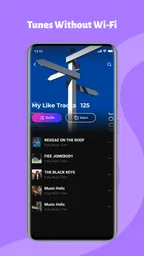
- Offline playback works without a mobile data connection.
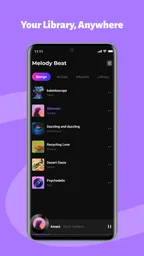
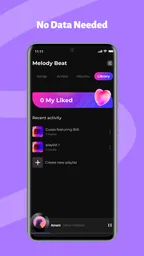
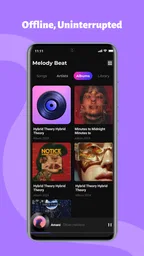
- A simple interface makes music easy to browse and play.
- Background playback lets you use other apps while listening.
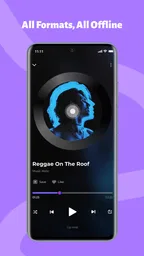
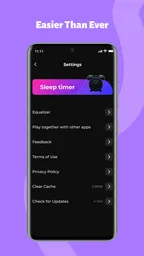
- Useful playback controls help you manage songs quickly.
- A good option for listening during travel or commutes.
What could be better
- Available tracks depend on the music stored on your device.
- Offline listening requires downloading or transferring songs first.
- Audio quality may vary with the source files.
- The app may lack the discovery features of streaming services.
- Some features may require permissions to access device storage.





