




McAfee Security: Antivirus VPN review
 Analysis by Appsdrops
I judge phone-security apps less by how impressive they look on day one than by whether I still find them useful once the setup excitement wears off. McAfee Security makes a clear first impression: it is a free tools app from McAfee LLC, built around protecting everyday phone use rather than asking you to become a security expert. Its focus on scam protection, malware checks, and safer browsing gives it an obvious role for people who tap links, install apps, and handle personal accounts on their phones.
My overall view is that it can earn a lasting place if you want a single security companion and will actually use its checks and warnings. It is less compelling if your phone already has the protections you rely on and you prefer not to add another app, account flow, or paid upgrade prompt to your routine. The difference is not simply whether an antivirus scanner exists; it is whether the app’s practical help fits your habits.
What feels useful in the first week
On first use, the main appeal is having security tools grouped under one familiar name. Rather than searching for a separate app whenever a suspicious message arrives or you want to check a download, you can start with one security app and learn where its protection sits. The store positions it around mobile security, scam protection, malware cleaning, and safer browsing; that combination speaks to common phone risks, not just traditional computer-style viruses.
The first week is also when an app like this can help make vague security concerns more concrete. A warning about a link is easier to act on than a general reminder to “be careful online.” I would treat those prompts as useful signals, not as permission to stop thinking. If a message claims to be urgent, asks for payment, or pushes you to share a login code, pause and verify it through a channel you already trust instead of relying on any one security tool to make the decision for you.
One practical way to evaluate the app is to use it around a real task: before opening a link in a delivery notification, check whether the message looks legitimate; before browsing through an unfamiliar page, choose a safer browsing option if it is available in your setup. That approach tests whether its protection fits your routine without turning security into a daily project. I would not install it just to run one scan and then ignore every later prompt.
McAfee’s scale is reassuring in a limited sense: the app has a 4.7 average from around 913,000 ratings and has passed 50 million installs. Those figures suggest that many phone owners have tried it, but they cannot tell you whether its alerts match your own needs or whether you will appreciate its interface. I would use popularity as context, not as a substitute for deciding what kind of protection you want.
Where it fits beside built-in protection
Android already includes security features, and people who stick to trusted app sources and keep their phone updated may feel their existing setup is enough. That is a reasonable choice. McAfee is more attractive if you want an additional layer focused on suspicious activity and web use, or if you would rather have a recognizable security brand organize those tools in one place. The relevant comparison is not “security versus no security”; it is whether this extra layer offers something you will notice beyond the protections you already use.
Compared with a narrowly focused antivirus app, McAfee’s appeal is its broader security framing. Compared with a standalone browser’s protection, its appeal is that safer browsing sits alongside other phone-security functions. That convenience comes with a trade-off: a broader suite can feel less lightweight than a tool dedicated to one job. If all you need is a cautious browsing routine or the phone’s built-in safeguards, a separate security suite may add more interface than value.
What keeps it relevant after the novelty
The best case for keeping McAfee installed is not that you will constantly open it. It is that it can support a few useful habits: check unexpected links before tapping, pay attention to warnings instead of dismissing them reflexively, and revisit the app when you have a reason to review your phone’s security. Those habits are more durable than a one-time scan. A protection app that sits untouched may still have a role, but its visible value will feel thin if you never engage with the features you chose it for.
A realistic example is a busy day when a message appears to come from a delivery service, bank, or familiar retailer. You may be tempted to tap quickly while moving between errands. I would slow down, inspect the sender and wording, and use the app’s scam-focused protection as another clue rather than treating it as a final verdict. If the message asks for credentials or payment details, go to the company’s app yourself instead of following the message’s route. That workflow is a stronger defense than trusting any single warning system.
Another useful habit is to decide what you expect the app to do before paying for anything. The app is free to install, while in-app purchases range from $0.99 to $279.99 per item. That wide span makes it especially important to read the exact offer and renewal terms presented in the app before confirming a purchase. I would start with the free experience, identify a specific limitation you want to solve, and only then consider whether an upgrade is worth it. A vague desire to “be more secure” is not enough reason to buy the most prominent option.
Maintenance without turning security into a chore
For ordinary use, I would keep maintenance simple. Let the app’s protections do their job, pay attention when it gives a clear warning, and review its settings if you change how you browse or use your phone. You do not need to open a security dashboard every morning to be careful. The useful middle ground is occasional attention: enough to understand what the app is asking for, but not so much that security becomes a second job.
Before relying on any security app, I also recommend checking that your phone’s operating system is supported and keeping it current. McAfee Security lists Android 11 as its minimum operating system, so an older device may not be a fit. The current version is 10.11.0.281; version numbers can change over time, but the practical point is to install updates when they are offered through the app store and to avoid assuming that a security app replaces operating-system updates.
There is a small but important distinction between “the app is installed” and “the app is helping.” If you repeatedly dismiss its notifications without reading them, take a minute to adjust your expectations: decide which alerts deserve attention and whether the app’s particular approach suits you. If you cannot tell what a warning means, do not blindly approve or ignore it. Investigate the link or activity separately, and use official channels for account issues. Good security software should support careful decisions, not make them on your behalf.
McAfee Security is rated for Everyone, which makes it accessible to a broad range of users, but that does not mean every person needs it. A family member who is less confident spotting fake messages may appreciate having a recognizable tool to consult, especially if someone can help them understand its alerts. On the other hand, an inexperienced user can also be overwhelmed by security prompts. In that case, a calm walkthrough and basic account-safety habits may be more valuable than adding an app they do not understand.
Where repeated use can become tiring
Security apps have to interrupt you sometimes, and that interruption can become the main source of fatigue. If warnings appear too often or do not explain what action you should take, people learn to dismiss them. That is a general trade-off of adding another security layer, and it is why I would judge McAfee by the clarity and relevance of the prompts you actually see rather than by the number of tools presented at installation.
There is also the risk of duplicated protection. If your phone already has a browser that warns about unsafe pages, you use built-in security checks, and you rarely install unfamiliar apps, another suite may overlap with what you already have. The overlap is not automatically harmful, but it can make it harder to know which alert matters. I would avoid running multiple security products simply because more icons seem safer; choose a setup you understand and can maintain.
The commercial side deserves attention too. Although installation is free, optional purchases can be substantial, so I would not tap through an upgrade screen without checking what is included, how long it lasts, and whether it renews. The app’s free entry point is helpful for trying the experience, but “free” should not be mistaken for every feature being included. If you only want basic awareness and do not need a paid package, decline offers that do not solve a concrete problem for you.
As an app that has been available since May 30, 2011, McAfee Security has had a long life in mobile security. It has 55,000 reviews as well as its much larger pool of ratings, giving prospective users plenty of other experiences to consider. Still, security needs vary with device habits, region, and the kinds of messages a person receives. I would read recent feedback for patterns about the parts you care about—such as alert quality or ease of use—rather than assuming every reviewer’s experience will match yours.
Who should keep it, and who can skip it
I would recommend trying McAfee Security if you want a recognizable mobile-security suite, are uneasy about suspicious links, or prefer several security-related tools in one app instead of assembling a routine yourself. It is also a sensible option for someone who will respond to clear warnings and occasionally check that the app remains useful. Its long-standing presence and broad adoption may make it feel approachable, but the deciding factor should still be whether its protections fit your day-to-day phone use.
I would skip it if you are already comfortable with your phone’s built-in protections, browse cautiously, and do not want additional alerts or purchase prompts. I would also look elsewhere if you only need one very specific function and prefer a smaller, dedicated tool. A security suite is not automatically better simply because it combines more tasks; the best choice is the one that gives you relevant help without training you to ignore its messages.
For me, the lasting value comes down to maintenance and attention rather than novelty. McAfee Security can be worthwhile when it helps you pause before trusting a questionable message and gives you a security routine you can actually follow. It becomes much less persuasive when it is just another app on the phone, or when you cannot tell which protections are already covered elsewhere. My recommendation is to try the free version with a specific purpose in mind, keep only the features and alerts you understand, and pay for nothing until you can name the problem an upgrade would solve.
What we like
- App Lock can protect selected apps with a PIN or biometric check.
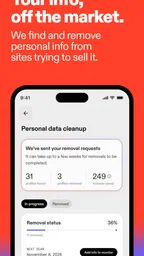
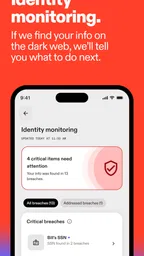
- Identity monitoring alerts you if personal details appear in data breaches.
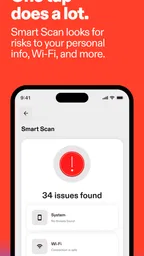
- The Wi-Fi scanner flags networks that may put your privacy at risk.
- Anti-theft tools can help locate a lost device.
- The interface makes core security tools easy to find.
What could be better
- Several useful features require a paid subscription.
- VPN access may be limited by plan or data allowance.
- Background protection can increase battery use.
- Some alerts may require manual checks to resolve.
- The app may request broad permissions to provide its features.





