




Moovit: Your Transit Tracker review
 Analysis by Appsdrops
When I’m heading somewhere by bus or train, the hard part is often not choosing a route but knowing whether the next departure still makes sense. Moovit is built around that everyday problem: it brings transit schedules and real-time travel information into one place so I can plan a city trip without checking several sources. Its value is most noticeable when I need a practical answer quickly, rather than a detailed guide to every aspect of a city.
Real-time transit information is the main draw
Moovit is a free navigation app from developer Moovit, aimed at people who rely on public transportation. The key idea is straightforward: look up a journey, compare transit options, and use schedule information to decide when to leave and what to catch. In my view, the real-time element matters most when a trip is time-sensitive or a service may not run exactly as expected. A printed timetable can tell you what should happen; current travel information is more useful when you need to make a decision now.
That focus makes the app different from a general-purpose map. A broad mapping app is often the better place to orient yourself, explore streets, or combine driving and walking. Moovit’s more specific purpose is getting a passenger through a public-transit journey. I’d reach for it when the question is “Which bus or train should I take?” rather than “What’s around me?” The distinction sounds small, but it helps keep the trip-planning task in view.
The app has an average rating of 3.8 from around 1.5 million ratings, and it has been installed over 100 million times. Those figures suggest that it is a widely used transit option, though popularity alone does not guarantee that every route or local schedule will suit every rider. It is free to download, with optional in-app purchases priced from $0.99 to $23.99 per item, and it is rated for everyone.
Why current information changes the decision
For a straightforward commute, a schedule may be enough. The advantage of real-time information appears when there is a choice to make: leave now for a connection, wait for a later service, or change the plan. Rather than treating a timetable as an unquestionable promise, I find it more useful to check the app close to departure and use what it shows as a planning aid.
That does not mean I would follow any displayed estimate blindly. Transit journeys depend on local service conditions, and a useful app cannot make a delayed bus arrive sooner. I treat the information as a way to reduce uncertainty, not eliminate it. If the trip matters—a work shift, appointment, or a connection I cannot miss—I leave room for a backup rather than planning around the tightest possible timing.
How I would use it before and during a trip
My practical routine would be to search for the destination before leaving, compare the available public-transport choices, and check again when it is nearly time to go. That second check is valuable: planning at home and making the final departure decision are different tasks. A route that looked sensible earlier may deserve another look if the current departure information changes.
For a journey with a transfer, I would pay attention to the connection as a whole, not just the first bus or train. A fast first leg is not necessarily the best choice if it leaves little room to make the next one. When comparing alternatives, I’d favor a plan that feels robust over one that saves a small amount of time but depends on everything running perfectly. This is a useful habit with any transit planner, and Moovit’s schedule-focused approach gives me a reason to check the timing before committing.
Another practical tip is to use the app to make the decision, then keep the essential details in mind instead of repeatedly reopening the route screen while walking. I’d note the line and departure I intend to take, then check again if the journey changes. That reduces phone-checking in busy stations and makes it easier to notice when the plan needs adjusting. It is a workflow choice rather than a special feature, but it makes a transit app more useful in real life.
A realistic trip where it earns its place
Imagine leaving work for an evening appointment across town. You can take one direct service that may involve a longer wait, or a quicker option that requires a transfer. I’d use Moovit to compare the schedule and current travel information, then choose based on how much risk I’m willing to accept. If arriving on time matters more than saving a few minutes, I’d prefer the option with a more comfortable connection rather than the most optimistic itinerary.
On the way back, the same tool can help answer a different question: whether to head to the stop now or spend a little longer where I am. That is where up-to-date departure information can make a routine journey feel less like guesswork. It is not a substitute for judgment—if the route is unfamiliar or the connection is crucial, I would still keep an eye on my surroundings and allow extra time—but it can make the next step clearer.
Where it fits beside other navigation options
Compared with a standard map app, Moovit is a more focused choice for public transport. If I need to understand the surrounding streets, find a place, or plan a trip that mainly involves driving, a general map is likely to be more convenient. If I’m moving around by bus and train, I’d rather start with a transit-oriented planner than sift through features designed for other kinds of travel.
There is also a place for official transit sources. When I need authoritative information about a specific operator or an unusual service change, checking the operator’s own communication can be a sensible cross-check. Moovit is most useful as the convenient trip-planning layer, not as a reason to ignore an important notice or assume every local detail is captured perfectly. I would use both when the stakes are high or a route is unfamiliar.
The tradeoffs I would keep in mind
The main limitation of any real-time transit planner is that the quality of its usefulness depends on the service information available for the journey at hand. A city regular may find it helpful for familiar routes, while a visitor could still need to verify a complicated transfer or an unfamiliar stop. I would not assume that an app’s suggested timing removes the need to look at station signs or pay attention to announcements.
There is a small but meaningful difference between a route that looks neat on a screen and one that feels comfortable in person. Tight connections, unfamiliar stations, and a trip at an inconvenient time can make the fastest option a poor fit. I’d choose a slower, simpler plan when I’m carrying bags, travelling with someone who needs extra time, or heading somewhere where arriving late would cause a problem. That is not a knock against Moovit; it is a reminder to judge the route by the real journey, not just the displayed schedule.
The free entry point makes it easy to try, but the app also offers in-app purchases. I would first use the free experience for the trips I actually take and decide whether any paid item is worthwhile only after understanding what I need. Since the core reason to open it is transit planning and schedule information, there is no need to spend money simply because an optional purchase is present.
Who is most likely to benefit
I’d recommend Moovit to commuters who regularly use buses or trains, occasional riders who want a clearer starting point for a city trip, and visitors who would rather compare transit choices in one app than piece together a plan from memory. It is especially useful when departure timing affects the choice of route. The app’s broad reach and long availability—released on March 28, 2012—show that it has been part of the transit-app landscape for years, but my reason to use it would still be its practical role in the journey I have today.
It is less compelling for someone who rarely uses public transportation, already relies on a local operator’s tool for every journey, or mainly needs driving and street-navigation features. It may also be the wrong choice when the trip depends on a detail that should be confirmed directly with a transit agency. In those cases, a general map or the operator’s own information may be a better companion.
My recommendation for everyday travel
Moovit is worth considering if your regular travel involves buses and trains and you want schedule information to help shape when you leave. I like the emphasis on making a concrete trip decision: compare options, check the timing, and avoid treating a plan made hours ago as fixed. The best results come when I use it as a guide, leave sensible breathing room, and verify important details when a journey is unfamiliar.
For a transit-dependent city routine, that can make the difference between a trip that feels improvised and one with a workable plan. I would not make it my only source for every unusual service situation, but I would happily keep it as a dedicated public-transport option. Its strongest point is helping riders turn schedules into a practical next move.
What we like
- Real-time arrival estimates make it easier to plan a commute.
- Step-by-step directions help with unfamiliar routes.
- Service alerts can flag disruptions before you travel.
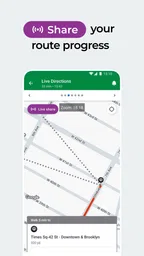
- Live location sharing helps others follow your trip.
- Route options can include multiple forms of public transit.
What could be better
- Coverage and data quality vary by city.
- Real-time estimates may be inaccurate during service disruptions.
- Some features require an internet connection.
- The app may request location access to provide directions.
- Ads can interrupt the trip-planning experience.





