

Offline Map Navigation review
 Analysis by Appsdrops
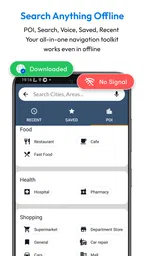
When I’m planning a drive somewhere unfamiliar, I want the map ready before I leave, not dependent on a steady connection at every turn. Offline Map Navigation is built around that practical need, with offline map access and GPS navigation alongside tools such as lane assistance and junction views. It is a free navigation app from VirtualMaze, and my overall impression is that it makes the most sense for drivers who want a prepared route and useful visual guidance without treating a phone’s data connection as a given.
Where the free access offers value
The app is free to install, with optional in-app purchases listed from $0.99 to $29.99 per item. That gives you a way to try its navigation before spending anything. The purchase range is broad, though, so I would check what a particular item includes and whether it matches a need before buying; a high-priced option is not automatically worthwhile just because you plan to use offline maps.
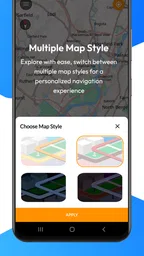
That distinction matters: free access is clear, but I would not assume every map or navigation capability is included in the same way. Before a trip, I’d explore the app’s available map and purchase options, then make sure the areas I need are actually ready for offline use. This small bit of preparation is more useful than finding out on the road that an expected region or feature requires an extra step.
Offline navigation earns its keep when a signal is unreliable, expensive, or simply inconvenient. A trip through rural areas, a drive across a border, or a route that includes a long stretch of poor reception can make a preloaded map more than a backup. It can also be helpful when I want to avoid relying on mobile data throughout a journey. The value is less compelling for someone who drives familiar city routes with dependable connectivity and already likes a standard online maps app.
Navigation that rewards a little preparation
The strongest reason to consider this app is the combination of offline mapping with GPS guidance. GPS can locate the phone without a mobile-data connection, while downloaded map information can keep the route useful when online map access is patchy. The key is that offline use is not magic: I would prepare the map area and route needs before setting off, rather than expect the app to fetch missing information after the connection disappears.
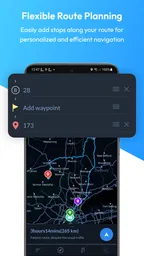
My practical routine would be to open the app on Wi-Fi before leaving, check the destination and surrounding area, and confirm that the map coverage needed for the drive is available. I’d also keep the phone charged and mounted where I can glance at it safely. That routine avoids two common sources of frustration: discovering a coverage gap mid-trip and trying to sort out navigation while already driving.
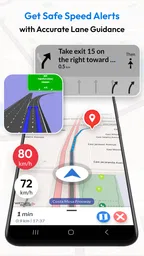
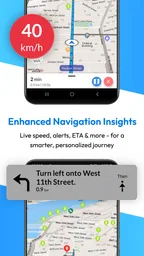
Lane assistance and junction views are especially useful when a route becomes visually demanding. A basic line on a map may tell me where to go, but it can be less reassuring as several exits or turning lanes appear close together. Seeing more specific guidance at those moments can reduce last-second lane changes. I’d still treat the display as support rather than an authority: road signs, lane markings, and safe driving decisions come first.
One less obvious benefit of offline maps is that they can make planning calmer even when the route itself is easy. I can check the general shape of a drive before leaving, note where a junction-heavy section occurs, and avoid spending the first few minutes of a trip adjusting a map while traffic builds. This is particularly handy for visitors driving in an unfamiliar town, where a missed turn can quickly mean circling a busy block or having to make an awkward correction.
How it compares with familiar navigation choices
Compared with the usual online-first navigation apps, Offline Map Navigation puts more emphasis on being prepared for connectivity gaps. That focus is valuable for travel and remote drives, but an online service can be a better fit when I want live traffic information, frequent automatic updates, or a large ecosystem of place details. I wouldn’t switch away from a trusted everyday map app solely for offline capability if I rarely lose reception and its other tools already suit me.
Android Auto support is another practical part of the package for compatible in-car setups. A larger vehicle display can be easier to read than a phone mounted low on the dashboard, while lane assistance and junction views address moments when a simple turn prompt may feel too vague. I’d check that the app works with my particular car and setup before building a trip around it; Android Auto being supported does not mean every vehicle arrangement will behave identically.
There is also a trade-off between a dedicated navigation workflow and the convenience of an app I already use. Switching can mean learning where map preparation and route controls live, and remembering to keep offline areas current enough for upcoming travel. If my priority is a polished, familiar online experience with live conditions, another navigation option may be more suitable. If my priority is having a usable map when the network is unreliable, this app’s emphasis is more relevant.
Everyday situations where it makes sense
Imagine I’m driving to a rented cabin outside a city. I can use a connection at home to prepare the destination area, then rely on GPS guidance once the route moves beyond reliable coverage. At a complicated exit, lane guidance or a junction view may help me get into position earlier rather than react at the last moment. That is a realistic use case for the app’s particular mix of offline access and driving-oriented prompts.
It can also suit someone who regularly travels between places where data access is inconsistent, or a driver who prefers not to make continuous mobile connectivity part of the navigation plan. A person who takes occasional road trips might keep it as a backup even if another app remains their daily choice. In that role, the important step is testing the route and map area before relying on it, not waiting until the backup is needed.
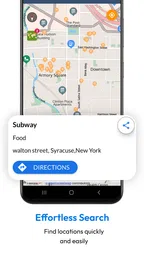
On the other hand, I would skip it if I mainly need walking directions, public transport planning, or rich live updates and have no interest in preparing maps. The store positioning and features are clearly aimed at navigation by road, and the offline advantage asks for a little forethought. It is also not a replacement for attention: no junction image can guarantee that a lane is open or that road conditions match what the map suggests.
What the audience response suggests
The app has a 4.3 average from around 107,000 ratings, with roughly 1,800 written reviews and more than 10 million installs. Those figures suggest that it has reached a substantial audience, but they are not a promise that its map coverage or interface will suit every driver. I’d use them as context, then judge the app against the actual places and routes I intend to navigate.
It is rated for Everyone and was released on February 19, 2016. Its longevity and broad reach make it a familiar kind of utility rather than an experimental navigation idea, but the most useful question remains very specific: can I prepare the areas I need, and do its driving prompts work for the way I travel? A quick test on a familiar route is a sensible way to answer that before trusting it on a long trip.
My verdict on whether to install it
I’d recommend Offline Map Navigation to a driver who wants offline maps as a real part of their routine, especially for trips beyond dependable coverage. The free installation makes it reasonable to explore, while the optional purchases mean I’d inspect the available choices carefully rather than assume the free experience includes everything I want. VirtualMaze has put the right emphasis on preparation, GPS guidance, Android Auto, lane assistance, and junction views for that audience.
My advice is to install it, test a route you already know, and prepare a map area before counting on it for travel. Keep a familiar online navigator if live conditions and place discovery matter more to you, or if you do not want another map-preparation step. Its best value is as a ready-before-you-go navigation tool, not as a universal replacement for every map app. For people who regularly encounter weak reception, that is a useful and fairly clear reason to give it a try.
What we like
- Maps remain available when mobile data is weak or unavailable.
- Offline routing can help reduce roaming data usage.
- Saved maps make it easier to plan trips ahead of time.
- Useful for navigating in remote areas with limited coverage.
- Turn-by-turn guidance helps keep attention on the road.
What could be better
- Offline maps need storage space on your device.
- Map downloads can take time and require a connection.
- Road changes may not appear until maps are updated.
- Live traffic details may be limited without internet access.
- GPS use can drain your battery during longer journeys.





