



Uber - Request a ride review
 Analysis by Appsdrops
I think of Uber less as a map and more as a way to turn a location into a ride with a few decisions in between. That distinction matters if you are choosing it for someone who needs a trip to be straightforward: the app can make requesting a car feel simple, but using it still involves reading details, choosing a pickup point, and coordinating with a driver. In my experience, it works best when the traveler can comfortably handle those steps or has someone nearby who can help.
Reading the screen and finding the next step
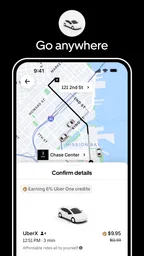
Uber is a free ride-booking app from Uber Technologies, Inc., in the maps and navigation category. Its core flow is easy to understand: set a destination, review available ride choices, and request one. That focused sequence is less intimidating than navigating a full transit network when the immediate question is simply how to get from here to there.
The app has a 4.7 average from around 20 million ratings and over one billion installs. Those figures suggest broad familiarity, but popularity does not automatically make a screen comfortable for every person. I would still recommend checking the interface on the intended phone, especially if the rider relies on larger text, magnification, or other system-level display settings.
A practical strength is that the journey is organized around a specific destination rather than requiring the user to interpret a whole city map first. For a new visitor, a late appointment, or a ride to an airport, that can reduce the mental work of comparing streets and figuring out which transit line serves the address. The map remains important, though: the proposed pickup point may not be the place the rider is standing.
My useful habit is to enter the destination before moving outside, then review the pickup location while there is time to correct it. A building entrance, curb, or nearby side street can be easier for a driver to reach than a broad address pin. This small check can spare a stressful exchange later, particularly for someone who finds hurried phone use difficult.
Clear choices, with a need to compare
Ride options can involve differences that matter more than the label alone. Before confirming, I would pause to consider whether the displayed choice suits the passenger, the journey, and any companions. A person who needs extra time to enter or arrange belongings may value a calm pickup more than shaving a little time off the wait; someone travelling with another person should agree on the destination and ride choice before placing the request.
The app is not a substitute for a dedicated navigation tool when the main task is exploring a route on foot or understanding a complicated public-transport transfer. For that, a map or transit app may present the broader journey more clearly. Uber is stronger when the decision has narrowed to booking a car, and weaker when a rider needs detailed route planning before deciding whether a car is appropriate.
Motor, sensory, and communication demands
Booking a ride requires several small interactions: entering or selecting a destination, checking the pickup point, choosing an option, and confirming. None is inherently difficult, but the sequence can be awkward for someone with limited dexterity, tremor, pain, or fatigue. I would avoid trying to complete it while walking through a crowded station or balancing bags. Sitting somewhere stable and entering the details first makes the interaction less demanding.
There is also a sensory side to the experience. A rider may need to look between the phone, the street, and the arriving vehicle, while dealing with traffic noise or a busy curb. That is a lot to process at once. I find it sensible to identify a safe waiting spot, keep the phone accessible, and check the vehicle information before approaching. If reading a screen quickly is difficult, a companion can help verify the pickup and car details rather than leaving the rider to manage everything under time pressure.
For anyone who is hard of hearing or uncomfortable with spoken coordination, the key question is whether the trip can be managed through the information and communication options available on their own device and in the app version they use. I would not assume every interaction can be handled without a call or a conversation. Before relying on the service for an important appointment, it is worth trying a low-stakes trip and seeing whether the pickup process fits the rider’s communication needs.
A non-obvious trade-off is that a car ride can reduce the physical effort of walking between transit stops, yet the pickup itself may demand more attention than expected. Finding the right curb, recognizing the correct vehicle, and getting in safely are separate tasks. For someone who finds transitions difficult, arranging a clear meeting point with a companion can be more helpful than simply choosing the shortest route.
When location and timing change the experience
Uber can be useful when a person needs door-to-door travel, is carrying groceries, or wants to avoid a long walk from a stop. It can also help a family coordinate a ride to an airport when one person is managing luggage and another is helping a child or older relative. In each case, the value is not just the car; it is the ability to make the trip without planning multiple transfers.
But a pickup location is not always equally convenient for every body or situation. A pin on the opposite side of a busy road, a crowded venue entrance, or an obstructed curb can turn a simple request into a confusing rendezvous. I recommend checking the map against visible landmarks and, where possible, choosing a meeting point that is easy to describe and reach. If the rider cannot safely get to the suggested point, the app’s convenience has limits.
Imagine a person leaving a clinic after an appointment, tired and carrying paperwork. They can set the destination while seated, check that the pickup is near the accessible entrance they used, and wait in a sheltered spot while watching for the car. That is a realistic situation in which booking a ride may be easier than walking to a distant transit stop. If the entrance is crowded or the pin lands elsewhere, however, a companion or staff member may need to help coordinate the handoff.
For airport travel, I would plan the pickup or drop-off with extra attention to the terminal and curb location. Large airports can have several levels and designated areas, and a general map position may not tell a tired traveler which door to use. A transit service can be a better fit for someone who prefers a predictable station-to-station route and can manage luggage; a taxi stand may be easier for a traveler who wants to ask a person directly for help. Uber offers another option, not a universal replacement.
Where the convenience has limits
The most important friction is that a smooth booking screen cannot guarantee a smooth physical journey. The rider still needs to reach the pickup point, identify the correct car, and get in and out. Those steps may be challenging for people using mobility aids, travelling with bulky equipment, or needing more assistance than a standard curbside pickup provides. I would not choose the app on the assumption that every vehicle or pickup will meet a particular access requirement; the rider should confirm suitability before depending on it.
There is also a difference between knowing where a car appears on a map and feeling confident about the handoff. Map interpretation can be hard in a dense street grid, and GPS positions may not correspond neatly to entrances or curb space. When the exact meeting point matters, a simple landmark and a brief plan with a companion can be more reliable than repeatedly adjusting the pin while standing in traffic.
People who dislike using a phone under pressure may find the final minutes more stressful than the booking itself. I would prepare the destination and pickup while indoors, keep the device charged, and avoid waiting in a place where moving to another curb would be difficult. If a trip depends on precise assistance, a prearranged ride through a provider that can discuss those needs directly may be more suitable than an on-demand request.
Uber is rated for Everyone and is free to install, but that does not mean every rider will find every journey easy. A free app can still involve ride charges, and the practical experience depends on local availability, the vehicle offered, and the surroundings. I would treat the app as one tool in a travel plan, not the whole plan—especially for medical appointments, unfamiliar airports, or trips where arriving at a precise entrance is essential.
Who I would recommend it to
I would recommend Uber to people who are comfortable making a few decisions on a phone and want a direct way to request a car for everyday trips. It can be particularly useful when walking is inconvenient, when public transport would require several transfers, or when a traveler wants to arrange a ride from a known pickup point. Its scale and familiarity can also make it easier for a group to discuss a shared ride plan.
I would be more cautious recommending it as the only travel option to someone who cannot independently manage a changing pickup point, read vehicle details, or communicate if the driver and passenger miss each other. In that case, a trusted companion, a taxi booked through a service that supports direct assistance, or accessible public transport with a familiar route may be a better choice. The right alternative depends on the person’s needs and the specific journey, not simply on which app has the neatest interface.
My overall view is that Uber makes car booking approachable, but inclusive use depends on the rider’s full journey, not only the screen. I like the focused destination-first flow and the option to avoid some walking and transfers. I also think users should plan for the curbside details, test the experience before a high-stakes trip, and bring help when the pickup or vehicle handoff could be difficult. For travelers who can manage those practical steps, it is a useful everyday option; for those who need guaranteed assistance, a more directly supported arrangement may be the kinder choice.
What we like
- See the driver’s name and vehicle details before pickup.
- Share your trip status with trusted contacts.
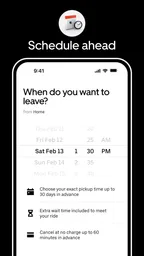
- Schedule some rides ahead of time in supported areas.
- Choose from different ride options to fit your budget.
- Pay in the app without handling cash.
What could be better
- Fares can rise during periods of high demand.
- Ride options and availability vary by location.
- Pickup times may change with traffic and driver supply.
- Cancellations can incur a fee in some situations.
- You need an internet connection to request a ride.





