




Local News - Breaking &Weather review
 Analysis by Appsdrops
I judge a local-news app by what it does in the small gaps of a normal day: whether I can check what is happening nearby, get a sense of the weather, and share useful information with someone at home without turning the phone into a constant stream of alerts. Local News - Breaking &Weather is aimed at that practical overlap between news and local forecasts. It is a free news and magazines app from Daowei Network, with live radar included in its stated focus. That combination makes it worth considering for households that want a quick local check-in, though I would treat it as a supplement rather than a complete news service.
A shared screen for local check-ins
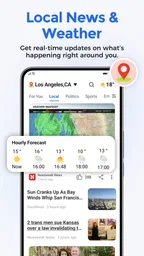
Picture a household deciding whether to leave early for an appointment. One person wants to know what is happening nearby, while another wants a weather check before choosing a coat or changing plans. An app that brings local news and forecasts together can make that routine less scattered: rather than opening a news reader and a separate weather app immediately, I can start with one place and see whether anything local deserves attention.
That is the most convincing use case for this app. Its appeal is not that it replaces every source of information, but that it can serve as a convenient first stop. A quick glance at local headlines and radar may help a household decide whether to look deeper, discuss a developing situation, or simply carry on with the day. The live-radar angle is especially relevant when weather is changing and a general forecast feels too broad for a nearby decision.
For shared-device use, convenience comes with a small trade-off: a phone passed among family members can make the app feel like a common noticeboard, but it does not automatically make each person’s interests or habits the same. One person may care about neighborhood events; another may open it only for weather. I would agree on a simple household routine—check it when needed, then discuss anything important—rather than assume one shared screen is a personalized feed for everyone.
What the combined news-and-weather approach does well
Many people already rely on separate apps: a dedicated news reader for reporting and a weather tool for forecasts or radar. Local News - Breaking &Weather tries to make the first step more compact. That can be useful when I have only a moment to orient myself, especially before a commute, a school pickup, or a walk that might be affected by rain.
The trade-off is depth. A focused news service may offer a more deliberate reading experience, and a specialist weather app may be a better choice for detailed forecast planning. I would use this app to notice what may matter locally, then turn to a trusted specialist source if the decision is consequential. Radar can help me understand current conditions, but it should not be treated as a guarantee about what will happen at a particular street or at a particular time.
Keep setup and account expectations modest
With any app that combines news and weather, I recommend taking a moment after opening it to make sure the local context is useful. A forecast or story feed is only helpful when it reflects the place you care about. If more than one person uses the same device, it is sensible to check that the location and reading context suit the next person too, rather than assuming the phone’s previous use reflects everyone’s needs.
I would also keep account boundaries clear. A shared device is not the same as a shared account, and household members may prefer different settings or reading habits. Before treating the app as a family hub, consider who can access the device and whether anyone expects their activity to stay private. I would not rely on the app as a way to manage separate household profiles or parental controls; those should not be assumed. If each person needs a distinct experience, separate devices or a service with explicitly documented profile options may be a better fit.
A practical tip is to use the app as a prompt, not as the household’s sole source of truth. If a headline affects a plan, read the story carefully and check the relevant official announcement where appropriate. If radar raises concern about a journey, confirm conditions with a dependable forecast source before making a safety-sensitive decision. This layered workflow keeps the convenience of a single starting point without asking one app to answer every question.
Coordination without turning updates into noise
Local information is most useful when it leads to a clear action. In a household, that might mean telling someone that the weather could affect the walk home, or mentioning a nearby story that changes a planned route. I find it more helpful to share a specific takeaway than to forward a stream of headlines: “Let’s check the forecast before we go” is easier to act on than a vague sense that something might be happening.
For a shared phone, a simple handoff can prevent confusion. The person who checks the app can say which location they had in mind and when they checked it. That matters because local conditions and breaking coverage can change; a screenshot or an old glance may not represent what is happening now. This is a household habit rather than a feature claim, but it makes any local-news-and-weather tool more useful.
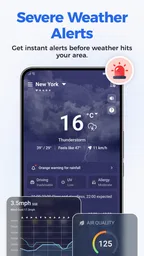
I would be cautious about relying on notifications as the only way to stay informed. The app’s focus includes trending news updates, but each person may have a different tolerance for interruptions. If alerts are available and you choose to use them, consider whether they help you act or merely draw attention away from work, rest, or family time. For a household, one person’s preferred level of urgency should not automatically become everyone else’s.
Age context and trust at home
The app is rated for Everyone, which makes its stated age classification broad. That is useful context for adults deciding whether it may be suitable to have on a shared household device, but it does not mean every news item will suit every child or that an adult should stop paying attention to what younger users encounter. News can include difficult real-world events even when an app itself has an Everyone rating.
For younger readers, I would treat local headlines as an opportunity to talk through what is happening rather than leave the feed to do all the explaining. A parent or caregiver can help distinguish a developing report from a confirmed fact and put upsetting events into context. For older family members, the same caution applies in a different way: a quick headline is not the whole story, and an app’s convenient presentation should not replace checking a report before sharing it widely.
Trust also means recognizing the app’s role. Daowei Network is the developer, and the app sits in the news-and-magazines category. Its stated purpose brings local coverage and weather together, but readers should still use judgment about important claims. If a story affects health, travel, school arrangements, or public safety, I would look for a fuller report or an authoritative local source before acting. That is not a criticism unique to this app; it is a sensible boundary for any fast-moving news feed.
What the store figures suggest—and what they do not
The app has an average rating of 3.9 from around 500 ratings, alongside roughly 90 written reviews. It has passed 100,000 installs, which suggests it has found an audience, but those figures alone cannot tell me whether its local coverage will match a particular town or whether the reading experience will suit a particular household. I would use the app’s first-hand fit—especially whether the local material is relevant—as the deciding factor.
It is free to install, with in-app purchases listed from $1.99 to $14.99 per item. I would check the purchase details in the app store before buying anything, particularly if a child or another household member can use the device. The presence of paid items is worth knowing even if your plan is simply to try the free version. The app is for everyone by age rating, but that does not remove the value of setting household expectations around purchases.
The release date is February 12, 2026, and the current version is 1.5.01. It requires operating system version 7.1 or later. These details matter most when deciding whether an older device can run it and whether an installed copy is current. If someone in the household uses a device with an older operating system, compatibility is a practical first check before building a routine around the app.
Who should make room for it
I can see this working well for someone who wants a quick local pulse: a commuter checking conditions before leaving, a household member keeping an eye on nearby developments, or a person who prefers a combined starting point instead of jumping between apps. It is particularly appealing when the goal is orientation rather than exhaustive reporting. The useful habit is to glance, identify what matters, and follow up where the stakes justify it.
I would skip it as a primary choice if you want a highly specialized weather workspace, a deep customizable news-reading system, or clearly separated household profiles. In those cases, a dedicated weather app, a more established news service, or a product that explicitly explains its account and family options may serve you better. The same goes for anyone who expects a single feed to cover every local source equally well; a combined app is convenient, but convenience is not the same as comprehensive coverage.
My household verdict
Local News - Breaking &Weather makes most sense as a shared starting point for everyday local awareness, not as a family-management tool or a final authority on news and forecasts. I like the practical pairing of local updates with live radar because it can bring a quick decision into focus without asking me to begin in two separate apps. The strongest household use is modest: check what is relevant, communicate the useful detail, and verify anything important before changing plans.
My recommendation is to try it if your household wants a simple local check-in and you are comfortable keeping account expectations, purchases, and age-appropriate news conversations clear. Give it a short, practical test during an ordinary week: see whether the local information is relevant, whether the radar helps with real plans, and whether the shared-device routine feels convenient rather than distracting. If it becomes a useful first glance, keep it in that role. If you need deeper reporting, specialized forecasts, or separate experiences for each person, choose a more focused alternative instead.
What we like
- Browse local headlines by location.
- Weather forecasts add useful context to daily news.
- Breaking-news alerts can highlight urgent updates.
- A focused local feed makes nearby stories easier to find.
- The app combines news and weather in one place.
What could be better
- Local coverage may vary depending on your area.
- Breaking-news notifications can become distracting.
- Weather forecasts may differ from conditions outside.
- Some stories may link to external websites.
- The feed may include more headlines than you need.





