



Klover - Instant Cash Advance review
 Analysis by Appsdrops
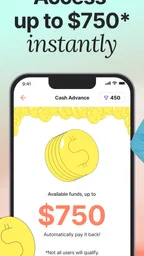
When an unexpected bill lands before payday, the hard part is often figuring out what to do next without adding more stress. Klover is a finance app built around that moment: its store description presents it as a payday cash advance service for people looking to borrow money and get cash quickly. I find the idea easy to understand, but the value of an advance depends on the full journey, not just the promise of speed. You have to get started, follow the steps the app makes available, understand what happens when money moves, and decide whether the result suits your situation.
From a cash shortfall to a possible next step
The app is free, and its focus is narrower than a general-purpose money manager: it centers on access to a cash advance. That makes the starting point straightforward. You are not opening it primarily to browse investments or plan a household budget; you are looking for a way to bridge a gap between an expense and your next payday. For someone in that position, a focused app can feel more approachable than a financial tool packed with unrelated sections.
Still, I would treat an advance as a short-term option rather than extra income. Borrowed money can ease an immediate pinch, but it does not make the underlying expense disappear. Before moving forward, it helps to know what the money is for, how soon you expect to need it, and how the advance will fit into your next pay period. That bit of preparation makes it easier to judge whether the app’s offer is useful or whether another solution would leave you in a better position.
The key question is not simply whether cash can arrive quickly, but whether the whole process makes sense for your budget. A smooth app experience is valuable, yet the timing and terms of any borrowing matter just as much. I would go into the process with a clear amount in mind and take time to read each screen rather than tapping through because the need feels urgent.
Taking the first steps
After opening Klover, the natural next move is to follow the app’s prompts and see what options are presented. The exact screens can change as the service evolves, so it is better to focus on the decisions in front of you than assume every user sees an identical sequence. In practice, that means paying attention to what the app asks you to do, reviewing the information it displays, and making sure you understand the next action before continuing.
This is where the difference between a quick pitch and a useful financial tool becomes clear. A cash advance sounds simple in a short description, but a real borrowing decision needs context. I would check the amount being offered, when the money would be available, and what repayment expectations apply before accepting anything. If an explanation is unclear, pausing is more sensible than treating speed as a reason to skip the details.
Financial apps also depend on a handoff between your choices and the service’s process. You provide information or complete the steps shown, the app evaluates what can be made available, and you decide whether to proceed. That sequence can feel seamless when everything is clear. It can feel less comfortable when you are unsure why a step is needed or what will happen after you complete it. Taking a moment to review prompts helps keep the decision in your hands.
Where the handoffs matter
The most important handoff is from browsing an advance option to actually accepting one. Until that point, you are exploring. Once you confirm a borrowing choice, you are making a financial commitment, so it is worth slowing down enough to understand the figures and timing shown on screen. I would not rely on a general promise of instant cash as a substitute for reading the specific details attached to the option being offered.
There is also a handoff between the app and your broader finances. Money received today has to be accounted for later, often when your next paycheck is already expected to cover regular costs. Before accepting an advance, I would mentally set aside the amount that needs to go back and consider whether rent, utilities, food, and other essentials will still fit. That quick check can reveal whether an advance is a helpful bridge or simply moves the shortfall to a later date.
Another practical handoff is the transition from using the app to tracking what happens afterward. Keep an eye on the status displayed in the app and make a note of any repayment or follow-up dates that apply. This is ordinary good practice with any borrowing tool: do not assume that completing one screen means the entire process is finished. A little attention after the initial decision can prevent confusion when you are managing a tight budget.
What the experience is trying to deliver
The promised outcome is direct: a way to borrow money when you need cash before payday. That clear purpose is the app’s strongest appeal. Someone dealing with a near-term expense does not necessarily want a long financial education course before finding the relevant action. A purpose-built interface can make the first step easier to locate and can keep the experience centered on the immediate problem.
The app has a substantial audience, with more than five million installs and an average rating of 4.6 from around 178,000 ratings. Those figures suggest that many people have tried it and that overall reactions are favorable, though an aggregate score cannot tell you whether a particular advance will suit your needs. I see those numbers as useful background, not a reason to borrow without checking the details for yourself.
Its broad reach is also reflected in a large volume of written feedback: users have left around 53,000 reviews. Reading recent comments in the app store can help you understand how people describe their experience, especially around clarity and ease of use. Reviews are personal accounts, though, and one person’s outcome does not guarantee yours. I would use them to spot themes and still make the decision based on the terms and steps shown in your own app.
When the flow can feel less smooth
The main friction point is the gap between wanting cash immediately and needing to make a careful borrowing decision. When a bill is urgent, every extra step can feel inconvenient. Yet those steps are part of the process of deciding whether an advance is available and appropriate. If you find yourself rushing because you feel pressured, that is a good reason to pause, read the screen again, and make sure the choice fits your ability to repay.
Another possible sticking point is expectation. The short description emphasizes instant cash, but an app’s general promise is not the same as a personal guarantee about timing or eligibility. The useful approach is to treat the in-app offer and its displayed conditions as the information that guides your decision. If the available option does not match what you need, it may be better to step back than to assume the result will change simply because you continue.
For some people, the deeper concern is not the interface but the cycle of relying on advances. If borrowing today leaves too little for the next pay period, the immediate relief can turn into another shortfall. I would consider whether the expense is one-off or likely to repeat, and whether there is a way to reduce the pressure without borrowing. That does not make a cash advance automatically unsuitable; it simply puts the tool in the right context.
It is also worth remembering that a free app does not mean every borrowing choice is cost-free in every sense. The important details are the terms shown for the particular option, including any obligations connected to receiving and repaying money. Read those carefully instead of inferring the full cost from the fact that downloading the app is free. A few minutes spent understanding the commitment can matter more than getting through the screens quickly.
Who may find it useful
Klover may appeal to someone who wants a dedicated app for exploring a payday cash advance rather than a broad suite of financial tools. Its finance focus and straightforward purpose make it easy to understand why a person facing a short-term cash gap might take a look. The app is rated for Everyone, and it has been available since April 12, 2020, with version 2026.23.0 listed as its current version. It requires Android 7.0 or later, so device compatibility is worth checking before installing on Android.
That does not mean an advance is the right answer for every user. Someone who can wait, negotiate a bill date, use savings, or find another lower-pressure option may prefer that route. Someone who does decide to explore the app should approach it with a specific need and a realistic repayment plan. That way, the tool remains a way to manage a temporary timing problem instead of becoming the default response to every tight week.
A practical way to decide
I would approach the experience in a simple order: identify the expense, open the app to see what is available, read each relevant screen, compare the timing and obligations with your budget, and proceed only if the outcome still makes sense. If the available option does not line up with the amount or timing you need, stop there. The ability to walk away is part of making a sound financial decision, especially when urgency makes a fast yes feel tempting.
Overall, this is a focused cash advance app with a clear purpose and a sizeable user base. Its appeal is convenience at a moment when convenience can matter, while its main limitation is inherent to borrowing: a short-term solution still needs to be repaid and planned for. I would consider it a practical place to explore a payday advance, but not a substitute for checking the details or thinking through the next pay cycle. If you use it with care, read the conditions, and keep the repayment impact in view, you can judge whether the result genuinely helps rather than merely postponing the problem.
What we like
- No credit check is required to request an advance.
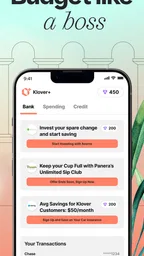
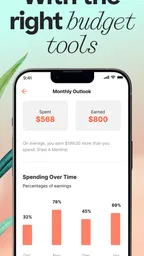
- The app includes financial tools for tracking spending.
- Users can earn points through eligible in-app activities.
- Repayment is typically arranged through automatic bank withdrawals.
- The interface makes it easy to review advance details.
What could be better
- Eligibility depends on income and linked account activity.
- Advances are not guaranteed for every user.
- Some features require a paid membership.
- Automatic withdrawals may strain a low account balance.
- Availability and terms can vary by state.





