




Kinedu: Baby Development review
 Analysis by Appsdrops
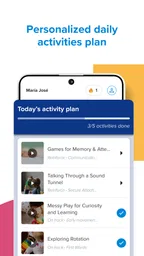
In a household with a baby, the hard part is often not finding one more activity; it is helping the adults stay on the same page about what to try and what the child seems ready for. I find Kinedu: Baby Development most useful as a source of guided ideas and a place to keep developmental notes, rather than as a substitute for a parent’s judgment or a clinician’s advice. It is a parenting app from Kinedu INC, and its mix of play activities, milestone guidance, classes, and a baby tracker gives it a broader role than a simple checklist.
Making a shared routine work
Imagine one caregiver has a few minutes with the baby before work, while another takes over in the evening. With an app like this, the first person can look for an activity that fits the moment, and the second can use the tracker or milestone material as a prompt for what to notice next. That is a more realistic use than trying to turn every suggestion into a formal lesson. Short, playful interactions are easier to fit around feeding, naps, and the unpredictable pace of a baby’s day.
The practical value is in reducing the “what should we do now?” pause. Instead of searching broadly for baby activities, I can use the app’s development-focused framing to choose something purposeful and then adapt it to the child’s mood. If the baby is tired or distracted, stopping is a sensible choice, not a failed session. The suggestions work best as invitations to play, not obligations to complete.
For shared-device households, though, I would keep expectations modest. A phone passed between adults is convenient, but it does not automatically make everyone’s notes or interpretations consistent. I would agree on a simple handoff habit: mention what activity was tried, what the baby seemed to enjoy, and anything worth remembering. That small conversation matters more than assuming the app itself will coordinate every caregiver.
Set boundaries before making it the family reference
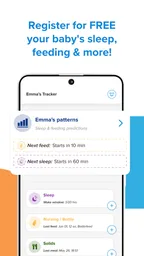
Before relying on any parenting app as a household record, decide who will enter information and what you want to track. If several adults all add observations in different ways, a tracker can become noisy rather than helpful. I would use it for a few concrete things that matter to the family, then keep the rest of the routine informal. The app is easier to live with when it supports your habits instead of asking the whole household to reorganize around it.
Account access also deserves a deliberate choice. If a device is shared, think about whether each caregiver should be able to open the same account and what personal information may be visible there. I would not treat a shared phone as a reason to share login details casually; decide who is responsible for the account and how other caregivers can be involved. This is especially useful when a babysitter or relative only needs a brief activity suggestion, not access to a family’s ongoing notes.
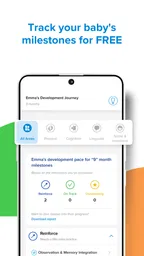
A second useful boundary is separating guidance from diagnosis. Milestone material can help parents notice patterns and prepare questions, but development does not unfold in identical steps for every child. If something worries you, use your observations to have a clearer conversation with a qualified health professional rather than treating an in-app activity or tracker entry as a verdict. That distinction keeps the app in its best role: an organizer and idea source.
Coordination is a household habit, not a magic feature
When more than one adult is involved, the strongest workflow is simple: choose one activity, try it when the baby is receptive, and pass along one useful observation. For example, a caregiver might mention that the child engaged more when the activity was shortened or repeated slowly. The next person can make a sensible adjustment instead of starting from scratch. This kind of shared context is valuable even if everyone does not use the app in exactly the same way.
I would avoid turning the tracker into a scorecard between caregivers. Babies have changing energy, and a quiet day is not evidence that someone has done something wrong. The useful question is whether the app helps adults notice and respond, not whether they can record every moment. If updates create pressure or disagreement, scale back to the parts that genuinely help.
Compared with the usual alternatives—general parenting articles, scattered activity searches, or a paper notebook—Kinedu brings ideas and developmental tracking together in one app. That can save effort for a parent who wants a guided starting point. A notebook, however, may be better for a household that wants a fully flexible record shared across caregivers, while a direct conversation with a pediatric professional is the right route for health concerns. The choice depends on whether you want structured prompts or maximum simplicity.
Age context and trust
The app is listed for everyone, and its subject is baby development, so the intended user is an adult caregiver rather than a child using a phone independently. I would keep the device in an adult’s hands and use the content together with the baby. That makes the activity itself the focus, rather than screen time, and gives the adult room to stop or adapt a suggestion based on the child’s response.
At the time of writing, the current version is 2.42.0 and it requires Android 6.0 or later. It is free to install, with in-app purchases ranging from $0.99 to $299.99 per item. That is a wide range, so I would check what is included in any offer before committing and avoid assuming that every class or resource is available without payment. The app’s average rating is 3.3 from around 43,000 ratings, alongside about 841 written reviews; that mixed reception is a reason to try the free experience first and judge whether its organization suits your family.
Its reach is substantial, with over 5 million installs, and it was released on March 6, 2018. Those figures tell me it is an established option, not that it will fit every household. For trust, I would focus less on popularity and more on whether the guidance feels understandable, whether the app’s suggestions fit your child, and whether any paid content is worth the expense to you.
Where it fits—and where it does not
The best reason to try Kinedu is the combination of guided play and developmental context. Parents who feel short on activity ideas may appreciate having a focused place to begin, while caregivers who like recording observations may value the tracker alongside the activities. Expert-led classes can also appeal to adults who prefer a more guided learning format than browsing unrelated articles.
It is less compelling if you already have a trusted routine, prefer to collect your own resources, or dislike subscription-style app experiences and in-app purchase prompts. It may also be the wrong choice if you want a shared family log with clearly defined roles or expect the app to coordinate caregivers automatically. In those cases, a simple shared note or direct handoff conversation may be more reliable and less demanding.
One practical tip is to test the app in a small way before building a routine around it: choose one activity, see whether it fits your child’s current mood, and decide whether the explanation is useful to the adults who will care for the baby. If the app helps you spend less time searching and more time engaging, keep using that part. If it adds pressure or clutter, there is no need to track everything.
My household verdict
I would recommend Kinedu: Baby Development to caregivers who want a structured source of play ideas and developmental prompts, especially when they are still finding a rhythm with a baby. It can make a shared routine easier to discuss, but the coordination still comes from the adults: agree on account access, pass along useful observations, and keep expectations realistic.
With a free starting point and optional purchases, it is reasonable to explore before deciding whether paid material belongs in your family’s routine. I would treat its activities as flexible suggestions, its milestones as prompts for observation, and its tracker as a tool only if recording details genuinely helps. For a household that values guided ideas without expecting an app to manage parenting, it is worth a try; for families seeking a complete shared-care system or clinical answers, a simpler record or professional guidance is the better fit.
What we like
- Personalized activity suggestions support different stages of early development.
- Activities offer parents practical ways to encourage learning through play.
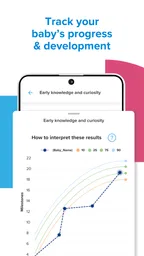
- Progress tracking helps families follow developmental milestones over time.
- The library covers several areas of early childhood development.
- A family-friendly interface makes activities easy to browse.
What could be better
- Some features require a paid subscription.
- Activity recommendations may not replace professional developmental advice.
- The app requires personal information about a child to tailor suggestions.
- Families may need to provide regular updates for relevant recommendations.
- Access to activities depends on having a compatible mobile device.





