



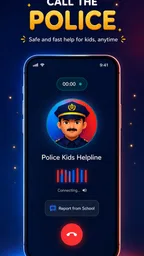


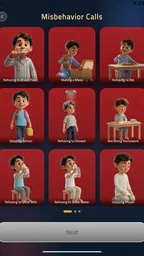
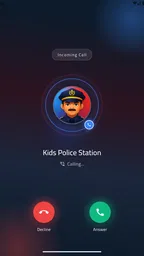
Kids Police: Fake Call Prank review
 Analysis by Appsdrops
I can see why Kids Police: Fake Call Prank might catch a parent’s eye: it offers a quick, playful way to interrupt a familiar household standoff. But a pretend police call is a delicate tool. It can turn a tense moment into a laugh, or make a child feel frightened and watched. My view is that this parenting app is worth considering only when the adult treats the call as make-believe, uses it sparingly, and keeps the relationship—not the prank—at the center.
A playful idea with a serious boundary
Made by Wari Forge, this free parenting app is built around fake police calls for children, with behavior rewards and discipline as its intended setting. Its appeal is easy to understand: a parent can reach for a playful interruption when ordinary reminders are being ignored. That is a very different proposition from a parenting guide or a behavior-tracking system. The app’s central device is a staged call, so whether it helps depends less on the novelty itself than on how an adult frames it.
I would not treat a simulated call as proof that a child has done something wrong, or as a substitute for explaining a rule. A child may take an authority figure literally, especially when upset or very young. If I were using this with my family, I would make clear that the caller is pretend and that the goal is to help everyone reset—not to threaten punishment. That small distinction changes the experience from intimidation into shared play.
The app is in the parenting category and is rated for Everyone. That broad age label does not mean every child will respond well to the concept. A confident older child may recognize the joke immediately, while a sensitive child might worry about getting in trouble. I would judge suitability by the child’s temperament and understanding, rather than assuming the same approach works for every family.
Where it may fit into an ordinary day
Picture a child who has been asked several times to put away toys before dinner. A parent could use a pretend call as a light cue to pause, then follow it with a calm, specific request: “Let’s put the blocks in the box together.” The useful part is not making the child obey a fictional officer; it is creating a brief break in the argument and moving quickly to a doable next step.
That is also why I would reserve it for occasional, low-stakes situations. If the call appears every time a child resists, its novelty may wear off, and the child may start waiting for the performance rather than responding to ordinary guidance. A practical approach is to agree on a small set of situations where a playful reset is acceptable, then use direct conversation, choices, or a routine for everything else.
What the current release tells me
The current version is 2.0.3, and the app was released on March 31, 2026. Those facts give a useful snapshot of where the product stands, but they do not by themselves show what changed between releases. I wouldn’t infer new call scenarios, improved controls, or added parenting tools from a version number alone. The soundest expectation is simply that this is the version users can assess now, rather than a promise about what may arrive later.
There is some evidence of an audience: the app has more than 100,000 installs and an average rating of 4.5 from around 820 ratings. Those figures suggest that many people have tried it and that the overall response has been favorable. They cannot tell me whether it suits a particular child, or whether families use it as a joke, a reward cue, or a serious discipline tactic. I would treat the rating as a reason to take a look, not as a parenting recommendation.
For existing users, a newer version number is most meaningful when it brings a change they can actually notice in daily use. Since the confirmed version information alone does not establish specific changes, I would avoid assuming that an update has altered the app’s approach. If you already use it, compare what you experience after updating with your own needs: does the call remain easy to use, does your child still find it playful, and does it support a conversation afterward? Those are more useful measures than the number attached to the release.
The trade-off against familiar parenting tools
Compared with a reward chart, a pretend call is immediate and theatrical. A chart can make expectations visible over time, while a staged call offers a momentary interruption. Compared with a calm reminder or a choice between two acceptable tasks, the call may feel more entertaining, but it also places an invented authority figure in the exchange. For building habits, I would generally prefer a predictable routine or a reward system that shows the child what they can do next.
That does not make the app pointless. Some families may find that humor helps shift a stuck interaction, particularly when the child already enjoys pretend play and understands the call is fictional. The trade-off is that an amusing trick can become a shortcut around explaining boundaries. If a child asks whether the police really know about their behavior, that is a cue to stop the act and reassure them—not to intensify the performance.
A useful workflow is to decide the purpose before opening the app. Is this meant to prompt a transition, celebrate a positive choice, or break a cycle of arguing? Pick one goal and make the next step concrete. For example, after the playful interruption, offer a simple choice such as putting away the toys now or after one last song. This keeps the parent in charge of the real expectation and avoids leaving the child to guess what the fictional caller wants.
Limits worth considering before you rely on it
The idea itself creates a limitation: a fake police call can blur the line between pretend and real authority. It may be unsuitable for children who are anxious, easily startled, or already worried about police or punishment. I would also skip it during a genuine meltdown. A child who is overwhelmed needs reassurance and help regulating, not another surprise that could raise the intensity.
It is also not a replacement for consistent discipline. If one parent uses the call as a joke and another presents it as a real consequence, the child may become confused about what is true and what is expected. Before trying it, caregivers should agree on the framing and the boundaries. The adult should be ready to explain the fiction plainly and move back to a real-world conversation as soon as the child seems uneasy.
The app is free to download, with in-app purchases listed from $2.99 to $39.99 per item. That makes it sensible to inspect the available options and costs in the app store before buying anything. I would not pay for extras simply because the premise sounds entertaining; first decide whether this style of interaction actually suits your child and whether you would use it beyond a novelty moment.
Kids Police has five written reviews alongside its larger pool of ratings. That difference is a reminder that a score can give a broad impression while offering limited detail about how families use the app. I would test the basic idea cautiously, notice the child’s reaction, and make my own judgment rather than relying on a headline rating to settle a question about behavior and trust.
Who is likely to appreciate it
I can see this working best for parents who already use humor and pretend play, and whose child can comfortably distinguish a joke from a real emergency. It may be useful as an occasional transition cue when the household mood is light and the task is small. In that setting, the app’s specific premise gives a parent another way to get a child’s attention, while the follow-up still comes from the adult.
I would steer away from it if your child fears authority figures, tends to take pretend threats literally, or needs calm, predictable communication. It is also a poor match if you want a structured behavior program, long-term progress tracking, or advice on handling recurring challenges. A reward chart, a family routine, or a conversation with a qualified professional is a better fit for those needs. The app’s concept is narrow by design; it should not be expected to solve problems that need a broader approach.
As a product, it has a clear identity rather than a wide parenting toolkit. That focus can be a strength for a parent who wants a quick playful prompt, but it also means the adult supplies the judgment, explanation, and follow-through. I would use it only when I can stay present and respond to the child, not as a way to hand discipline over to a phone.
What I would watch as it develops
For anyone following future releases, the most useful things to watch are changes that make the pretend nature and adult role clearer, or that help a parent use the idea without turning it into a threat. Those are hopes, not claims about features already present. I would also look for clear explanations of any paid options and for updates that address practical family concerns, while judging each release by what it actually changes.
My recommendation is cautious and specific: try Kids Police only if your child enjoys make-believe, keep the call obviously playful, and pair it with a real explanation and achievable next step. Wari Forge’s app has drawn a sizable audience and a strong average score, but neither popularity nor novelty makes a staged police call right for every home. Used lightly, it may help a parent reset a minor standoff; used to frighten or control, it can undermine trust. For most families, it belongs in the occasional-tool drawer, not at the center of a discipline plan.
What we like
- Simple controls make it easy for young children to use.
- Pretend calls can inspire imaginative role-play.
- Short interactions suit quick play sessions.
- Police-themed scenarios may appeal to fans of pretend games.
- The prank concept can be enjoyed without complex gameplay.
What could be better
- Fake calls may confuse children about real emergency services.
- Some scenarios could make police seem frightening to younger kids.
- Repeated call sequences may feel predictable over time.
- Children may need adult guidance to understand the pretend premise.
- The app offers limited appeal for older children seeking deeper gameplay.





