


Kids Chores Tracker To Do List review
 Analysis by Appsdrops
Kids Chores Tracker To Do List is aimed at a familiar family problem: a child knows what needs doing, but the reminder, follow-up, and reward all fall back on a parent. I like the idea of putting that routine somewhere the whole household can refer to, rather than relying on shouted reminders or a chart on the fridge. In practice, the app makes most sense for families who want chores to feel visible and trackable, while still keeping a parent involved in setting expectations.
It is a free parenting app from NEATKID KIDS CHORE TRACKER AND REWARD CHART. The app has a 4.3 average from around 1,600 ratings and has passed 100,000 installs. Those figures suggest that families are finding a use for it, but they do not tell me whether its approach will suit every child. The important question is whether a digital chart fits your household better than a paper list or a conversation.
Making a routine easier to see
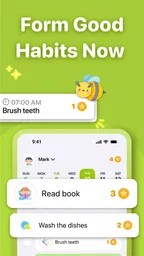
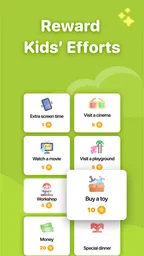
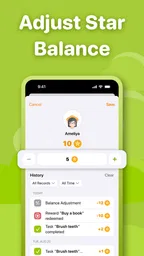
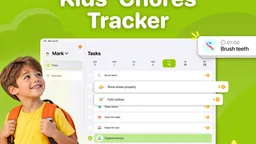
The basic appeal is straightforward: parents can assign tasks, and children can work toward stars and an allowance. That combination gives a chore two clear parts: the job itself and the outcome the family has agreed to attach to it. For a child who responds well to seeing progress, a chart in an app can make an ordinary task feel less abstract.
I would treat the app as a shared routine aid, not as a substitute for deciding what “done” means. Before assigning a task, a parent should explain the expected result in plain language. “Put your toys away” may mean something different to a young child than it does to an adult. A clear, specific instruction is more likely to prevent disputes than adding more items to a list.
The star-and-allowance approach is also worth discussing as a family before the first chore is assigned. Decide whether stars are encouragement, a record of completed work, or a step toward an allowance. If a child expects every small helpful act to earn money, but a parent intended the allowance to cover a fixed set of responsibilities, the chart can create friction instead of reducing it. The useful part is not just tracking chores; it is making the family’s expectations visible.
Where it may fit into a real week
Picture a school morning when everyone is trying to leave on time. A child still needs to pack a bag, put breakfast dishes away, and feed a pet. If those responsibilities have already been agreed and recorded, the child can check what remains instead of waiting for a parent to remember each item. That can reduce repeated prompting, especially when the same jobs recur as part of a household routine.
Evening jobs are a different test. A parent may be busy cooking while a child is expected to clear the table. A visible record can help the child remember the task, but it cannot resolve every disagreement about whether it has been completed properly. I would use a quick check-in at the beginning—what counts as finished, and who confirms it—rather than turning the app into a courtroom after dinner.
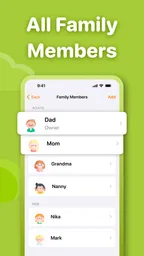
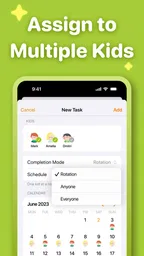
For a family with several children, the key is to keep each child’s responsibilities understandable. A long list can look organized to an adult yet feel like a wall of demands to a child. Start with a small number of meaningful tasks, see whether the routine holds, and only then add more. That is a practical way to judge whether the app is helping without confusing a burst of early enthusiasm for a lasting habit.
What the digital chart changes—and what it does not
Compared with a paper chore chart, an app offers a more convenient place to check progress when the family is away from the fridge or whiteboard. A paper chart, however, is always in view if it is placed in a busy spot, requires no device handoff, and can be easier for a young child to understand at a glance. If your family already uses a paper system reliably, switching to a phone-based one may add another thing to manage rather than solve a problem.
Compared with a simple reminders or to-do app, this one is more specifically framed around children’s chores and rewards. A general checklist may be preferable if your main need is assigning errands among adults, coordinating schedules, or managing a large set of household projects. The parenting-focused approach is more appealing when the goal is to help a child take ownership of a manageable routine, not to build a comprehensive household management system.
There is a trade-off in using stars and allowance together. A reward can make progress tangible, but it may also shift attention from contributing to the family toward earning something for every task. I would reserve rewards for responsibilities where that arrangement feels right to the parent, and talk through which household contributions are simply part of living together. The app can help show the plan; it cannot make that decision for you.
Keeping the experience manageable during busy moments
The most demanding moment for any chore tracker is not necessarily a long list on screen. It is the handoff between parent and child: a parent has to set a task, the child has to understand it, and someone needs to recognize completion. If those steps are already part of the family’s rhythm, the app has a clear role. If adults are entering chores while rushing out the door or changing reward rules from day to day, the digital chart may simply make an inconsistent routine more visible.
One approach I would try is a short weekly planning conversation. Choose the responsibilities that matter for the coming days, agree on what counts as complete, and keep the reward terms steady for that period. This avoids repeatedly editing the plan in response to every missed task. It also gives a child a fair chance to remember the routine instead of feeling that the rules have changed midweek.
Another useful distinction is between reminders and accountability. A chart can help a child see what is expected, but a parent may still need to show how to do a task, especially when it is new. For example, “tidy the room” is much less actionable than separating toys, books, and clothes into familiar places. I would use the app to record a task after teaching it, not as the first explanation of an unfamiliar job.
Reliability depends on the routine around it
I would not judge this app solely by whether a child earns stars quickly. A chore system is more dependable when tasks are realistic, expectations stay consistent, and the parent-child conversation does not disappear behind a screen. If a child disputes a completion mark, settle the disagreement calmly and clarify the standard for next time. Treating every missed task as a failure of the app misses the human part of the process.
For recovery after a missed day, I recommend returning to the next agreed task rather than piling yesterday’s unfinished chores onto today’s list. That is a practical household rule, not a special app feature. It prevents the chart from becoming discouraging and makes it easier to distinguish a one-off lapse from a routine that needs adjusting. If the same job keeps being missed, consider whether it is too vague, poorly timed, or simply not appropriate for the child yet.
Families should also decide who is responsible for checking the chart. If one parent assumes the other is reviewing progress, the record may stop reflecting what is happening at home. A quick, regular check by the adult who manages the routine can keep expectations aligned. The app may make the plan easier to consult, but the family still supplies the consistency that gives it meaning.
Device fit, cost, and who should choose another option
The app is listed for Android devices running version 7.0 or later, so an older device below that requirement is not a suitable choice. The age rating is Everyone, which is useful context for parents considering a family tool, though an age label does not determine whether a particular child is ready to use a phone responsibly. I would decide whether the child will use the app directly or whether a parent will manage it, based on the family’s device habits and the child’s age.
It is free to download, with in-app purchases ranging from $3.99 to $69.99 per item. I would check the purchase choices in the app store before building a routine around it, and decide in advance whether any paid option is worthwhile for your family. A free starting point makes it easier to try the basic idea, but the presence of purchases means “free” should not be taken to mean that every possible option comes at no cost.
The current version is 3.5.10. I would keep the app updated through the usual app-store process, as with any family utility, but I would not assume that an update alone guarantees a smooth experience on every device. If you are choosing a chore system for a household that depends on a shared tablet or an older phone, first check that device compatibility and consider whether a paper chart would be more dependable for your day-to-day setup.
This is not my first choice for a family that dislikes screen-based routines, wants a plain checklist with no reward framing, or needs detailed coordination across adults. It may also be a poor fit if a child finds stars stressful or starts judging their contribution only by what they can earn. In those cases, a paper schedule, a basic shared list, or a direct conversation about responsibilities may work better and demand less upkeep.
My performance verdict for a household routine
As a parenting app, Kids Chores Tracker To Do List has a focused job: make children’s responsibilities and the family’s reward arrangement easier to keep in view. I would expect the experience to feel useful when the list is short, the tasks are clear, and adults keep the rules stable. I would not promise that it will make a child more independent by itself, or that adding more chores will make the system more effective.
Its practical strength is the connection between a task, visible progress, and a reward that a family can discuss. Its main limitation is the same one shared by every chore chart: it cannot teach a task, resolve an unclear expectation, or motivate every child in the same way. Those are not reasons to avoid it, but they are reasons to start small and assess whether the approach improves your household’s routine rather than assuming it will.
For a family already looking for a child-focused digital chart, I think it is worth trying with a modest set of responsibilities and an agreed reward plan. Give the routine enough time to show whether the child checks it without constant prompting and whether the parent’s follow-up becomes simpler. If it creates more negotiation than clarity, switch back to paper or a basic checklist without guilt. My recommendation is to use it as a practical aid for shared expectations, not as a replacement for parenting or a guarantee of cooperation.
What we like
- Colorful visuals make chore lists more appealing to children.
- Recurring chores help families build consistent routines.
- Parents can tailor tasks to suit each child's age.
- A shared view can clarify who is responsible for each task.
- Task completion provides children with a sense of accomplishment.
What could be better
- Younger children may need help navigating the app.
- Families must enter chores before the tracker is useful.
- Notifications may add noise to a busy household.
- Children may lose interest if rewards feel repetitive.
- Tracking chores digitally may not suit every family's routine.





