


JunkRemover review
 Analysis by Appsdrops
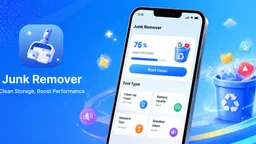
Phone-cleaning tools appeal to me most when they make a cramped device feel manageable without turning maintenance into another chore. JunkRemover is aimed at that simple need: it is a free Android tool from QFD CONSULTANTNS ( PRIVATE ) LIMITED, with a focused cleanup purpose rather than the broader mix of utilities found in some competing apps. That narrow scope can be useful if you want a straightforward place to start, but a cleanup button is only helpful when you can understand what it will do and decide whether the result is worth the effort.
Finding your way around a simple cleanup task
The app’s name and purpose make it relatively easy to understand why you might open it. Its store description presents cleanup as a one-step task, which is appealing when you are already dealing with a full phone and do not want to learn a complicated set of tools. In my view, that simplicity is the main point to assess: does the experience help you make a considered choice, or does it encourage you to tap quickly without checking what is being removed?
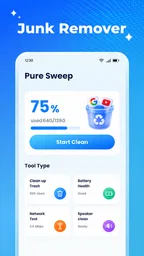
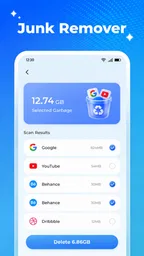
For readable navigation, the most useful cleanup screen is one that makes its main action obvious while keeping the consequence of that action understandable. I would approach JunkRemover as a focused utility, not as a file manager or a detailed storage-analysis workspace. If you need to inspect folders, compare large files, or decide manually which photos to archive, a dedicated file-management tool or the phone’s built-in storage settings will usually be a better fit.
That distinction matters for people who prefer uncluttered interfaces, including users who find dense dashboards tiring. A single-purpose tool can reduce the number of choices to process. At the same time, minimal navigation is not automatically clear navigation: users still need to know what the app has identified and what a cleanup action means before confirming it. I would make a habit of pausing at any review or confirmation step rather than treating the app’s central action as an instruction to clear everything.
The app is listed at version 1.1.2, and its minimum Android requirement is version 9. Those details make it possible to check basic compatibility before installing, which is especially useful if you are maintaining an older phone or helping someone else set up a device. The age rating is Everyone, but that describes the store’s content classification; it is not a guarantee that every screen or interaction will suit every user.
What a one-step approach is good for—and what it cannot replace
Compared with the storage tools already built into Android, a dedicated cleaner offers the appeal of a task-specific starting point. The built-in settings are often the more cautious choice when you want to see storage categories or manage files with the phone’s own controls. A cleaner can feel more direct when your goal is simply to look for removable clutter. I would not assume, however, that an app’s cleanup label means it can identify every kind of unwanted content or safely make every decision for you.
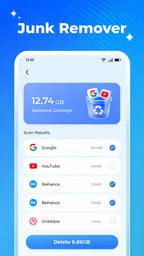
A practical workflow is to open the app when you have time to review its findings, rather than in the middle of a rushed task. If it presents items for review, inspect those before acting; if your goal is to free space for a particular download, check the phone’s storage afterward so you can tell whether the change was useful. This small before-and-after habit gives you a clearer sense of whether the app is helping, without relying on a dramatic-looking scan result.
Touch, attention, and sensory comfort
Cleanup apps are usually used in brief bursts, but short interactions still need to be forgiving. Anyone with limited dexterity may benefit from taking care not to tap a prominent cleanup control before understanding the screen around it. If controls are crowded or a confirmation is easy to miss, the phone’s native settings may be a safer route, since they can provide a more familiar context for managing storage. I would also avoid handing the phone to someone else with the app already open on a consequential screen unless the next action is clear to them.
For people who are sensitive to visual clutter, a focused tool may be easier to approach than an all-in-one utility filled with unrelated panels. But I would not treat a sparse screen as proof of good accessibility. Readability depends on practical details such as text size, contrast, spacing, and whether important information remains understandable when the display is adjusted. If you use system text scaling or other display settings, check the app’s screens before relying on it for an important cleanup.
Sensory needs also include the pace and tone of an interaction. A maintenance tool should let you work calmly rather than make a storage warning feel urgent. My advice is to use JunkRemover when you have a moment to look through the task, not when you are distracted, in a noisy environment, or trying to complete something immediately. The less attention you can give the screen, the more valuable it is to postpone a cleanup that involves deleting or changing files.
Using it in everyday situations
Imagine you are about to record a family event and your phone warns that storage is tight. A cleaner may be a convenient first stop, but I would not make it the only step. Check whether the space problem comes from large videos, offline downloads, or other files you actually want to keep. If the biggest items are personal media, a manual review and backup are more appropriate than a broad cleanup pass. That workflow helps avoid the common mistake of treating every large file as junk just because the phone is short on room.
Another useful situation is helping a relative who wants an uncomplicated way to maintain an Android phone. A focused app can be easier to explain than a long tour through settings, especially if the person is comfortable with a clear, repeatable routine. I would still demonstrate the steps together and ask them to read any review screen before confirming an action. If they have difficulty seeing small text, distinguishing controls, or managing touch input, do not assume the app will solve those barriers; test it with their actual display preferences and consider the phone’s built-in controls instead.
JunkRemover is also less compelling when storage pressure is caused by one known app or a collection of important files. In those cases, opening the relevant app’s own storage controls, moving files deliberately, or backing up media can give you more control than a general cleaning workflow. A cleaner is best treated as a convenience for a quick check, not as a substitute for understanding what occupies your phone.
Where the experience may still create friction
The central trade-off in cleanup software is convenience versus control. The faster an action appears, the more important it is that the app explains the items involved and gives you a meaningful chance to review them. I would skip any cleanup choice that I could not confidently explain to another person. That is especially true for users who share a device, rely on particular downloads, or need saved files available offline.
There is also a difference between reducing clutter and improving day-to-day performance. A cleaner may help with unwanted files, but it should not be expected to fix every cause of a slow phone, weak battery life, or unstable apps. If your actual problem is an app that freezes, a nearly full photo library, or a phone that needs a restart or software maintenance, address that issue directly. The tool’s narrow purpose is a strength only when it matches the problem you have.
The broader reception gives a prospective user some context, but not a guarantee about their own experience: JunkRemover has a 3.3 average from around 1.3 thousand ratings, alongside 64 written reviews. It has passed the one-million-install mark, which suggests that many people have tried it, yet popularity does not tell me whether its cleanup choices will suit a particular phone or a person’s needs. I would use those figures as background, then judge the app by how clearly it presents its own actions.
Because the app is free, it can be reasonable to try if you want a dedicated cleanup tool and your device runs a compatible Android version. I would still approach installation thoughtfully: check the app’s current store details and review the choices presented in the app before allowing any cleanup. Free removes the purchase decision, not the need to consider whether the tool fits your habits and comfort level.
Who I would recommend it to
I would consider JunkRemover for someone who wants a narrowly focused way to begin dealing with phone clutter and is comfortable reviewing a cleanup task before acting. It may suit people who prefer one clear maintenance purpose over a bundle of unrelated tools. The developer is QFD CONSULTANTNS ( PRIVATE ) LIMITED, and the app’s simple positioning makes its role easy to explain: it is for checking cleanup needs, not for replacing careful file organization.
I would recommend a different approach for anyone who needs precise control over individual files, who is unsure what can safely be removed, or who depends on accessible controls that they have not yet tested in this app. Android’s own storage settings are a sensible alternative for people who prefer familiar system-level management; a file manager is better for deliberate sorting; and a backup workflow matters more when valuable photos or documents are at stake. These options may take longer, but that extra control can be worth it.
My overall view is cautiously positive: JunkRemover’s focused purpose may make routine cleanup feel less daunting, especially for someone who wants a simple starting point. Its usefulness depends on the clarity of the choices in front of you and on whether your problem is genuinely removable clutter. For an inclusive experience, I would test readability and touch comfort on the actual device, take time to review each action, and choose Android’s built-in tools whenever they offer the clearer or more controllable path.
What we like
- Quickly identifies junk files that may be safe to remove.
- Simple controls make cleanup easy for first-time users.
- Can help free storage when a device is running low.
- A scan provides a clear overview before files are removed.
- Useful for occasional maintenance without manual file hunting.
What could be better
- Some detected files may still be useful to the user.
- Cleanup results can vary by device and Android version.
- Background scans may consume battery while running.
- Users should review selections carefully before deleting files.
- Cleaning junk cannot replace uninstalling large unused apps.





