
JLab review
 Analysis by Appsdrops
I find JLab most useful when I treat it as a companion for compatible JLab audio gear, rather than as a general-purpose sound tool. It is a free Tools app from JLab Audio, and its job is to make the company’s audio products easier to manage from a phone. That focus is both its main advantage and its biggest limitation: if your headphones or earbuds are supported, one dedicated place can be more convenient than adjusting things by memory; if you use another brand, this app has little reason to stay installed.
What the app is for today
The app’s identity is deliberately straightforward. Its short store description is simply “JLab,” and I would set expectations accordingly: this is an accessory app tied to JLab hardware, not a music player, streaming service, or universal equalizer. The practical question before downloading is not whether you need another audio app, but whether your particular JLab model can use it and whether you want to manage that product from your phone.
JLab Audio has made the app available as a free download, and it is rated for Everyone. It has a 4.1 average from around 4.7 thousand ratings, with over 1 million installs. Those figures suggest a sizeable audience, but they cannot tell you whether a specific headset is supported or whether the app’s controls suit your habits. For that, the model you own matters more than the overall rating.
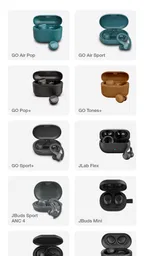
I would start by checking the exact product name and comparing it with the app’s available device options once installed. A brand match alone is not enough: companies often have several generations and product lines, and companion-app compatibility can differ between them. If your device does not appear or cannot connect, the app cannot replace its physical controls or turn an unsupported product into a supported one.
A companion, not a universal audio fix
Compared with a phone’s built-in sound settings, a manufacturer’s companion app has a narrower but potentially more relevant role: it is intended for that manufacturer’s own products. The trade-off is clear. A phone-level equalizer may be available regardless of headphone brand, while JLab’s app is only worth exploring when your JLab hardware is compatible. Conversely, general sound controls cannot necessarily substitute for device-specific management.
I also would not install it expecting a better listening experience automatically. An app can make controls more accessible, but it cannot make every mix, ear tip, or listening environment sound ideal. If you already like your setup and never change its settings, opening a companion app may add an extra step instead of solving a real problem. Its value rises when you regularly switch between listening situations or want a more deliberate way to manage compatible gear.
A sensible everyday example is moving from a quiet morning commute to a desk where you take calls and listen at lower volume. Rather than rely on a setting you vaguely remember changing, you can open the companion app and see what controls are available for your paired JLab product. The useful habit is to make a small, intentional adjustment, listen briefly, and keep only the change that genuinely helps. That is more reliable than repeatedly changing several controls at once and losing track of what improved the sound.
What the recent version tells us
The current version is 2.0.2.1, and the app was released on May 17, 2023. The most concrete recent product change is broader compatibility with additional models. That matters because support is the threshold feature for a hardware companion: adding more models can make the app useful to people whose devices previously sat outside its reach. It is a meaningful direction for the product, even though it does not mean every JLab product is covered.
For someone considering an update, the compatibility expansion is more relevant than a vague promise of a refreshed experience. If an older device has not been recognized before, trying the current release is a reasonable next step, provided the model is among those now supported. If your device already connects and the controls you need work, the update may not change your daily routine much. I would judge it by whether it improves access to your own hardware, not by version numbers alone.
This is also where I would separate what has happened from what might happen. The app’s development has included an update that extends support to more models. That is evidence of wider device coverage, not a guarantee that all future JLab releases will work with it or that every older product will be added. If long-term compatibility is a deciding factor for you, check the app’s current device choices after installing rather than assuming the brand name settles the question.
How existing owners can get more from it
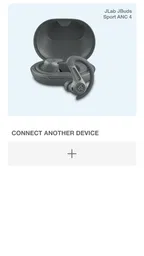
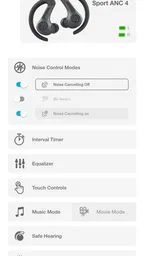
If you already own a compatible JLab product, I would use the app as a setup and reference point, then avoid turning it into a constant chore. First, connect the device and check which controls are actually available for that model. Next, make one adjustment at a time while listening to familiar material. A track or podcast you know well gives you a better comparison than switching between unfamiliar audio, where changes can be hard to judge.
A useful, less obvious approach is to keep your own simple mental baseline: notice how the device sounds and behaves before changing anything, then test a single setting in the situation where you care about it. For instance, a setting that seems pleasant during focused listening may not be the one you want for spoken audio or a noisy journey. Returning to the baseline is easier when you have changed one thing rather than several. This workflow is helpful even if the app offers only a modest set of device-specific controls.
There is also a practical distinction between app dependence and app convenience. If you use your headphones across more than one phone, or lend them to someone, the app on one handset should not be mistaken for a universal control panel that follows the hardware everywhere. I would keep any changes simple enough that the product remains comfortable to use without reopening the app every time. For many owners, the best outcome is a short setup session followed by occasional checks, not constant tweaking.
JLab Audio’s app is most compelling for people who have a compatible product and want to make the relationship between phone and headphones more manageable. It is less compelling for someone who only wants general equalization across several brands. In that case, the phone’s own audio settings or a platform-wide sound tool may be a better fit, because those options are not tied to one manufacturer’s device list.
Where the experience can fall short
The central limitation is the same one that defines the app: its usefulness depends on hardware compatibility. A person browsing before buying should not treat the app’s availability as proof that a particular JLab model can use it. Check the exact model first, and be prepared for the possibility that the app adds little if your device is not recognized. That is a more important caveat than any broad judgement about the app’s interface.
There is a second trade-off in keeping a manufacturer-specific tool on your phone. It adds another app to manage, and its controls matter only within the supported JLab ecosystem. If you change headphone brands often, use several manufacturers, or prefer to adjust sound once at the operating-system level, a dedicated JLab tool may feel fragmented. I would skip it if your goal is one shared audio setup for every headset you own.
It is also worth being realistic about what app-based adjustments can accomplish. They can help you tailor a compatible listening setup, but they cannot fix a poor physical fit, a worn product, or audio that is badly recorded. If sound quality seems wrong, check the connection and the headset itself before assuming a setting is responsible. Changing multiple controls in response to a problem can make troubleshooting harder, so a clean test with the original settings is often the better first move.
For prospective users asking whether it costs anything, the app is free. For those wondering whether it is suitable for younger users, its content rating is Everyone. It supports Android 7.0 and newer, so an older Android phone below that requirement is not a suitable installation target. These points are useful for deciding whether the phone can run it, but compatibility with the audio product remains a separate question.
Who should install it, and what I would watch next
I would recommend trying JLab to a friend who owns a supported JLab headset or earbuds and wants a direct way to manage that hardware. It is also a reasonable option for someone who has previously ignored companion apps but now wants to see whether model-specific controls make daily listening easier. The free price lowers the commitment, while the compatibility check keeps expectations grounded.
I would steer away from it if you want a universal sound-control app, do not own JLab audio gear, or are perfectly happy using your device’s physical buttons and built-in audio settings. I would also avoid installing it simply because a review score looks reassuring: the average reflects many users and products, not necessarily your particular model or preferred workflow. For a hardware companion, fit with your own device is the decisive factor.
When considering the app’s next steps, I would watch for clear expansion of model support and whether the current release works smoothly with the products people already own. The existing move toward supporting more models is encouraging, but it is better to treat future coverage as something to verify than something to assume. For existing users, the practical test is simple: does the app recognize the device, expose a useful control, and save time compared with handling the same task another way?
Overall, JLab is a focused companion app whose value depends on owning compatible JLab hardware. Its update history shows an effort to broaden that compatibility, and its no-cost access makes it easy to try when your model is a match. I would use it for purposeful device management, not as a replacement for every audio tool on a phone. If you are in the JLab ecosystem, it is worth checking; if you are not, a general phone setting is likely the more practical choice.
What we like
- Connects with compatible JLab earbuds and headphones.
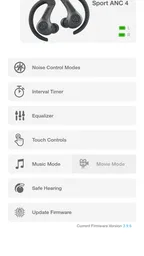
- Lets you customize sound with adjustable EQ settings.
- Offers control over touch gestures on supported devices.
- Can help locate compatible earbuds through the app.
- Provides access to firmware updates for supported products.
What could be better
- Features vary depending on the connected JLab model.
- Some devices may not support every app control.
- A compatible JLab product is required to use the app.
- Bluetooth pairing issues can interrupt setup.
- Settings may reset after reconnecting on some devices.





