



Jerry: Insurance & Car Care review
 Analysis by Appsdrops
Handling insurance and car-related errands can be a lot to juggle, especially when the useful details are scattered across different services. Jerry: Insurance & Car Care brings insurance, roadside help, property tax appeals, and more into one app, giving users a single place to explore several practical needs. My main question while looking at it is not just what the app covers, but how comfortably people with different abilities and routines can make sense of that promise.
A practical starting point for everyday car and insurance needs
Jerry is a finance app developed by Jerry, Inc. It is free to download, intended for everyone, and has been available since October 25, 2017. Its broad pitch is easy to grasp: get help with insurance and roadside assistance, along with property tax appeals and other services. That range could be useful for drivers who would rather begin in one app than search separately for help with every issue.
The app has a 4.4 average from around 18,000 ratings, with roughly 11,000 written reviews, and more than one million installs. Those figures suggest that it has reached a sizable audience, though popularity alone cannot tell me whether its design works equally well for every user. For that, the important questions are whether the information is understandable, whether navigation feels manageable, and whether the app suits people using it under varied conditions.
Readability and navigation: making a broad service feel approachable
Insurance and vehicle-related services come with unfamiliar terms, consequential choices, and plenty of opportunities to feel overwhelmed. A useful app in this area should make the next step understandable without assuming that every visitor already knows the difference between types of coverage or how a particular service works. Jerry’s central appeal is its range of practical assistance; a clear presentation of those options matters just as much as the number of services gathered under one name.
When approaching an app like this, I find it helpful to take one task at a time. Someone who opens it to look for insurance help may not be ready to consider roadside assistance or a property tax appeal in the same visit. Keeping those goals mentally separate can make a wide-ranging service feel less daunting. The value of an all-in-one app depends partly on whether users can identify the relevant path quickly rather than having to understand every offering at once.
Readability also means more than being able to see words on a screen. Plain explanations, familiar labels, and a sensible order can help people who are new to insurance, have difficulty processing dense information, or are simply short on time. I would approach any financial decision with care, read the details presented for the specific service, and avoid treating a short summary as a substitute for understanding the full terms. That habit is useful regardless of experience or reading speed.
Jerry is on a stable footing as a mature product: it has been around since 2017 and its current version is 3.137.1. Still, version history and time on the market do not tell me whether every screen is easy for every person to navigate. What matters in practice is the experience of the individual user. Taking a moment to explore the app’s sections at a comfortable pace is a reasonable way to judge whether its organization suits your needs.
Motor and sensory considerations: different ways of taking in information
People interact with phones in many ways. Some rely on larger text or screen magnification; others use a screen reader, voice input, switch controls, or a combination of touch and audio. Sensory preferences vary too: one person may benefit from concise text, another from a quieter setting, and another from having time to reread instructions. A finance app is more inclusive when its content remains understandable across those different approaches.
Because Jerry brings together several kinds of help, it is especially useful for users to be able to focus on one topic without having to absorb everything at once. If long descriptions are tiring, breaking a task into small visits may be more comfortable than trying to complete every piece of research in one sitting. If visual reading is difficult, users may want to try their device’s built-in accessibility tools and see whether the app’s text and controls work well with them. The experience can depend on both the app and the phone’s settings.
Motor access deserves similar thought. Some people find precise taps difficult, while others experience fatigue or pain during extended phone use. A task that involves several screens, repeated typing, or careful review can feel very different depending on someone’s dexterity and energy. I recommend approaching a complicated insurance or tax-related task when there is enough time to pause, rather than trying to rush through it between other activities.
It is also worth separating an app’s general purpose from what a particular user can comfortably complete inside it. Jerry’s service scope makes it a potentially useful starting point for several common concerns, but individual tasks may involve detailed information and decisions. Users should take breaks when needed and seek assistance from someone they trust if a process becomes difficult to follow. That is not a weakness in the user; it is a sensible way to handle decisions that can affect money and transportation.
Situational access: useful when life does not happen at a desk
Insurance and car-care needs rarely arrive on a perfect schedule. A driver may be planning ahead at home, checking options while away from their usual routine, or trying to understand what kind of help to seek after a stressful event. Having insurance and roadside help represented in the same app can make it easier to begin exploring the relevant kind of support without first deciding which separate service to search for.
In a stressful moment, though, more choices are not automatically better. It can be harder to read carefully or compare options when someone is upset, dealing with a vehicle problem, or under time pressure. I would use Jerry as a place to orient myself and review relevant information, while making safety the priority if a roadside situation is unfolding. A phone task should never distract someone who is driving or dealing with an immediate hazard.
The app may also suit different planning styles. A highly organized user might explore insurance, roadside help, and property tax appeals as separate errands. Someone who prefers minimal digital administration may use it only when a particular need arises. Neither approach requires treating the app as a complete replacement for every other source of information. It can be one tool in a broader routine, used when its services match the task at hand.
Situational access includes emotional and cognitive comfort, too. Insurance language can feel intimidating, particularly for someone new to managing a vehicle or making financial choices independently. A low-pressure approach helps: identify the immediate question, read relevant explanations at a manageable pace, and confirm important details before acting. I value tools that make it easier to start, but users should still feel free to step away and return when they can give a decision their full attention.
Remaining barriers: broad coverage is not the same as easy access
One challenge with an app covering multiple services is that breadth can create complexity. Insurance, roadside assistance, and property tax appeals are different subjects, and each can involve its own terminology and decisions. Users who want a single, simple answer may need to do additional reading before they know whether a particular service fits their situation. An app can bring topics together, but that does not remove the effort involved in understanding them.
Another potential hurdle is the difference between discovering a service and completing a task. A person may be comfortable browsing but find it harder to provide information, compare choices, or make a decision on a small screen. People with limited data-entry ability, low confidence with financial products, or less experience using apps may need more time. It is sensible to move carefully and ask questions when something is unclear instead of assuming that every step will be obvious.
Access can also depend on a user’s circumstances. Someone may have limited connectivity, an older device, a small screen, or little privacy while reviewing personal matters. Those conditions can make financial tasks less comfortable even when the basic app is available. Planning for a quieter moment, using a familiar device, or asking a trusted person to help review information can reduce some of that friction.
Most importantly, no app should be treated as a guarantee that a user’s particular needs will be met. The right choice depends on individual circumstances, and financial or vehicle decisions deserve careful consideration. I would judge Jerry by how well it helps me understand the service relevant to my situation, rather than assuming that its broad range means every task will be equally straightforward for every person.
An inclusive verdict for people weighing their options
Jerry makes a clear case for convenience by gathering insurance, roadside help, property tax appeals, and other assistance under one roof. That combination may be especially appealing to people who want a practical place to begin when car-related and financial errands overlap. Its long presence in the app market and substantial user base make it a familiar option, but the best measure of fit is still whether its content and process work for you.
For readers with accessibility needs, I would treat the app as something to assess with your own device and preferred way of interacting. Try the relevant section at a calm time, check whether text and controls are comfortable to use, and see whether your phone’s built-in tools support the experience. If a task feels crowded or tiring, splitting it into shorter sessions is a reasonable alternative to pushing through.
My overall impression is that Jerry’s broad scope offers a useful starting point, while inclusive access depends on the details of each person’s experience. The app may help users begin exploring several important services in one place, but careful reading and an unhurried approach remain essential. For anyone seeking a more convenient route into insurance and car-care decisions, it is worth considering—especially if its presentation feels clear and comfortable on your device.
What we like
- Keeps insurance documents and car details in one place
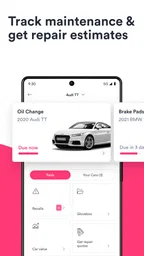
- Offers reminders for important vehicle-related tasks
- Can help users track maintenance and ownership costs
- Provides a convenient way to review insurance information
- Useful for organizing details across multiple vehicles
What could be better
- Available features may vary by location
- Some services may require a paid plan
- Insurance options may be limited to supported providers
- Reminders depend on users entering accurate vehicle details
- Personal and vehicle information must be shared with the app





