




Jellyfin for Android TV review
 Analysis by Appsdrops
I’d recommend Jellyfin for Android TV to someone who wants to watch their own media on a television and is willing to connect the app to a Jellyfin server. The first useful thing to know is that this is not a streaming service with a ready-made catalogue: the app is the TV-side player for a library you manage. Once that distinction is clear, the setup feels much less mysterious, and the app’s purpose makes sense.
What to expect from the TV app
Jellyfin is a free video player and editor-category app, developed by Jellyfin, with a focused role: bringing a Jellyfin media library to Android TV. In practice, it is most relevant to people who already run a server at home or have someone who can help them set one up. If you install it expecting films to appear automatically, you will hit a dead end; the app needs a server to connect to before there is anything to browse.
That server-based approach is the main difference from familiar subscription streaming apps. Those services provide the content and handle the catalogue behind the scenes. Jellyfin instead gives you a way to access your own collection, so you have more control over what is available but also take responsibility for getting the library organized and reachable. I see that as a worthwhile trade for media enthusiasts, but an unnecessary hurdle for someone who just wants to press play on a ready-made selection.
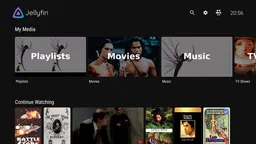
The app is aimed at the television experience rather than phone use. Its place in the Video Players & Editors category can sound broad, but this is not a general-purpose editing tool or a video service. It is a living-room client, designed around choosing something from a server library and watching it on an Android TV device.
Jellyfin has an average rating of 4.4 from around 3,200 ratings, and more than a million installs. Those figures suggest that it has found an audience among people looking for a self-managed media setup. They are useful context, not a promise that every home network or media collection will behave identically.
Who will enjoy it—and who may not
I think it suits viewers who value having their own media in one place, especially if they already use Jellyfin on another device. It can also make sense for a household where one person maintains the library and other people simply want to browse and watch on the TV. The appeal is less about discovering new content and more about making a personal collection convenient to reach from the sofa.
On the other hand, I would steer a first-time user away if they do not want to manage a server or troubleshoot a connection. A conventional streaming app is the easier choice when convenience, a supplied catalogue, and minimal setup matter more than control over a personal library. Jellyfin is not a shortcut around those responsibilities; its advantage begins after the server side is in place.
Getting from installation to a connected library
After installing the app on an Android TV device, the practical next step is to have your server details ready. You will need to know how to reach the Jellyfin server from the TV, and the server needs to be running and available on the network you intend to use. If someone else manages it, asking them for the connection information before you sit down to configure the TV can save a frustrating start.
For a first setup, I would keep the goal modest: connect to the server and confirm that the library appears. Avoid changing several network or server settings at once if the connection fails. First check that the server is running, then make sure the TV and server can communicate, and only then revisit the connection details. This step-by-step approach makes it easier to identify whether the problem is the app, the server, or the network.
A useful, easily overlooked distinction is the difference between having a library and being able to reach it from the TV. A collection may be perfectly organized on the server while the television still cannot connect. When troubleshooting, that means there is little value in rearranging titles or blaming playback before confirming the connection itself. Getting the server visible is the first meaningful success.
For someone setting up a shared household TV, I would also agree on a simple routine with whoever maintains the server: keep it available when people expect to watch, and let them know when the library or connection changes. That small bit of coordination can prevent the app from looking broken when the real issue is simply that the source is not reachable.
The first satisfying moment: play one known title
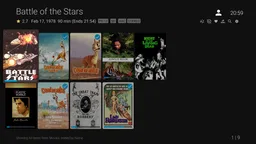
Once the library is visible, choose something familiar rather than spending the first session browsing everything. A title you know is in the collection is a better test: you can tell quickly whether the app has connected correctly and whether playback is working as expected. If that succeeds, you have completed the essential setup. There is no need to perfect the whole library before enjoying the app.
This is also a practical way to separate browsing questions from playback questions. If you cannot find the title, check whether it is present in the server’s library and whether you are looking in the right place. If you can find it but cannot watch it, focus on playback and the server or network path instead. Treating those as separate stages makes troubleshooting more manageable, particularly for a first-time user.
A realistic everyday use is straightforward: one person adds or maintains films and shows on the home server, while another turns on the TV, opens Jellyfin, and picks something already in the collection. That division of work is one of the app’s strengths. It does, however, depend on the server being ready, so it is not quite as effortless as opening a service that handles both content and delivery.
If playback works in one room but not in another, I would compare the connection conditions before changing the library. The TV’s network path and the server’s availability matter to a server-based client. This is a useful trade-off to understand early: Jellyfin brings your collection together, but it cannot make a home network reliable by itself.
Common confusion and realistic limits
The biggest source of confusion is assuming that installing the TV app creates a library. It does not replace the server or supply films and episodes. Think of it as the viewing end of a system: the server organizes and provides access to your media, and the Android TV app lets you browse and watch from the television.
Another common mix-up is treating every failure as a playback bug. If the library is missing, first investigate the server connection. If the library appears but a particular item will not play, that is a different issue and should be approached separately. This simple distinction avoids the unhelpful cycle of repeatedly reinstalling the app when the underlying cause may be elsewhere.
There is also a convenience cost to the control Jellyfin offers. A subscription app usually hides the work of maintaining content and access; with a personal server, somebody has to look after that side. For people who enjoy organizing their own collection, that can feel empowering. For people who see setup and maintenance as chores, it can outweigh the benefit.
The age rating is Everyone, and the app is free. That makes it easy to try on a compatible Android TV setup without paying for the app itself, but “free” does not mean the entire arrangement is automatic: you still need a working Jellyfin server and media to watch. I would judge whether it is right for you based on that setup, not just on the download cost.
How it compares with other ways to watch
Against mainstream streaming apps, Jellyfin is less immediate but gives you a different kind of ownership and organization: you are accessing a personal library rather than choosing from a service’s catalogue. If you mainly want recommendations and a large ready-to-watch selection, the usual streaming alternatives are likely a better fit. If your priority is watching media you already manage, those alternatives may not solve the same problem.
Compared with using a general video player directly on another device, the Android TV app is more naturally suited to a television and a shared viewing routine. The server model can centralize a collection rather than making every viewer hunt through files on separate devices. The trade-off is that this central point has to be reachable; a straightforward local player may be preferable for someone who only wants to open an individual file with as little infrastructure as possible.
I would also think about who handles the setup. For a technically confident person, preparing the server once can make TV viewing feel simple afterward. For a household without someone willing to take that role, a service that manages its own content may be kinder to everyone involved. Neither choice is universally better; they solve different problems.
Version, compatibility, and a sensible next step
The current version is 0.20.0, and the listed minimum Android requirement is 6.0. The app was released on July 25, 2019, and remains a focused option for Android TV users who want a client for their Jellyfin library. When deciding whether to install it, I would first check that the TV runs a compatible Android version and that you can reach a Jellyfin server from it.
My recommended next step is simple: install the app, connect to a server you know is available, and play one familiar item. If that works, explore the rest of your library at your own pace. If you do not yet have a server, decide whether you actually want to maintain one before investing time in the TV app. That choice is more important than any menu detail.
Overall, I find Jellyfin for Android TV a sensible, no-cost choice for people who want their own media on the big screen and are comfortable with the server behind it. Its first-run experience is only reassuring once you understand that the app is one part of a larger setup, but a successful connection and one working title make the purpose immediately clear. If you want a ready-made streaming catalogue, choose a conventional service; if you want a TV doorway into a library you control, this is worth trying.
What we like
- Browse and play media from your personal Jellyfin server.
- Supports multiple user profiles with separate viewing progress.
- Offers subtitle selection and playback controls.
- Works with Android TV remote controls.
- Open-source software avoids a mandatory subscription.
What could be better
- Requires a Jellyfin server with media already available.
- Setup can be challenging for less technical users.
- Playback quality depends on server speed and network stability.
- Some formats may need server-side transcoding.
- The interface may feel less polished than major streaming apps.





