
JBL One review
 Analysis by Appsdrops
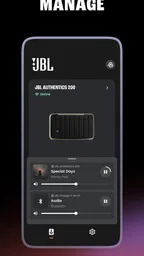
In a shared home, a speaker can be everyone’s device without everyone wanting the same setup. I find that’s where JBL One makes the most sense: it gives JBL owners a central app for managing compatible speakers and soundbars, rather than making each person rely on the speaker’s buttons or hunt through separate controls. It is a free Music & Audio app from Harman Consumer, Inc., and its purpose is practical rather than social: keeping supported JBL gear under control. It’s most useful when the household already uses compatible JBL equipment; it is not a general remote for every speaker in the room.
One shared speaker, several listening habits
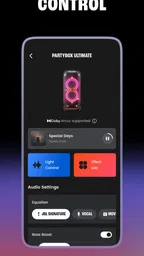
Picture a familiar evening: one person is listening to music in the kitchen, someone else wants the living-room soundbar ready for a show, and a guest asks how to use the PartyBox. JBL One can make the app side of that arrangement less scattered because it is designed to control JBL Wi-Fi and Bluetooth speakers, soundbars, PartyBox models, and BandBox models. Instead of treating those products as unrelated gadgets, it gives owners one place to work with the supported equipment.
That convenience has a clear boundary. The app is about controlling JBL devices, not coordinating every brand or every person’s listening. If your home mixes several audio brands, you’ll still need their respective apps or hardware controls. I’d treat JBL One as a household’s JBL control point, not as a universal audio dashboard.
For a shared device, the practical benefit is not simply having another app. It is reducing the number of little decisions people face when they want to use a speaker: which control to open, which device they are trying to reach, and whether the speaker they want is one the app is meant to manage. The more compatible JBL equipment the household has, the more useful that single point of access can become.
Where a central control app helps—and where it doesn’t
JBL One is a better fit for a home where people regularly use more than one compatible JBL product than for someone who owns a single speaker and rarely changes its setup. With one device, physical controls may already feel straightforward. With a soundbar in one room and a portable speaker used elsewhere, an app-based control route is easier to justify, especially when the same person is responsible for keeping the equipment ready for everyone.
There is also a useful distinction between controlling a speaker and managing household listening. A central app may help someone find the relevant JBL equipment, but it should not be mistaken for a family calendar, parental-control system, or shared playlist organizer. If the main problem is agreeing on what to play, people will still need to handle that separately. JBL One is about the equipment, not household etiquette.
Getting the setup ready without overcomplicating it
Before relying on the app, I’d first check that the exact speaker or soundbar model is among the JBL products it supports. JBL’s product families include devices with different roles, and the broad compatibility description does not mean every JBL-branded item works the same way. Confirming the model before building a household routine around the app avoids the frustration of expecting a device to appear or behave like another one.
It is also worth thinking through who will handle initial setup and ongoing changes. In many homes, one person is more comfortable managing audio equipment, while others simply want to turn on a speaker and listen. Keeping that responsibility clear can make a shared setup easier: the person who knows the system can make adjustments, while other listeners can use the controls they already understand. I would not assume that installing the app automatically settles who can access or change anything; households should agree on how they want to manage the device.
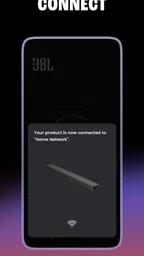
Bluetooth and Wi-Fi are both part of the product’s stated scope, but those connection types serve different practical situations. If someone is taking a compatible portable speaker away from the usual listening area, Bluetooth may be the relevant way to use it. For equipment used as part of a home setup, Wi-Fi may be the connection context. I’d avoid treating these as interchangeable in every moment: consider where the speaker is, what connection it is using, and whether the person operating it is working with the intended JBL device.
A simple household tip is to decide on a consistent name or verbal reference for each speaker before several people start using them. Even without assuming any particular naming feature in the app, calling the kitchen speaker “the kitchen JBL” in conversation can reduce mix-ups when someone asks for help. The useful insight is that shared audio friction often comes from people talking about different devices, not from complicated sound controls.
Coordination is a household habit, not an app feature
When several people use the same equipment, a little coordination can prevent small annoyances. I’d agree on who is responsible for changing settings, whether a portable speaker should be returned to its usual room after use, and how guests should ask before changing something that affects the next listener. Those habits matter more than expecting a control app to resolve disagreements automatically.
For a family, the app can be part of the practical routine: one adult can keep track of the compatible JBL gear, while children or guests use the speaker in ways the household has already agreed on. That is not the same as a built-in child account or a permission system. I would not rely on JBL One to separate household members or enforce different levels of access. If those boundaries matter, set them through the household’s own rules and the relevant device or service settings.
In a shared living space, it can help to decide what “ready for the next person” means. For a portable speaker, that may mean putting it back where others expect to find it. For a soundbar, it may mean leaving the television setup in a familiar state. JBL One’s value here is that the person responsible for JBL equipment has an app-based way to work with it; the app cannot replace a quick handoff or clear communication.
Age, trust, and who should manage access
The app is rated for Everyone, which is reassuring as an age-context label, but I would not read that as a promise of family controls or a guarantee that every use case suits every child. It is an equipment-control app, so the more relevant household question is who should be able to adjust shared audio devices. Parents or guardians can decide whether children should use the app themselves or simply ask an adult to operate it.
For guests, I’d keep the distinction between using a speaker and managing the household’s audio setup. A visitor may only need to play something through the connection method the owner chooses. They do not necessarily need to take on responsibility for the app or the broader set of JBL devices. Keeping the household’s main setup under the care of one or two trusted people can make troubleshooting simpler, particularly when several rooms or product types are involved.
That approach is less about restricting people and more about avoiding accidental changes. If a speaker is shared, it is reasonable to tell younger listeners which device is theirs to use and whom to ask when something does not work. JBL One can support the person who manages the equipment, but trust and supervision remain household decisions.
How it compares with the usual alternatives
Compared with using only physical buttons, JBL One offers an app-based route for controlling supported JBL products. Buttons are still appealing when someone wants a quick, direct action without reaching for a phone. The app is more compelling when the household has multiple compatible JBL devices or when the person responsible for the setup prefers to manage equipment from one place.
Compared with a general smart-home app, JBL One is narrower and more JBL-specific. That focus can be a plus if the home relies on JBL speakers, a soundbar, or PartyBox and BandBox models: the app’s job is easier to understand. But if the household expects one control center for lighting, televisions, speakers from different brands, and other connected devices, a broader smart-home platform may be a better match for that goal.
It also differs from a music-streaming app. JBL One is not best judged by the size of a music catalog or by playlist discovery. If the main need is finding songs, a streaming service is the more relevant tool. If the problem is controlling compatible JBL audio equipment, JBL One is the more focused option. Keeping those jobs separate helps set realistic expectations and avoids downloading it for a purpose it is not designed to serve.
Who should install it, and who can skip it
I’d recommend JBL One to someone who owns compatible JBL equipment and wants an app-based way to manage it, especially if more than one person uses the speakers or soundbar. It is also a sensible choice for a household where one person regularly helps others get audio working. The app is free, and its current version is 2.9.4; it requires Android 10 or later on Android devices.
People browsing the app store can see that it has a 4.5 average from around 40,000 ratings, with over 1 million installs. Those figures suggest that it has reached a substantial audience, but they do not answer the most important question for an individual household: whether its exact JBL model is supported and whether the app’s control approach suits the way the device is used.
I’d skip it if you do not own a compatible JBL product, if you prefer physical controls for a single speaker, or if you need a universal control app for a mixed-brand home. I’d also avoid expecting it to organize family accounts, set listening rules, or decide who gets the speaker next. It is a focused tool, and its usefulness depends on having the right JBL equipment and a practical reason to control that gear through an app.
My household verdict
As a shared-home tool, JBL One makes the most sense when the household wants one JBL-focused place to work with compatible audio equipment, while keeping expectations grounded. It can help the person responsible for a soundbar, speaker, PartyBox, or BandBox manage the devices they own, but it does not replace communication between listeners or provide a complete household-management system.
Harman Consumer, Inc. released it on June 13, 2022, and the app remains a straightforward choice for JBL owners who want app-based control rather than relying on buttons alone. My recommendation is simple: check your model, decide who will look after the setup, and install it if that control workflow solves a real problem in your home. For a compatible JBL household, JBL One is a useful shared tool; for everyone else, a device’s own controls or a broader platform may be the better fit.
What we like
- Controls compatible JBL speakers and soundbars from one app.
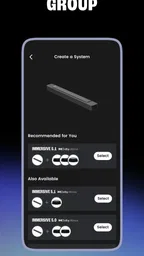
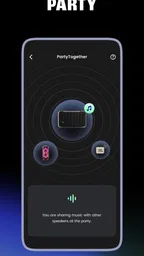
- Makes it easy to group speakers for synchronized playback.
- Offers quick access to supported music streaming services.
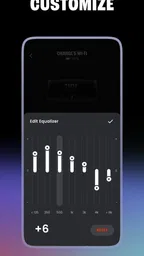
- Includes speaker settings for adjusting sound to your room.
- Can manage compatible devices over Wi-Fi without Bluetooth pairing.
What could be better
- Only works with select JBL models and newer products.
- Some features require a JBL account and an internet connection.
- Setup can be confusing when a device does not appear automatically.
- Streaming service availability varies by region.
- Firmware updates may take time and interrupt device use.





