
JBL Headphones review
 Analysis by Appsdrops
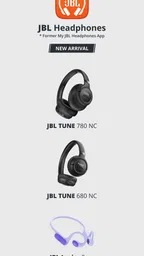
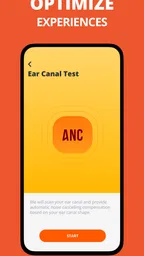
If you use JBL headphones, the JBL Headphones app is a free companion worth considering for managing your listening experience. Its promise is simple: give JBL headphone users an app focused on music and audio, rather than asking them to rely on a general-purpose tool. I like that straightforward approach. The app has a sizeable audience, but its appeal ultimately depends on whether you own compatible JBL headphones and want an app alongside them.
What you get without paying
JBL Headphones is free to download, so trying it does not require an upfront purchase. That is the clearest point about cost: access to the app itself is free. It does not mean that every JBL product is free, nor does it establish anything about optional purchases or costs associated with headphone ownership. For someone who already has JBL headphones, the app is an easy way to explore the brand’s companion software without adding a download price to the decision.
That distinction matters when judging value. A free app can be useful, but “free” alone does not tell me how well it fits a particular person’s setup. I would first ask whether JBL headphones are already part of my daily routine and whether I want a dedicated app to go with them. If the answer is yes, the barrier to trying it is low. If I do not use JBL headphones, the brand-specific purpose is a reason to look elsewhere rather than install it just because it costs nothing.
The app is listed as suitable for everyone, and its minimum operating system requirement is 7.0. Those details help frame who can consider it, though device compatibility still matters in practice. The app’s current version is 5.38.2, and it has been available since November 6, 2015. Together, those basics establish that this is a long-running companion app, not a new product whose presence in the app store is still untested.
A focused companion, not a universal music player
The description positions the app around redefining the music experience with JBL Headphones. I read that as a focused companion for people interested in JBL’s headphone ecosystem, not as a replacement for every music service or audio app they might already use. That difference keeps expectations sensible: the central question is whether you want JBL-related app support, not whether this single download can take over your entire music setup.
Because the app’s identity is tied to a hardware brand, ownership is the first practical consideration. A person who regularly listens through JBL headphones is much more likely to see a reason to keep the app around than someone who uses a different brand. I would treat that as the main filter before judging any companion app: does it match the devices I actually use? If it does, free access makes a trial feel low-risk. If it does not, the app’s broad popularity does not automatically make it relevant to me.
Where the value comes from
For me, the value proposition rests on convenience and fit. A dedicated companion app can make sense when it is connected to a product already in someone’s life. Rather than paying merely to gain access, users can try this app without an upfront app charge and decide whether it belongs in their routine. That makes the cost side simple, while leaving the usefulness side personal: it depends on how much someone wants a JBL-focused place alongside their headphones.
The app’s reach suggests many people have taken an interest in it. More than 50 million installs is a substantial audience for a headphone companion, and a 4.6 average from around 817,000 ratings indicates that its reception is generally positive. I would take those figures as useful context, not a guarantee. A strong average cannot tell me whether the app suits my exact headphones, phone, habits, or expectations, so I would still make the decision based on my own setup.
There are also around 14,000 written reviews, giving prospective users a sizeable pool of opinions to consult in the app store. I find written feedback most useful when it reflects a situation similar to mine: the same kind of device, a similar phone, or comparable listening habits. Broad popularity can help establish that an app is widely used, but personal relevance is what makes it valuable day to day.
Tradeoffs to weigh before installing
The biggest tradeoff is that this is a brand-specific app. That is a strength for the right audience, because it keeps the purpose tied to JBL headphones. At the same time, it narrows the group most likely to benefit. If I do not own JBL headphones, or do not plan to use them, I would not install the app expecting it to deliver a general music experience on its own. The product name and store summary both point toward a companion role.
Another sensible tradeoff is expectation-setting. The phrase “redefine your music experience” is broad, but I would not take a promotional summary as a detailed promise about particular tools or results. I would approach it as an invitation to explore the app with JBL headphones, then judge whether that combination is useful for me. That avoids assuming specific functions or outcomes before I have checked the app’s current information and tried it with my own devices.
Compatibility deserves a quick check as well. The stated minimum operating system is 7.0, but the version requirement by itself does not settle every device-specific question. Before relying on the app, I would make sure my phone and headphones are supported by the current app experience. This is ordinary housekeeping for any companion app, especially one intended to sit between a phone and a particular product ecosystem.
Finally, free access should be read precisely. It means the app is free to download; it does not tell me what any separate hardware costs or settle every possible expense connected to using JBL products. If I am choosing headphones as well as an app, I would consider those decisions separately. The app’s price is an advantage for exploring the companion software, but it is not a complete measure of the cost of building a listening setup.
Who is most likely to find it useful?
I would put current JBL headphone owners at the top of the list. They already have the product that gives the app its context, and they can decide for themselves whether a dedicated companion fits their habits. Since the app costs nothing to download, there is little financial risk in giving it a try. The more interested someone is in keeping their listening tools connected to the JBL brand, the more reasonable the app is to explore.
It may also suit people comparing headphone ecosystems who want to learn what companion software is available before settling on a brand. In that case, I would treat the app as one part of a broader buying decision, not as proof that a particular headphone is the right choice. The best value comes from matching the software to the hardware and to the way I listen, rather than choosing either based on popularity alone.
On the other hand, listeners who do not use JBL headphones have less obvious reason to install it. The app’s identity is clear, and that clarity is helpful: it lets people quickly decide whether the product is relevant. If I wanted a broad music library, a streaming service, or a brand-neutral audio tool, I would look for an app designed for that purpose instead of assuming this companion fills the same role.
My buy-or-skip verdict
My verdict is an easy try for JBL headphone owners and a skip for people who do not need a JBL companion. The app is free, has been around for years, and has drawn a large audience with generally positive ratings. Those points make it a credible option to explore, but they do not erase the most important caveat: the value depends on whether the app belongs with the headphones you use.
I would not pay for something that is free to download, and I would not treat its popularity as a reason to install it without a relevant device. Instead, I would check that my setup is compatible, download it from the app store, and see whether it adds enough convenience to earn a place on my phone. That is a practical way to judge a companion app: start with the free access, then keep it only if it fits.
Overall, JBL Headphones makes the most sense as a no-cost, brand-focused companion for people already invested in JBL headphones. Its appeal is not universal, and the free price does not make it a substitute for a music service or a reason to buy hardware by itself. But if JBL headphones are part of your everyday listening, it is a sensible app to try and evaluate for yourself.
What we like
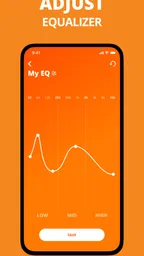
- Adjustable EQ lets you tailor the sound to your preferences.
- Find My Buds can help locate supported JBL earbuds.
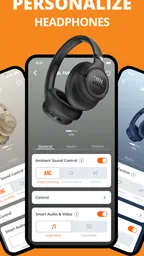
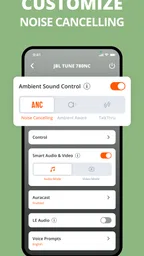
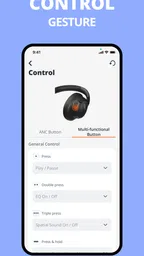
- The interface makes headphone settings easy to find.
- Voice prompts make connection status easier to understand.
- Firmware updates can add improvements for supported headphones.
What could be better
- Many features only work with compatible JBL models.
- Some settings may differ between headphones and app versions.
- Find My Buds may not work if the earbuds are out of range.
- Firmware updates can take time and require a stable connection.
- The app offers limited value if you use headphones from other brands.





