



Invitation Maker-Card Creator review
 Analysis by Appsdrops
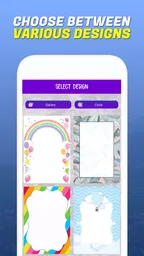
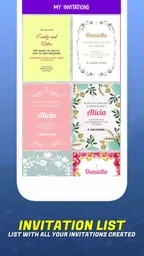
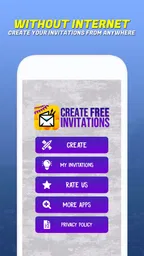
I can see the appeal of Invitation Maker-Card Creator straight away: when a birthday or holiday is coming up, making a personal invitation can feel more thoughtful than sending a bare message, but designing one from scratch is a chore. This is an event-focused app for creating invitation cards for occasions such as birthdays, weddings, and Christmas. In my view, its best role is as a handy creative tool you open when an event gives you a reason—not as an app that needs to occupy your attention every day.
From a quick first try to a real invitation
The first-week appeal is easy to understand. A card-making app turns an otherwise vague task—“I should invite people”—into something concrete: choose a visual direction, add the essential information, and prepare a card to share. That can be especially useful when you want an invitation to feel warmer than a group-chat announcement without taking on a full design project.
The key practical test is not whether a card looks elaborate on screen. It is whether someone receiving it can quickly understand what the event is and what they need to do. I would treat the design as a frame for the important details: occasion, date, time, location, and any useful note for guests. A polished-looking card that hides those basics is less helpful than a simple one that makes them clear.
A realistic use case is a family birthday where plans are settled late. Rather than spending an evening learning a general-purpose graphics editor, I would use an invitation maker to put together a card that feels celebratory, then share it with relatives. The same approach suits a seasonal get-together: a Christmas invitation can establish the mood, while the message itself carries practical details such as when to arrive and whether guests should bring anything.
For a wedding or another high-stakes event, I would be more cautious. A digital card can work well for an informal announcement or a supplementary reminder, but a couple who needs strict print specifications, coordinated stationery, or a carefully controlled visual identity may be better served by a dedicated design workflow or a professional. The app’s appeal is convenience, not a promise that every event’s production needs are covered.
Make the card useful before making it decorative
One non-obvious way to get better results is to write the invitation text before choosing the look. That prevents a common design trap: falling in love with a layout, then squeezing long or awkward wording into it. I would first settle the event details, decide what guests genuinely need to know, and only then shape the card around that message.
I would also make a quick recipient check before sharing. Names, dates, and locations are easy to mistype when attention is on colors and decorations. For an event with several groups of guests, preparing a clear general version first can help; personal notes can then be sent separately rather than cramming every special instruction onto the artwork. These habits matter more than adding visual flourishes.
There is a useful distinction between an invitation and an event-management system. A card can announce a plan and make it feel personal, but guests may still need a separate conversation to confirm attendance or ask questions. I would not rely on the card alone to track responses unless the tools I need are plainly available in the app and suit the event. For a small gathering, that is no problem; for a wedding with complicated logistics, it can become a reason to pair the design with other tools.
Where it fits among the usual alternatives
Compared with typing an invitation directly into a messaging app, a designed card gives the occasion a more deliberate feel. That difference is valuable for birthdays, family celebrations, and seasonal events where a little visual personality helps. Compared with a general graphics editor, an invitation-focused app should feel more approachable for this particular task, while the broader editor is likely the better choice for someone who wants fine control over every element or needs designs beyond invitations.
There is also the option of using a pre-made card from elsewhere and adding the details in a message. That is quicker, but it may feel less personal. I see this app as a middle ground: more considered than a plain text announcement, less demanding than building a full design from a blank canvas. It makes the most sense when that balance is exactly what you want.
Will it still be useful after the novelty fades?
The month-to-month value depends on how often your calendar gives you a reason to make invitations. If you regularly organize birthdays, family dinners, holiday gatherings, or community events, the app can earn occasional repeat visits. If you only host one event a year, it may be useful in bursts and then sit untouched. That is not necessarily a flaw; many event tools are naturally seasonal.
Its category is events, and the developer is Battery Stats Saver. The app has a 4.8 average from around twelve thousand ratings, with more than one million installs. Those figures suggest that people have found a reason to try it, but they do not answer the more personal question of whether it fits your own routine. I would judge it by how quickly it helps you get from an idea to a card you are comfortable sending.
The app is free to install, with in-app purchases ranging from $0.99 to $99.99 per item. That wide span is worth keeping in mind before building a regular workflow around paid options. I would start with the free experience and decide whether the available choices already cover your needs; only consider spending if a specific limitation is getting in the way. The presence of purchases does not mean you need to pay to make the app worthwhile, but it does make it sensible to check what is included before committing to a design habit.
For a recurring host, a practical way to preserve value is to keep a simple personal checklist outside the artwork: event details, guest groups, and any follow-up message. Then each new card starts with reliable information rather than a fresh round of guesswork. I would not assume that past designs can be reused or edited in a particular way without checking the app itself, so I would save any finished card somewhere accessible if I expected to need it again.
Low upkeep, with a few reasons to take a break
Maintenance should be light in the everyday sense: this is not the kind of app that needs a daily routine to deliver its main benefit. I would open it when an occasion is approaching, make the card, and leave it alone until another event comes along. That on-demand pattern suits people who want a practical tool without another ongoing commitment.
The main source of fatigue is repetition. If every gathering gets the same style of card, the personal touch can start to feel automatic. On the other hand, spending too long adjusting a design for a casual event defeats the point of using a convenient invitation maker. I would set a time limit for myself: make the information clear, choose a look that fits the occasion, and stop once the card feels finished.
Another possible frustration is expectation mismatch. Someone looking for guest-list management, RSVP tracking, print production, or sophisticated layout control may discover that a card maker is not a substitute for a specialist tool. I would choose another option if those functions are central to the event rather than nice extras. Likewise, if a plain message already gets the job done and no one in your circle cares about a designed invitation, there may be little reason to add another app to your phone.
It is rated for Everyone, and its current version is 2.1.3. The listed minimum operating-system requirement is version 8.0, which is useful to know if you are checking compatibility with an older device. The release date is May 4, 2020. For a reader choosing an app today, those details are background; the more important question is whether the current experience feels straightforward enough for the occasional task you have in mind.
Who I would recommend it to
I would recommend Invitation Maker-Card Creator to someone who wants an invitation to look more personal than a text but does not want to learn a full design suite. It is particularly appealing for informal celebrations and recurring family occasions, where a small amount of visual effort can make the invitation feel more considered. It can also suit a busy host who prefers to prepare a card quickly and handle follow-up conversations separately.
I would skip it if you need a complete event-planning hub, highly exact print control, or a design process that must follow strict brand rules. I would also skip it if you rarely invite people to events and would rather keep everything in the messaging app you already use. The app’s value is tied to a specific, understandable job; it does not need to be an everyday fixture to be useful.
My long-term verdict is that this is best treated as an occasional helper whose value returns when the calendar calls for it. It can make birthdays, weddings, Christmas gatherings, and other celebrations feel more thoughtfully announced, while asking for little ongoing attention. I would install it for a real upcoming event, test whether its free options are enough, and keep using it only if the finished cards save time without making the task feel fussy. For that kind of user, it can earn a small, practical place on the phone even after the first-week novelty wears off.
What we like
- Templates make it easy to create invitations without design experience.
- Text and color controls allow quick personalization.
- Suitable for birthdays and other casual celebrations.
- Finished designs can be shared digitally with guests.
- A simple editing workflow helps beginners get started.
What could be better
- Some designs and features may require in-app purchases.
- The free version may include advertisements.
- Template choices may feel repetitive for frequent users.
- Fine layout adjustments can be limited on small screens.
- Export quality and options may vary by device.





