



iHeart: Music, Radio, Podcasts review
 Analysis by Appsdrops
I think of iHeart: Music, Radio, Podcasts less as a studio for making creative work and more as a listening companion that helps me find material, follow a mood, and keep audio within easy reach. That distinction matters: it is built for listening, not recording, editing, or publishing. If your idea of a creative tool includes gathering inspiration through music, live radio, and spoken shows, it has a useful role. If you need to produce a finished audio project, you will want a different app.
In everyday use, the appeal is having several kinds of audio in one place. I can turn to music when I want a familiar atmosphere, radio when I want something more immediate, or podcasts when I have time to follow a longer conversation. That variety makes the app easier to return to than a single-purpose player, though it also means it is not as focused as an app devoted entirely to one listening format.
One listening app, several ways to find a starting point
iHeart is a free music and audio app from iHeartMedia, Inc. The basic proposition is straightforward: music, radio, and podcasts sit under one roof. I find that combination especially useful when I do not have a specific album or episode in mind. Rather than deciding on one format before opening the app, I can choose based on how much attention I want to give the audio.
For a normal morning, that could mean switching from music while getting ready to a radio stream during breakfast, then saving a podcast for a commute or a walk. The practical benefit is not that every listening need becomes identical; it is that I do not have to begin each moment by opening a different kind of audio service. The trade-off is that people with a very particular listening habit may prefer a specialist app with a more tightly focused experience.
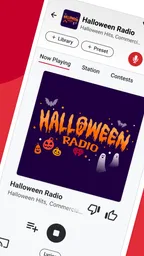
The radio side gives the app a different character from a library built only around on-demand tracks. Live listening can feel like company in the background, while a podcast suits a stretch of time when I want to stay with one subject or host. Music is the more flexible choice when I want to set a general tone without committing to a spoken program. Moving between those modes is the app’s strongest idea for listeners who use audio in varied parts of the day.
That flexibility can also help with creative inspiration. I might listen to music while gathering ideas for a playlist or use radio to hear a broader mix than I would have chosen deliberately. A podcast can provide conversation and context rather than just a sound bed. These are listening-based ways to spark ideas, not tools for capturing a voice memo or turning an idea into a produced piece.
What it is good for during the making process
When I am working on something, audio often serves one of two purposes: it either helps me settle into a rhythm or gives me something interesting to listen to during routine tasks. iHeart can cover both, because music and radio suit background listening while podcasts can make repetitive chores feel less dull. It is a companion to the work, rather than part of the production chain.
A useful habit is to match the format to the task. I would lean toward music or radio when I need to keep my attention on writing, drawing, or housework, and save a talk-heavy podcast for a walk, a break, or another activity that does not demand much concentration. That is not a special feature; it is simply a sensible way to use the app’s mix of audio without letting a detailed conversation compete with focused work.
There is a limit here that is worth stating plainly. I would not choose iHeart to record narration, edit clips, arrange tracks, mix sound, or prepare a final audio file. Nothing about its core identity makes it a replacement for an audio editor or a podcast production tool. If you are looking for a place to create and deliver work, use a dedicated recording or editing app and treat iHeart, at most, as a source of listening and inspiration.
Compared with a music-only service, its advantage is the inclusion of radio and podcasts alongside music. Compared with a dedicated podcast player, it has a broader listening scope, but someone whose priority is carefully managing a large podcast routine may prefer an app centered on that format. The right choice depends on whether you value variety in one place or depth within one type of audio.
How I would handle discovery and repeat listening
For a listener who is still figuring out what to play, the best approach is to start with the kind of attention available, not just the genre. If I have a few minutes and want an easy background, I choose music or radio; if I have a longer, quieter window, a podcast makes more sense. This small decision saves the common annoyance of starting a long spoken episode when I only wanted a soundtrack for a short task.
Another practical tip is to keep listening intentions separate. I would not expect the same choice to work equally well for concentration, catching up on a topic, and filling a quiet room. Switching between the app’s audio types is more useful than trying to make one format do everything. That is a modest but real strength: variety can reduce the effort of finding something suitable for the moment.
For repeat use, it helps to notice which format you actually return to. If most sessions end up being radio, then the app’s broader catalog is a bonus rather than the main reason to keep it. If you mostly want podcasts, you may eventually prefer the organization and listening workflow of a podcast-focused alternative. I would give the app a fair try across different routines before deciding whether its all-in-one approach fits.
As a general audience signal, it has a 4.6 average from around 2.3 million ratings, and it has passed 50 million installs. Those figures suggest that many people find the broad listening mix appealing, but they do not tell me whether it suits an individual’s taste. I would use them as reassurance that the app is established, not as a substitute for checking whether its music, stations, and shows match what I want to hear.
Iteration, control, and the limits of an all-in-one approach
In a creative workflow, iteration usually means revising a draft, comparing versions, or adjusting a finished piece. iHeart is not designed for that kind of revision. Its version of iteration is more informal: I can change what I am listening to as my mood or task changes. That is useful for adapting a listening session, but it should not be confused with editing or managing creative assets.
The all-in-one setup comes with a familiar compromise. Bringing several audio types together can make the app convenient, but it may not deliver the most specialized experience in each category. Someone who wants only curated music may prefer a music-first service; someone who wants a dedicated place for podcast subscriptions and listening habits may prefer a podcast-first app. I would choose iHeart when the ability to move among music, radio, and podcasts matters more than having a single format dominate the interface.
It is also worth thinking about attention. Radio and podcasts can be absorbing, and that is a benefit when I want to listen closely, but it can become friction when I need quiet or uninterrupted focus. For work requiring careful reading or precise decisions, I would pause the audio rather than assume background listening will always help. The app offers different kinds of content, not a guarantee that every kind is appropriate for every task.
The app is free to start, with in-app purchases listed from $4.99 to $12.99 per item. I would check the purchase details in the app store before paying for anything and make sure the option addresses a need I actually have. If all I want is occasional listening, I would begin with the free experience rather than treating an optional purchase as necessary from the outset.
Its Teen content rating is another useful point for families and younger listeners to consider. I would not assume that every show or song will suit every household simply because the app has an age label. A parent deciding whether it is appropriate should consider the actual listening choices and the child’s maturity, rather than relying on the rating alone.
From listening session to creative handoff
There is no meaningful export or delivery stage here in the way there is in a production app. I would not expect to finish an audio project in iHeart and hand a file to a client or collaborator. The useful handoff is simpler: the app can be part of a routine where I listen for ideas, then move to a separate tool to write, record, edit, or share my own work.
For example, a person planning a spoken project could listen to a podcast to think about pacing or use radio as a change of atmosphere, then make notes elsewhere. That is a personal workflow suggestion, not a claim that iHeart contains production or note-taking features. Keeping that boundary clear prevents disappointment: the app helps with listening and inspiration, while the actual creative work belongs in tools made for creation.
If you are choosing between this and a more specialized alternative, ask what you want to do after pressing play. If the answer is simply to listen across several formats, iHeart is a sensible option to try. If you need precise control over an audio library, a dedicated music player may suit you better; if you need to create a finished recording, choose an editor. The app’s convenience is real, but it does not remove the need for those other tools.
Who I would recommend it to
I would recommend iHeart to someone who likes moving between music, radio, and podcasts and wants a single app for those listening moods. It is particularly suited to casual routines: putting something on while preparing a meal, having audio accompany a walk, or choosing between background music and a show during a commute. The mix matters most when your listening changes from one part of the day to another.
I would suggest skipping it, or pairing it with another service, if you have a narrow requirement. A creator looking for recording, editing, publishing, or project management should go straight to tools built for those jobs. A listener who wants an especially focused music or podcast workflow may also be happier with a specialist alternative. Those are not failures so much as signs that a broad listener app is being asked to do work outside its purpose.
My overall view is that iHeart works best as a convenient listening hub, not as a creative production platform. Its strength is the choice between different kinds of audio without making me commit to one format for every session; its limitation is that breadth cannot replace the control of a dedicated service or editor. For a free app with optional in-app purchases, I think it is worth trying if your listening habits are varied. I would keep it if that variety genuinely saves me effort, and move on if I mainly need one specialized audio experience.
What we like
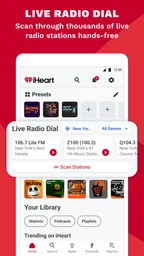
- Browse live radio stations by location or music genre.
- Create custom stations based on favorite artists or songs.
- Listen to podcasts across a wide range of topics.
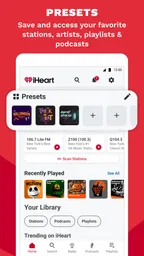
- Save favorite stations and podcasts for quick access.
- Use the app on phones and compatible connected devices.
What could be better
- Some features require a paid subscription.
- Free listening may include frequent advertisements.
- Music playback depends on an internet connection.
- Station selection and availability vary by region.
- Podcast episodes may not be available for offline listening.





