



Hypic - Photo Editor & AI Art review
 Analysis by Appsdrops
I would try Hypic if I wanted to make a photo look more finished without first learning a full desktop editor. It is a free photography app from Bytedance Pte. Ltd., with filters, AI effects, and touch-up tools at the center of its appeal. That mix makes it approachable for quick edits, though it also means the experience may feel less predictable than a straightforward crop-and-brightness editor.
My first impression is that this is best treated as a creative editing workspace, not simply a camera roll utility. You bring in a picture, try a visual treatment, and decide whether the result still looks like the moment you meant to capture. That last check matters: AI-driven effects can be striking, but the most convincing edit is not always the one that changes the most.
What to expect from Hypic
The app has reached over 100 million installs, but its average rating is 3.0 from around 269,000 ratings, which is a useful reminder to keep expectations grounded. A large audience does not guarantee that every tool or result will suit every person. I would approach it as a capable option to explore, rather than assume it will replace every editor I already use.
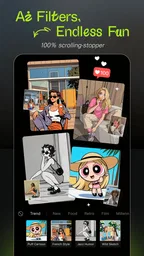
Hypic is aimed at people who want visual impact with relatively little editing experience. Filters can give a photo a consistent mood, while AI effects and touch-ups invite more noticeable changes. If you mainly need to straighten a document or make a small exposure correction, a simpler editor may get you there faster. If you enjoy comparing looks and polishing portraits or social images, Hypic’s broader creative focus makes more sense.
It is free to download and is rated for Everyone. In-app purchases range from $2.99 to $159.99 per item, so I would check any purchase prompt carefully and decide whether a paid option is genuinely useful before committing. You can begin by exploring what is available without assuming that every attractive effect requires payment; the price range alone is a good reason to read the on-screen terms before confirming a transaction.
The app was released on January 3, 2023, and its current version is 10.0.0. It requires Android 6.0 or later. Those details help Android users judge basic compatibility, but the important practical question is whether the editing style suits their photos and their tolerance for experimenting. I would start with one image I do not mind adjusting, rather than make a big workflow change on the strength of a download alone.
Start with one photo, not every tool
For a first session, choose a picture with a clear subject and reasonably good light. A portrait, a meal, or a travel scene gives you something obvious to evaluate: skin, color, texture, and background. Open the image and test a restrained filter first. That creates a useful baseline before you add an effect that changes the character of the photo more dramatically.
One practical habit is to compare each edit with the original before moving on. A filter that looks appealing in isolation may push skin tones too warm or make shadows feel heavy. If the app offers several treatments that seem close, change one thing at a time rather than stacking effects immediately. You will learn which adjustment helped and can undo the rest without guessing.
I would also keep an untouched copy of an image you care about. That is not a Hypic-specific trick so much as a sensible safeguard when experimenting with any editor, especially one built around creative effects. It lets you try a bolder look without feeling that the original moment has been lost if the result becomes overprocessed.
Your first satisfying edit
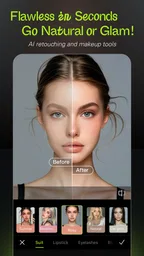
A realistic first win might be a quick portrait for a profile or a family photo you want to share. Start with a natural-looking filter, then use a touch-up only if something distracts from the person. The goal is not to erase every line or reshape the image until it feels unfamiliar; it is to make the photo clearer and more balanced while keeping the person recognizable.
For a food or travel photo, I would take the opposite approach: preserve the details that make the scene feel real. Try a filter that supports the existing light, then inspect areas that often reveal excessive editing, such as bright surfaces, deep shadows, and small details around the subject. If those areas still look believable, the edit is probably doing its job.
A useful non-obvious workflow is to make two versions before settling on one: a subtle pass for everyday sharing and a more expressive pass for a post where style matters more than realism. Even without changing the source image, comparing those outcomes helps clarify what you actually want from an effect. It also prevents the common mistake of treating the strongest-looking result as automatically the best one.
Where AI effects help—and where they can distract
AI effects are the part most likely to make Hypic feel different from a basic photo editor. They can be fun when you want an image to feel stylized rather than documentary, and they give a novice an easy way to explore a more imaginative treatment. I would use them on a picture intended for playful sharing, a creative experiment, or a visual idea—not as a default step for every photo.
The trade-off is control. A conventional adjustment tends to be easier to judge because you can see what changed; a more transformative effect may shift the overall look in ways that are harder to fine-tune. If the output no longer resembles the person or place you photographed, that is not necessarily a malfunction, but it may be the wrong tool for the job. For an accurate record, keep to lighter edits or choose an editor focused on direct image adjustments.
Another useful tip is to decide your purpose before browsing effects. “Make this portrait feel softer” is a more helpful target than tapping through options until one looks dramatic. A clear intention makes it easier to stop, and it reduces the chance that several individually attractive changes will compete with one another.
Common points of confusion
It is easy to mistake a visual preview for a finished image. Before sharing, inspect the entire photo at a comfortable size and ask whether the subject still looks natural, whether the colors fit the scene, and whether the effect has taken attention away from the main point. A result can look polished on a small screen but feel too intense when viewed more closely.
It is also worth separating “touch-up” from “correction.” If you are fixing a small distraction, a subtle adjustment can help. If you keep adding changes because the photo still does not feel right, the underlying issue may be lighting, focus, or composition—things an effect cannot always repair convincingly. In that situation, choosing another photo is often better than pushing the edit further.
Paid options can create another moment of uncertainty. Since the app includes in-app purchases, I would pause whenever a tool or item presents a purchase choice and read the displayed price and terms before proceeding. If you only need an occasional filter or quick adjustment, avoid buying anything until you have tried the basic workflow enough to know what you would use regularly.
How it compares with other editors
Compared with a simple built-in phone editor, Hypic is more appealing when you want a distinctive look or AI-assisted creativity rather than just a quick crop and exposure fix. The built-in option may still be the better choice for routine corrections because it keeps the task simple. I would not install Hypic solely to rotate a picture or make a tiny brightness change.
Against more traditional, control-heavy photography apps, Hypic’s draw is its accessible, effect-led approach. A manual editor is preferable if you need careful, repeatable adjustments and want each change to be predictable. Hypic is a better fit when you are willing to experiment and judge the final image by feel. Neither style is inherently better; the right choice depends on whether you value speed and creative treatments or fine-grained control.
The rating and volume of feedback also suggest that people have mixed experiences. I would not treat a 3.0 average as proof that the app is unusable, any more than I would treat its popularity as proof that it is perfect. Instead, use your first few edits as a low-risk trial: see whether the interface makes sense to you, whether the results match your taste, and whether any purchase prompts fit your needs.
Who should try it, and who may prefer another tool
I would recommend giving Hypic a try if you often edit portraits, casual social photos, or images that could benefit from a more expressive finish. It is also suitable for a first-time editor who wants to explore filters and AI effects without beginning with a technical workflow. The most useful mindset is to treat each tool as an option, not a button you must apply to every picture.
I would skip it, or keep another editor alongside it, if you need precise, repeatable corrections, prefer a very minimal interface, or want to avoid exploring in-app purchases altogether. It may also be a poor match for someone who dislikes stylized results and wants every photo to remain close to the camera original. In those cases, a simpler phone editor or a manual photo app is likely to be less frustrating.
For a new user, my suggested next step is straightforward: choose one well-lit photo, try a modest filter, make at most one touch-up, and compare the edited image with the original before saving or sharing. If that small workflow feels enjoyable, explore AI effects on a separate image where a playful transformation is welcome. If the result takes too much effort or stops looking like your photo, there is no need to force it.
Overall, I see Hypic as a free, creative photography app with an accessible starting point and a more experimental side that rewards careful choices. Its strongest use is giving everyday images a deliberate style without demanding a traditional editing routine. The best results come from restraint: know what you want to improve, make one change at a time, and stop when the photo feels finished rather than when every effect has been tried.
What we like
- AI tools can speed up common photo edits.
- The interface makes core editing tools easy to find.
- Portrait retouching offers useful touch-up options.
- Creative filters help give photos a distinct look.
- Edited images can be saved for sharing.
What could be better
- Some features may require an internet connection.
- AI results can vary depending on the source photo.
- Advanced tools may take time to learn.
- Some editing options may be limited in the free version.
- Export quality can depend on the selected settings.





