


Huckleberry: Baby Tracker review
 Analysis by Appsdrops
I would choose Huckleberry: Baby Tracker when I wanted a clearer picture of a baby’s changing routine, not another app telling me that parenting can be reduced to a perfect schedule. Its appeal is practical: it brings sleep, feeding, solids, and milestones into one parenting-focused place, with nap timing as a particularly visible part of the experience. Used thoughtfully, it can make a hectic day easier to reconstruct. Used rigidly, it can make ordinary variation feel like a problem to fix.
That distinction matters because a tracker is only helpful when it fits around a family’s day. Babies do not pause for a tidy log entry, and caregivers may be switching between a phone, a feeding, and a much-needed attempt to get some rest. My overall view is that this app is most useful as a memory aid and routine guide, rather than as an authority. The information it helps organize can support better conversations and decisions, but a suggested nap time should never outweigh a caregiver’s observation of the child.
What it helps you keep track of
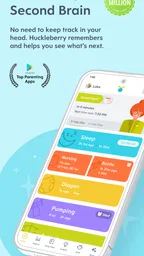
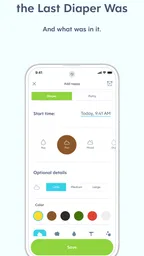
Huckleberry is a parenting app made by Huckleberry Labs. It is designed for the stretch from expecting a baby through toddlerhood, which gives it a broader purpose than a sleep-only timer. The central benefit is having recurring details about a child’s day gathered together: when sleep happened, how feeding is going, when solids are introduced, and which milestones a family wants to remember.
That breadth is useful in a way that becomes clearer after a few busy days. A caregiver may remember that the afternoon was difficult but not whether a short nap, a late feed, or a change in routine came first. A tracker gives those memories some structure. It can also help two caregivers compare notes without relying on one person to remember every detail while tired.
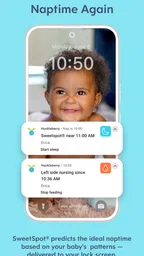
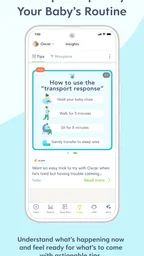
The nap-prediction angle is appealing, but I would treat it as a prompt for observation, not a promise. A suggested window may give a caregiver a reason to start winding down before a child becomes overtired. It cannot account perfectly for every unusual night, growth spurt, outing, or shift in mood. The best use is to combine the app’s guidance with what the child is actually showing.
When a network connection becomes part of the routine
Connectivity matters most at the moments when the app is being used as a live companion: checking a prediction, recording a feed, or consulting recent entries while planning the next nap. If a family’s routine depends on seeing current information at a particular moment, it is sensible to open the app ahead of time rather than assume that every screen will be available under every connection condition. I would not make an important caregiving decision depend on a prediction loading at exactly the right second.
There is also a difference between a tracker that helps with a later review and one that must be consulted constantly. For many families, the practical value lies in looking back at a day or a stretch of days, not checking the phone at every transition. That lighter approach reduces the pressure to keep the screen involved in intimate family moments and makes connectivity less central to the experience.
For example, imagine a caregiver heading out for a walk after a fragmented morning. Before leaving, they could review the recent sleep pattern and use it to decide whether to bring the stroller or plan to return home soon. The app’s record can inform that choice, but the baby’s cues and the realities of the outing still matter more than a predicted time. This is a useful scenario precisely because the tracker supports judgment rather than replacing it.
Using it in the middle of a real day
Parenting apps are often used one-handed, in short bursts, and at inconvenient times. That makes the quality of a tracking habit more important than the ambition to record every detail. I recommend deciding in advance which events are genuinely useful to log. Sleep and feeding may be essential for one household; milestone notes may matter more to another. A small, consistent record is usually more useful than a detailed log that becomes exhausting to maintain.
A non-obvious benefit of keeping entries together is that it can reduce handoff friction. If one caregiver takes over after another has been with the baby, a shared record can help answer practical questions such as when the last nap began or whether a feed has already been logged. The app is not a substitute for talking, but it can make that conversation more concrete. This is especially useful when both caregivers are tired and a vague “a little while ago” is not enough to plan the next stretch.
There is a trade-off, though: tracking can interrupt the very moment it is meant to document. If a caregiver is settling a baby, stopping to enter several details may be less useful than attending to the baby first and recording a simple note afterward. I would build the habit around natural pauses rather than trying to log instantly. The purpose is to make the day easier to understand, not to turn every interaction into data entry.
For families who spend much of the day away from home, connectivity deserves extra thought. A quick check before heading out can help avoid being caught relying on a screen that may not be convenient to consult. I would also keep essential care information accessible in the way that works for the family, rather than treating a phone-based record as the only source of truth. That is a sensible routine for any digital tracker, not a claim that a particular connection mode is supported.
What to do when tracking goes wrong
No family keeps a perfect log. An entry may be forgotten, a nap may run longer than expected, or a caregiver may realize later that a feed was recorded at the wrong time. My advice is to correct what you can without trying to reconstruct every minute. A rough but honest record is more useful than a precise-looking history built from guesses.
There is a related risk with patterns: a missing entry can make an ordinary day look unusually long or short. Before interpreting a sudden change, check whether the record is complete and whether the family’s routine was different. A tracker can show what was entered; it cannot know whether a caregiver forgot to log a short doze in the car or a feed during a hectic evening. This is one reason I would avoid making strong conclusions from a single day.
If the app is slow or a connection is inconvenient at the moment, the important thing is to keep caregiving first. A brief note elsewhere, or simply waiting until there is a suitable moment to update the record, may be more reasonable than repeatedly trying to interact with a phone while holding a baby. I would not assume that a particular recovery or offline workflow exists. Instead, I would use the app when it is readily available and keep the family’s basic routine understandable without it.
It can also help to review information at a calm time rather than during a difficult nap. That separates the emotional pressure of a fussy moment from the larger question of whether a pattern is emerging. If a suggestion does not fit what is happening, it is fine to set it aside. The app should support a caregiver’s perspective, not make a parent feel that a child is failing to follow a schedule.
Choosing a thoughtful, data-conscious routine
Because this app brings several kinds of child-related information together, I would be deliberate about what I record and who in the family needs to see it. Log details that help with care, handoffs, or reflection; skip entries that add effort without changing a decision. This keeps tracking manageable and makes the record easier to interpret later.
I would also avoid treating a long history as automatically better. More entries can reveal context, but they can also invite over-analysis of normal variation. If a family finds itself checking predictions repeatedly or feeling anxious when a log is incomplete, it may be worth simplifying the routine or taking a break from tracking. The point is to reduce mental load, not create another standard to meet.
Huckleberry is free to download, with optional in-app purchases ranging from $11.99 to $119.99 per item. That makes it possible to begin without paying, while leaving families to decide whether any paid option is worth considering for their own needs. I would first establish whether the basic tracking habit is genuinely helpful before spending money. If a family only wants a simple record of naps or feeds, a basic notes app or paper log may be enough and may feel less demanding.
The app has an Everyone age rating, and its current version is 0.9.316, with Android support beginning at version 9. Those details are useful when checking whether it fits a household’s device, but the more important choice is whether a dedicated parenting tracker suits the family’s style. Someone who enjoys reviewing routines may get real value from a purpose-built tool. Someone who dislikes logging or prefers not to organize family life on a phone may be happier with a simpler approach.
Who will get the most from it
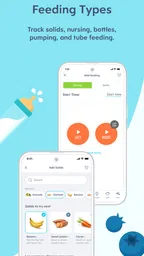
I think it is a strong fit for caregivers who want sleep and feeding records in one place, especially when more than one adult shares the day. It can also help parents who are trying to notice patterns without depending entirely on memory. The milestones and solids tracking make it more relevant across changing stages than a timer focused only on naps.
It is less suitable for someone seeking medical guidance, a guarantee of better sleep, or a rigid schedule that will solve every difficult day. A nap prediction is not a diagnosis, and a log is not a substitute for professional advice when a health concern arises. It may also be the wrong choice for a family that finds tracking stressful or that does not want a connected app involved in everyday care.
Compared with the usual alternatives, Huckleberry’s advantage is its combination of several parenting records with nap guidance. A paper notebook is flexible and works without a phone, but patterns may take more effort to spot and handoffs can be harder to coordinate. A general notes app is adaptable, though it requires the caregiver to create and maintain a system. A sleep-only tool may feel simpler if naps are the sole concern. The best option depends less on which one has the most features and more on which one a tired caregiver will actually use.
Huckleberry has an average rating of 4.9 from around 38,000 ratings, and it has been installed over 1 million times. Those figures suggest that many families have found the idea worthwhile, but they do not tell me whether it will suit a particular household’s habits. The practical test is whether recording a few useful details makes the day easier to manage rather than making parents feel watched by their own schedule.
My verdict on staying connected
Huckleberry: Baby Tracker is most convincing when it acts as a calm reference point: a place to record what happened, notice a possible pattern, and plan the next part of the day with a little more context. I would use its predictions as flexible guidance, keep entries selective, and check the record when it is convenient rather than reaching for the phone in every moment.
Huckleberry Labs has built a parenting app with a clear practical focus, and the free starting point makes it approachable for families who want to try a dedicated tracker. Its main limitation is also part of its nature: it depends on caregivers entering useful information and interpreting that information sensibly. A connection can make current app use more convenient, but no network-dependent tool should be the foundation of a child’s care routine.
If you want a combined record for sleep, feeding, solids, and milestones, and you are comfortable using a phone to support—not run—your routine, I think it is worth trying. If you want the simplest possible log, prefer paper, or find predictions more stressful than helpful, another approach may serve you better. My recommendation is to let the app earn its place through a small, useful habit, then keep only the parts that genuinely make family life easier.
What we like
- Tracks feeding sleep diapers and pumping in one app
- Lets caregivers share baby updates across devices
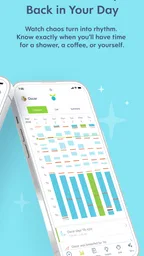
- Offers clear timelines for spotting routine patterns
- Supports multiple children in one family account
- Includes reminders for upcoming feeds and naps
What could be better
- Some advanced sleep guidance requires a paid plan
- Manual logging can feel repetitive during busy days
- Shared access may need setup for each caregiver
- Insights depend on consistently entered data
- Notifications can become distracting if overused





