


Hometown Gate review
 Analysis by Appsdrops
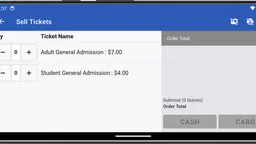
At a school performance, community game, or local fundraiser, the ticketing job often lands with whoever is nearest the entrance. Hometown Gate is aimed at that moment: it gives a venue’s box-office team a mobile tool for selling and scanning tickets, rather than asking families to treat it as a general-purpose event discovery app. I see its value less in household entertainment and more in helping a household coordinate around an event when one person is handling the door and another is buying or carrying tickets.
One household, several roles at the door
Picture a parent arriving with children while another adult is already inside helping at the entrance. The useful question is not just whether a ticket can be scanned; it is who is managing the sale, who is checking people in, and whether everyone understands which person is responsible for which part. Hometown Gate is built around the box office’s side of that exchange. It is not a family calendar or a shared wallet, so I would not expect it to coordinate household plans by itself.
That distinction matters if you are deciding whether to install it on a family phone. For a visitor, the app’s role may be limited or unnecessary: this is an events-category app from HomeTown Ticketing, Inc., designed for the venue’s ticketing workflow. If you are volunteering or working a school event, it is more relevant. I would first confirm that the organizer uses a Hometown box office and wants staff to use this tool; downloading it alone does not turn it into a general ticket scanner for every event.
Keep the work device and the family plan distinct
On a shared phone, I would make the work boundary explicit before an event begins. Decide which adult is using the device for box-office duties, and avoid passing it around casually while tickets are being handled. That is a practical habit, not a claim that the app offers separate household profiles or controls. The app should be treated as a work tool whose access belongs to the person the organizer has authorized.
If several relatives are helping, agree on one person to handle the scanning station and another to answer questions or direct arrivals. This reduces the chance that someone tries to use the same phone for unrelated tasks at a busy moment. It also makes handoffs easier: the person taking over should know whether they are expected to sell tickets, scan them, or both, and should get the organizer’s instructions rather than relying on assumptions about the app.
A shared device can be convenient when a small group has only one phone available, but convenience has a trade-off. Whoever holds it becomes the point person, and a low battery, a misplaced phone, or an unclear handoff can disrupt the entrance. I would charge the device beforehand and keep a named backup person in the plan. Those are simple event-preparation steps, not functions I would attribute to Hometown Gate itself.
Coordinate the box office before doors open
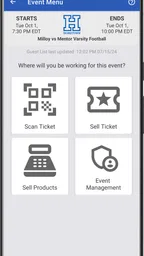
Hometown Gate’s most useful role is in the transition from ticket transaction to entry check. Selling and scanning belong to related parts of one event, but they can happen at different places and involve different volunteers. Before doors open, the organizer should tell the team where each task happens and who is responsible for it. That short conversation is especially valuable for a school or community event where helpers may not work together regularly.
For example, one volunteer could be assigned to the box-office table while another manages the line. If the same device is expected to move between those roles, decide when and how it will be handed over. If separate people are working, make sure they understand the venue’s process and have whatever access the organizer expects them to use. The app is not a substitute for that operational briefing; its usefulness depends on the event’s own setup.
I would also avoid making a last-minute assumption that every ticket can be handled the same way. The organizer should explain what to do if a guest has a question, arrives without the expected ticket, or needs help at the entrance. A scanning tool can support a clear process, but it cannot settle venue policy for a volunteer. Keeping exceptions with a designated box-office contact helps prevent different helpers from giving conflicting answers.
Age, trust, and who should have access
The app is rated for Everyone, but that describes its content rating, not a recommendation that children should manage ticket sales or entry checks. In a household, I would keep event responsibilities with an adult or an organizer-approved volunteer. Children can accompany the group or help with ordinary, supervised tasks, but the person using a ticketing device should understand the event’s instructions and be trusted with that role.
Because this is connected to a venue’s box office, account access deserves the same care as other work-related access. Do not share sign-in details casually among relatives, and do not assume a household member can use the app just because the phone is shared. If a new volunteer needs access, ask the event organizer how to arrange it. That keeps responsibility attached to the venue’s process rather than turning a personal device into an informal shared account.
For families attending an event rather than staffing it, the practical takeaway is to follow the organizer’s ticket instructions and ask the box office where to go if anything is unclear. I would not install Hometown Gate simply because a family member has a ticket to an event. Its purpose is on the selling and scanning side, so a visitor looking for event listings, reminders, or a place to organize family plans should use a more suitable option.
Where it fits—and where another approach is better
Compared with the usual alternatives in event work, Hometown Gate occupies a narrower lane than a broad event-discovery service and a more purpose-built one than trying to manage entry with informal paper notes. That focus is a strength when a venue uses the Hometown box office: the app is directed at ticket handling, not at finding outings or coordinating a household calendar. It is a poor fit, though, for organizers who need a tool for events outside that ticketing setup or for families who only want to keep track of plans.
The app is free, and its current version is 4.11.0. Its average rating is 4.2 from 56 ratings, with 15 written reviews, and it has passed 10,000 installs. Those figures suggest that people are using it, but I would not treat them as a guarantee that it matches every venue’s workflow. The developer is HomeTown Ticketing, Inc., and the app has been available since January 12, 2020. It supports devices running version 8.0 or later of its operating system.
My advice is to check the event’s actual arrangement before making this part of your plan. If you are staffing a Hometown-powered box office, ask whether the organizer expects you to sell tickets, scan them, or take on both jobs, then follow the venue’s access and handoff instructions. If you are simply attending, this is unlikely to replace the ticket or event information your organizer has already directed you to use. That role-specific distinction is more useful than installing it on every household phone.
A practical household verdict
I would recommend Hometown Gate to a person assigned to ticket sales or entry scanning at an event that uses the Hometown box-office workflow. Its focused purpose can make a volunteer’s job clearer, provided the organizer has explained access, responsibilities, and how to handle exceptions. For a household sharing a device, the best approach is to designate one responsible user, agree on a backup, and keep the phone charged and available during the shift.
I would skip it if your goal is to discover local events, share family schedules, store every kind of ticket, or coordinate a group outing. It is not presented as a household organizer, and treating it as one would blur the boundary between attending an event and operating its box office. For the right volunteer, that narrow focus is exactly the point; for everyone else, the venue’s normal attendee instructions are likely the better guide.
What we like
- Provides a convenient way to access local community information.
- Can help residents keep up with neighborhood updates.
- Useful for checking local services and resources.
- Offers a focused alternative to searching across multiple websites.
- May make community information easier to find on the go.
What could be better
- The app's usefulness depends on local content being current.
- Available features may vary by participating community.
- Some information may require an account to access.
- Updates can be limited if local organizations post infrequently.
- The app may offer little value outside its supported areas.





