
Holy Bible-Large Print review
 Analysis by Appsdrops
Small text can turn a familiar Bible-reading routine into a strain, especially on a phone. What drew my attention to Holy Bible-Large Print is its focus on making the text easier to read, supported by audio and offline access. Those details matter most when they remove everyday friction: being able to settle into a passage without squinting, or continue reading somewhere with no reliable connection.
This is a free Books & Reference app from Bíblia Offline, intended for Everyone. It has a 4.9 average from around 27,000 ratings, with over 100,000 installs. Its appeal is quite specific: it is for people who want a straightforward Bible-reading companion, particularly if legibility is a concern, rather than a broad study suite with lots of tools competing for attention.
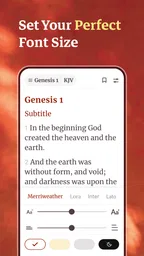
Large print changes the feel of reading on a phone
The central idea is practical rather than flashy. Larger text can make reading less tiring and help a passage feel more approachable on a small screen. I would especially value that during a quiet reading session, when constantly pinching and zooming would interrupt the flow, or when I want to look at a verse briefly without leaning close to the display.
That benefit is personal, of course. Large print is not automatically more comfortable for everyone. Bigger lettering can mean fewer words fit on screen at once, so readers who prefer to scan a long passage quickly may find themselves moving through it in smaller chunks. The trade-off is simple: prioritize comfortable, relaxed reading over seeing as much text as possible at a glance.
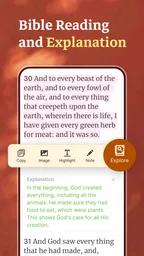
The app’s emphasis also makes it easier to decide whether it suits your routine. If you mainly want to read the Bible on a phone without fuss, large text addresses a real obstacle. If you need detailed comparison between translations, extensive annotation, or a structured academic reference environment, a more specialized study app may serve you better.
Audio and offline access support different moments
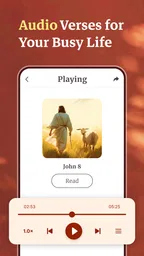
Audio gives the app another way to engage with scripture when reading is inconvenient. I can see it fitting a routine such as listening during a calm break or following along while doing a simple task that does not demand much attention. It is not a substitute for the kind of close reading where I want to pause over wording, but it can make a regular reading habit easier to maintain.
Offline access is useful for a different reason: it makes reading less dependent on being connected. That can matter during travel, in a building with poor reception, or when I simply want to keep a reading session free of network interruptions. A good practical habit is to open the app and confirm that the material you intend to use is available before heading somewhere without service, rather than discovering a connectivity problem at the moment you want to read.
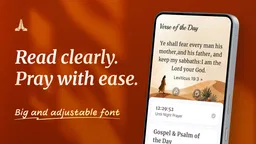
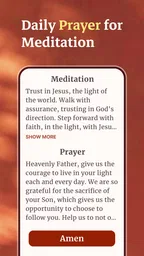
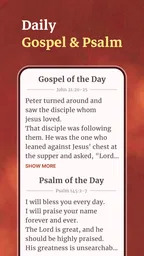
The app also includes a daily verse, which can work as a small prompt rather than a full study plan. I would treat it as a starting point: read the verse, then look at the surrounding passage if I want its context. A single verse can be encouraging, but pulling it away from the chapter around it may leave out the thought that gives it meaning.
What a realistic day with it looks like
Imagine having a few quiet minutes before leaving home. I could open the app, read a short section in larger text, and return to the same habit later when I have more time. If the day takes me somewhere with unreliable reception, offline access makes the app a sensible option to keep on hand. Audio, meanwhile, offers a different route on a day when sitting and reading is less convenient.
That combination is more useful than any one feature in isolation. Large text reduces a visual barrier; audio gives reading a hands-free alternative; offline availability helps remove a connection barrier. Together, they suit an everyday companion better than a tool that assumes every session will happen at a desk with a strong signal and plenty of time.
There is a trade-off in switching between listening and reading, though. Audio can help me keep contact with a passage, but it is easier to drift while listening than while concentrating on the words. For a study session, I would use it as an entry point and then return to the text, perhaps rereading the lines that stood out. For a brief routine or a familiar passage, listening may be enough.
Where it sits among Bible apps
Compared with a printed Bible, a phone app is easier to carry and can offer audio and offline use in the same place. Print may still be more comfortable for a long, focused session, especially for someone who wants fewer digital distractions. Large text makes the mobile option more welcoming, but it does not turn a phone screen into a book or remove the temptation to switch to other apps.
Compared with general-purpose Bible apps, this one’s identity is more focused on readability and straightforward access. Some alternatives may be better for readers who regularly compare translations, build elaborate notes, or use extensive study references. I would not choose this app solely on the assumption that large print means more advanced study tools. Its value is clearest when the priority is being able to read or listen with less setup.
That focus can be a strength for someone who finds feature-heavy apps tiring. A simpler routine is often easier to sustain: open the Bible, choose a passage, read or listen, and leave. On the other hand, if you already rely on detailed cross-references or a carefully organized personal archive of notes, moving to a more minimal companion could feel limiting.
Small habits that make the experience more useful
For a daily reading habit, I would pair the verse prompt with a little context instead of treating it as the whole session. Read the verse, then continue into the surrounding passage long enough to understand what is being discussed. That approach keeps a convenient prompt from becoming a disconnected quotation and does not require a complicated study workflow.
For listening, I would choose a time when attention can be divided safely and sensibly. A quiet household task is a better fit than a situation that requires concentration elsewhere. If a passage matters enough to revisit, switching back to the text lets me slow down and notice details that are easy to miss when the words are moving at a steady pace.
For offline use, the useful step is preparation rather than troubleshooting: check the app before leaving a dependable connection and make sure the reading you have in mind is accessible. This is a small routine, but it prevents an offline feature from becoming an assumption made only after the network has disappeared.
Who benefits most, and who may prefer another option
I would recommend it first to readers who find ordinary phone text uncomfortable, want a Bible available without a constant connection, or like having audio as an alternative to reading every passage. It also makes sense for someone who wants a simple daily prompt and a low-friction way to return to scripture throughout the week.
I would steer a reader toward a different option if their main goal is in-depth textual research, extensive note management, or a highly customizable study workspace. I would also suggest trying a printed edition if screen reading itself is tiring, even with larger text. The best choice depends less on how many tools an app has and more on whether its reading style fits the way you actually spend time with scripture.
The current version is 2.3, and it runs on Android 7.0 or later. That gives prospective users a straightforward compatibility point to check before installing. The app is free, so it is easy to try as a reading companion without making a purchase decision first.
Overall, I see Holy Bible-Large Print as a purposeful option rather than an all-in-one study library. Its strongest case is the practical one: making Bible reading more comfortable on a phone, with audio and offline access available for different circumstances. If those are the barriers you want to reduce, it is worth considering; if you need a dense research toolkit, a more specialized alternative is likely a better fit.
What we like
- Large text makes scripture easier to read on smaller screens.
- A simple layout keeps the focus on Bible passages.
- Useful for reading a verse during a short break.
- Suitable for readers who prefer a straightforward Bible app.
- Can provide quick access to familiar scripture passages.
What could be better
- Large text may require frequent scrolling on compact screens.
- The app may lack advanced study tools found in Bible platforms.
- Reading comfort can vary with screen brightness and font settings.
- Some users may prefer a choice of Bible translations.
- App features may depend on an internet connection.





