

HeyGen: AI Video Generator review
 Analysis by Appsdrops
I judge an AI video app not only by whether it can make a polished clip, but by how much effort it takes to get from an idea to something usable. HeyGen: AI Video Generator is built around making video through AI avatars, written prompts and photos, rather than asking you to film yourself or assemble every shot by hand. That can lower the barrier for people who find recording, editing or appearing on camera difficult. It does not, by itself, make the whole process accessible: you still need to evaluate the result, revise it and decide whether an AI-presented video suits your audience.
Getting oriented before making a video
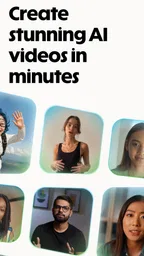
The app belongs to the video players and editors category, but its main appeal is creation rather than simply watching or trimming existing footage. HeyGen Technology Inc. develops it, and the overall idea is easy to grasp: choose an AI-assisted way to begin, then shape the result into a video. The name is short and the concept is direct, which helps if you arrive with a specific task instead of wanting to explore a complicated editing suite.
Its starting point matters for readability and navigation. A person who already knows they want an avatar-led explanation can approach the app differently from someone hoping to animate a still photo or turn text into a video. These are useful distinctions because they connect the first decision to the kind of output you want. I would settle that choice before writing a script; changing direction after drafting can mean rethinking the tone and visual plan, not merely swapping an editing tool.
The interface should be approached as a production workflow, not as a magic prompt box. I find it helpful to prepare a short script outside the app, divide it into clear thoughts, and then bring it in with a particular audience in mind. That makes it easier to notice whether the generated presentation is understandable and whether any sentence feels too dense when spoken. A screen-friendly script is not always a speech-friendly one.
The app is free to install, but that does not mean every possible use is cost-free. In-app purchases range from $4.99 to $999.99 per item, so I would check the purchase details in the app store before building a regular workflow around a paid capability. That matters especially for a student, volunteer group or small organization that needs predictable expenses. Try the basic experience first and make sure it fits your actual task before committing to a larger purchase.
Text, avatars and photos call for different preparation
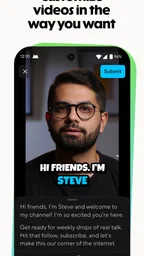
Text-to-video is a sensible route when the message is already clear but filming is inconvenient. It can help with a short explainer, a draft announcement or a lesson introduction. The practical trade-off is that words carry much of the burden: vague writing is unlikely to become a precise explanation just because it is presented by an avatar. I would keep sentences short, spell out unfamiliar terms where needed and read the script aloud before generating anything.
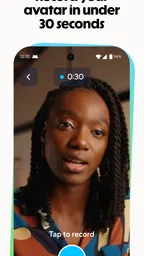
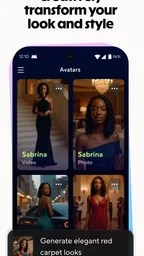
An avatar can make a message feel like a presentation without requiring the speaker to be on camera. That is useful for someone who is uncomfortable recording themselves, working in a noisy environment or preparing a repeatable introduction. But an avatar is not automatically the right substitute for a human presenter. For sensitive subjects, personal testimony or a message where trust depends on seeing the real speaker, a direct recording may feel more appropriate and authentic.
Photo-to-video offers a different starting point: a still image can become the basis for a moving presentation. I would use it selectively, for example when a project has a suitable portrait or visual that needs more presence than a static slide. Before using a person’s image, consider whether you have a legitimate reason and permission to do so. The fact that a tool can animate a photo does not settle the consent or context questions around that image.
Readable content takes more than a clear screen
For people with low vision, readable text is about more than the size of controls. The script and any words that appear in the finished video need to be easy to follow, with uncluttered phrasing and a sensible pace. I would inspect the final video on the kind of screen viewers are likely to use, rather than assuming a result that looks clear while editing will remain comfortable on a phone. If important information is carried only by visual details, some viewers may miss it.
There is also a useful distinction between making a video and making its meaning accessible. An AI presenter can speak a script, but a viewer who cannot hear the audio still needs a way to understand the essential message. If the app’s output does not give you the presentation options you need, plan an alternative alongside it, such as a written version of the key information. I would not treat an attractive talking avatar as a substitute for checking how different viewers will receive the content.
When reviewing a generated clip, I focus on comprehension rather than polish alone. Are names and technical terms spoken clearly? Does the delivery leave enough time to process each point? Is a visual example doing essential explanatory work that the spoken script never covers? These checks are especially helpful for educational or workplace videos, where an audience may need to act on the information rather than simply watch casually.
Motor and sensory needs in the creation process
AI video creation may reduce some physical demands because the creator does not have to set up a camera, maintain a pose or repeatedly record a line. That is a real advantage for people who find those tasks tiring or difficult. It can also make a quick revision less demanding than filming an entire segment again. Still, creation involves choices and review, and I would not assume that a short workflow is automatically comfortable for every person or every device setup.
A practical way to reduce effort is to make decisions in batches. First settle the script; then choose the visual approach; then review the generated result for specific issues. This is easier to manage than repeatedly switching between writing, visual choices and tiny edits. If precise touch interactions are tiring, keeping a prepared script and a short correction list can reduce unnecessary navigation. The advice is about organizing the work, not a claim that the app provides a particular motor-access feature.
Sensory preferences also affect whether an AI-presented video feels comfortable. A synthetic presenter may be convenient for some viewers and distracting or uncanny for others. A highly animated face can draw attention away from the words, while a flat delivery can make a long explanation hard to stay with. I would test a brief sample with someone from the intended audience before producing a full set of lessons or announcements. That small check can reveal whether the format itself is helping or getting in the way.
Where it fits into everyday routines
Imagine a community organizer who needs to explain a room change and a new check-in process before an event. They have the wording ready but cannot gather the team to film, and they do not want to appear on camera. An avatar-led clip could provide a quick, consistent presentation. I would keep the message focused, include the practical details in the spoken script, and also share those details in text so people can refer back without replaying the video.
For a teacher preparing a short introduction to a lesson, text-to-video may help turn a prepared explanation into a presentable clip without requiring a studio setup. The main benefit is convenience, not guaranteed instructional quality. I would still check the wording against the students’ level, break up complex ideas and make sure the video is not the only route to important instructions. A written handout or live explanation may be better when students need to ask questions as they go.
For a small business, the tool could be useful for a repeatable welcome or a simple product explanation, especially when recording a fresh presenter each time is impractical. It is less compelling when the message depends on genuine human expression, demonstrations that need exact visual detail, or rapid back-and-forth with customers. In those cases, a phone camera and a conventional editor may produce something more natural and easier to adapt.
Compared with ordinary mobile video editors, HeyGen shifts effort away from filming and manual assembly and toward selecting an AI approach, preparing the content and reviewing what the system produces. A conventional editor is usually the more direct choice if you already have footage and mainly want to cut clips, arrange shots or make precise visual adjustments. A camera app is simpler still for a quick personal message. I would choose this app when an AI presenter or photo-based animation is central to the task, not just because the word “AI” sounds faster.
Limits worth weighing before relying on it
The biggest limitation is a creative one: generated presentation can look polished while still feeling impersonal. That may be acceptable for routine information, but it is a poor fit for every subject. A message about a personal experience, a nuanced apology or a high-stakes decision often benefits from a real person speaking in their own voice. I would choose the format based on the relationship with the audience, not merely on how quickly a video can be made.
Another friction point is quality control. A generated video still needs a human to check wording, pronunciation, pacing and whether the visuals support the point. If the first result is not right, you need enough patience to revise the source material rather than expecting a single prompt to solve every issue. This makes the app less suitable for someone who wants an entirely hands-off production process, or who needs exact control over every edit.
It is also worth thinking about the audience’s expectations. Some people may welcome a clear, repeatable avatar presentation; others may prefer a human recording or plain text. If viewers need to trust the speaker personally, or if the video is meant to convey warmth and spontaneity, an AI-led approach can create distance. I would make that judgment before producing a large batch of content, since format consistency is only valuable when the format suits the people receiving it.
The app is marked for Everyone, and its average rating is 4.8 from around 85,000 ratings, with about 696 written reviews. It has passed one million installs, which suggests substantial interest, but those figures cannot tell you whether its workflow will suit your particular needs. Its current version is 2.8.6, and it requires Android 10 or later. It was released on November 26, 2025, so anyone using an older device should check compatibility in the app store before planning around it.
Who I would recommend it to
I would recommend HeyGen to people who have a clear message and want to turn it into an AI-presented video without filming themselves. It is especially worth considering for short explainers, repeatable introductions and situations where a still image or a script is a more practical starting point than fresh footage. The strongest results are likely to come from creators who are willing to prepare carefully and review the output with their audience in mind.
I would suggest skipping it if your main need is conventional editing of existing clips, if you need hands-on control over every visual detail, or if a real human presence is essential to the message. It may also be the wrong choice for a viewer or creator who finds synthetic faces uncomfortable. In those cases, a straightforward editor, a live presentation or a simple written explanation can be clearer and more personal.
Overall, I see this as a useful option for making video creation less dependent on cameras and on-camera confidence, with meaningful possibilities for people working in different settings. The inclusive potential is real, but it depends on choices the creator still has to make: clear scripts, suitable pacing, a format the audience can tolerate, and another route to essential information when video is not enough. For me, the best reason to use it is not that AI removes every barrier, but that it can remove a few important ones when the task genuinely fits.
What we like
- Creates polished videos from a written script.
- Offers a range of digital presenters and voices.
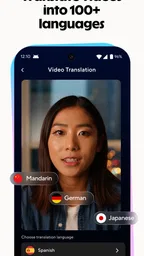
- Supports multiple languages for broader audience reach.
- Makes simple video production accessible without filming.
- Can help speed up routine marketing content creation.
What could be better
- Natural-looking presenters may still feel artificial.
- Free access may be limited by credits or features.
- Video rendering can take time for longer projects.
- Some voices may not suit every brand or audience.
- A stable internet connection is needed for cloud-based creation.





