






Haystack News: Local TV News review
 Analysis by Appsdrops
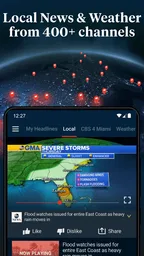
When I want a quick sense of what is happening beyond my own neighborhood, I would rather see a few useful reports than open several separate news apps and chase the same headline around. Haystack News is built around that kind of viewing: it brings news from many channels into one place, with local, live, and world coverage. The central benefit is convenience, but the more interesting question is whether that convenience helps me make better use of a short news break.
One place to browse across news channels
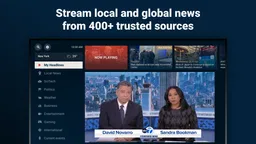
Haystack News is a free news and magazines app from Haystack News. Its defining idea is to gather coverage from a broad range of channels so I can move between subjects and perspectives without treating each broadcaster’s app as a separate destination. That makes it less like a single newsroom’s publication and more like a viewing point for people who want a varied news routine.
The breadth matters most when I am not looking for one specific article. If I already know which outlet I trust for a particular story, that outlet’s own app may offer a more direct route. But when I want to see what is being covered locally, then glance at national or international developments, a combined experience can reduce the effort of switching around. The practical advantage is fewer app changes, not a guarantee that every report gives a complete picture.
The app is in the News & Magazines category, and its scope makes it suitable for both quick check-ins and longer browsing. The experience is aimed at viewers rather than readers who want to work through a newspaper page by page. That distinction is worth considering before installing: if I want a compact video-oriented way to catch up, the format makes sense; if I want quiet, text-first reading, a traditional news app may suit me better.
Why the channel mix changes the routine
A wide channel selection is useful not simply because it sounds extensive, but because it changes how I can approach a topic. I can begin with a local angle and then broaden my view rather than assuming that one national headline captures the whole story. For subjects that affect a particular area, local reporting can supply context that a large outlet may not lead with.
There is a trade-off, though. More sources mean more choice, and choice can become its own small task. If I open the app without any idea what I want to learn, a broad feed can encourage passive scrolling or channel hopping. I get more from it when I bring a simple question: What changed in my area? What is the latest on a major story? Is there a local perspective I have not seen yet?
How I would use it during an ordinary day
Imagine I have a few minutes before leaving home and want to know whether a local issue is developing, but I also want a quick sense of the bigger headlines. I can use the app as a single starting point, rather than opening a local broadcaster’s app, then a national news app, and then another source for world coverage. That is a modest time-saving, but it is exactly the kind of task where combining channels can feel worthwhile.
I would treat that first pass as orientation, not as the end of my research. If a report raises a question that matters to me, I would look for fuller coverage from the relevant source or compare it with another outlet. That approach helps avoid a common weakness of fast news viewing: remembering the headline but missing the qualifications, background, or disagreement around it.
For a useful routine, I would separate browsing from verification. A short session can help me notice which stories deserve attention; a later, focused visit to a source can help me understand one of them properly. This is especially helpful when a developing story is changing quickly. A collection of coverage can show that several channels are addressing it, but I still need to pay attention to when a report was produced and what it actually establishes.
Making a broad feed easier to use
One practical tip is to start with a purpose rather than trying to sample everything. I might check local coverage first, then move outward to a national or world story only if I have time. This keeps a large selection from turning a brief catch-up into an unplanned viewing session.
A second useful habit is to compare how outlets frame the same issue instead of treating repeated coverage as independent confirmation. Several channels may focus on different parts of a story, but repetition alone does not settle a disputed claim. I find the app’s multi-channel premise most valuable when it prompts that comparison, not when I use the number of available voices as a shortcut to certainty.
It can also work as a discovery tool. If I usually follow only one or two news sources, browsing across a wider pool may help me notice a local report or a perspective I would not have sought out on my own. The sensible next step is to follow that lead deliberately: identify the source, examine the fuller report, and decide whether it is relevant to the question I started with.
Where the convenience has limits
A broad channel collection cannot remove the need to choose what deserves attention. It may make access easier, but it does not automatically make news more balanced, more detailed, or more reliable. Different outlets have different editorial priorities, and a quick video segment is not always enough to explain a complicated policy decision or a story with a long history.
There is also a format trade-off. Video is handy when I can listen or watch, but it is less convenient than text if I am in a noisy place, trying to keep my phone quiet, or hoping to scan details at my own pace. Anyone who prefers to search a written article for a name or figure may find a dedicated text-based publication more comfortable for deeper research.
Another limitation is the possibility of spending more time browsing than intended. Because the app brings many channels together, it is easy to keep moving from one report to another without a clear stopping point. I would use it with a small goal and leave once I have answered that first question. If I want a tightly curated daily briefing, a publication that deliberately limits its selection may be a better match.
The app is free to download, with in-app purchases listed from $4.99 to $49.99 per item. I would check the purchase details shown in the app before choosing anything, and I would not assume that every part of the experience has the same terms. Its content rating is Everyone 10+, which is useful context for households deciding whether it is appropriate for younger viewers, though parents should still consider the subject matter in current news.
How it compares with familiar alternatives
Compared with installing several individual broadcaster apps, Haystack News offers a more consolidated place to begin. That can be appealing if I want to sample local and wider coverage without maintaining a collection of separate apps. The compromise is that a broadcaster’s own app may be the more direct choice when I already know whose reporting I want, or when I want to stay closely within one outlet’s coverage and presentation.
Compared with a text-first news aggregator, this app’s channel-centered approach is better suited to someone who likes watching or listening to reports. A text aggregator may be faster for scanning headlines, searching within articles, or reading discreetly. I would choose based on the moment: use this app to browse video news from multiple channels, and use a written source when I need detailed reading, easy reference, or a deeper account.
Neither alternative makes the other obsolete. I see Haystack News as a useful front door for discovery and a convenient way to broaden a routine, not as the only place I would go for every important story. That distinction keeps expectations realistic and makes its main strength clearer.
Who gets the most from it
The app is a strong fit for people who want a quick, video-led overview and are curious about local coverage as well as national and world developments. It is also useful for someone who does not want to install a separate app for every channel they might occasionally watch. Haystack News has an average rating of 4.2 from around 35,000 ratings, with roughly 3,300 written reviews and more than five million installs, suggesting that this combined approach has found a sizeable audience.
I would be less likely to recommend it to someone who wants a single publication’s carefully edited front page, a text-only reading experience, or a comprehensive explanation of every story in one sitting. It may also frustrate viewers who prefer not to make choices among many sources. In those cases, a trusted broadcaster’s own app or a more tightly edited news service could be a better fit.
Haystack News was released on February 28, 2014, and its long-running focus remains easy to understand: bring a wide range of news channels into a convenient viewing routine. I would use it when I want to discover what local and broader outlets are covering, then follow up elsewhere when a story calls for more depth. If that balance sounds right to you, it is worth trying as a practical companion to your usual sources—not a replacement for thoughtful reading or checking a claim at its origin.
What we like
- Personalized feeds make it easier to follow topics that matter to you.
- Local coverage is available from stations across many US regions.
- Live news channels offer a convenient way to watch ongoing coverage.
- The app brings reports from multiple sources into one place.
- News clips are useful when you have little time to watch a full broadcast.
What could be better
- Local channel availability varies by your location.
- Some coverage may require a stable internet connection.
- The selection may feel limited outside major US markets.
- Ad breaks can interrupt the viewing experience.
- Personalized recommendations may take time to match your interests.





